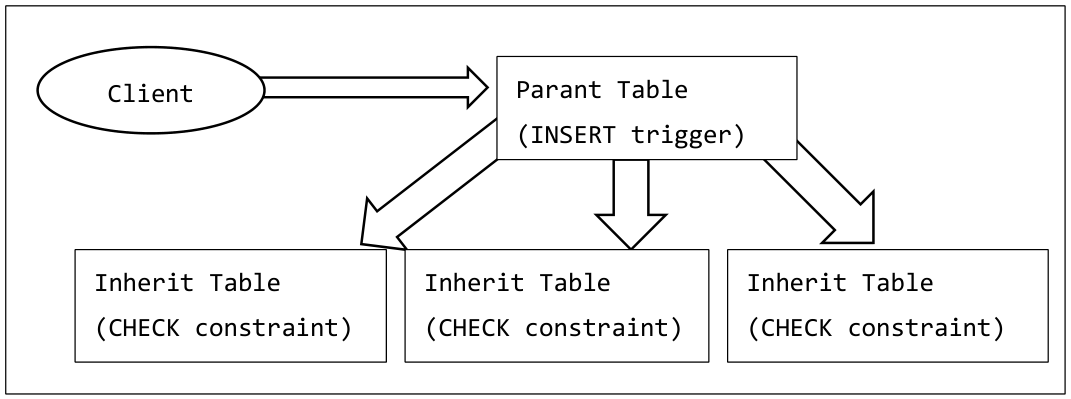
Traditional PostgreSQL used the function of the inheritance table as a method of physically partitioning a large table. The inheritance table creates multiple child tables for the parent table and maintains the consistency of data by CHECK constraints and triggers. The application can access the parent table and transparently use the data of the child table. However, this method had the following disadvantages.
Data consistency depends on the CHECK constraint specified individually in the child table
INSERT statements for the parent table need to redirect to child tables by triggers so that it is slower
Figure 2Structure of table partition using inheritance table
PDF page 12
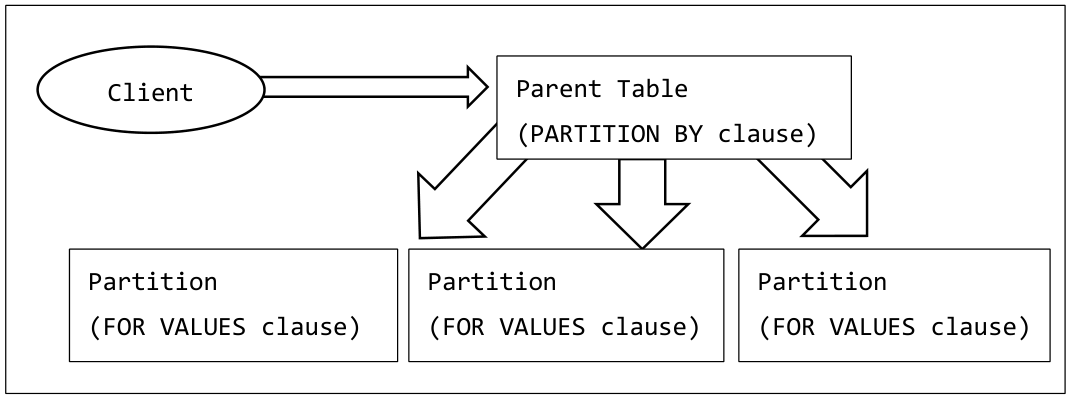
In PostgreSQL 10, partition table feature uses a more sophisticated table distribution method. It is the same as the conventional inheritance table that the partition table consists of child tables having the same structure as the parent table accessed by the application. However, INHERIT specification, CHECK constraint, trigger are unnecessary, so that addition or deletion of the child table can be done easily. In PostgreSQL 10, the column (or calculated value) to be specified for partitioning table. RANGE partitions that specify the range of values to be stored and LIST partitions that specify only specific values are available. The type of the partition is determined when creating the parent table.
PDF page 13
Figure 3Partitioning table structure
PDF page 13
3.2.2 List Partition Table
The LSIT partition table is a way to group multiple partitions that can only store certain values. To create a list partition table, first create a parent table accessed by the application, specifying the PARTITION BY LIST clause in the CREATE TABLE statement. In the LIST clause, specify the column name (or calculated value) to be partitioned. Only one column name can be specified. At this point the INSERT statement for the table fails. For tables created with PARTITION BY clause, the value of the “relkind” column in the pg_class catalog is ‘p’.
Example 1Create LIST partition table
postgres=> CREATE TABLE plist1(c1 NUMERIC, c2 VARCHAR(10)) PARTITION BY
LIST (c1) ;
CREATE TABLE
postgres=> CREATE TABLE plist1_v100 PARTITION OF plist1 FOR VALUES IN (100) ;
CREATE TABLE
postgres=> CREATE TABLE plist1_v200 PARTITION OF plist1 FOR VALUES IN (200) ;
CREATE TABLE
In the following example, refer to the definition of the partition table which has been created.
PDF page 14
Example 3Reference table definition
postgres=> \d+ plist1
                                          Table "public.plist1"
 Column |         Type          | Collation | Nullable | Default | Storage  | …
--------+-----------------------+-----------+----------+---------+----------+…
 c1     | numeric               |           |          |         | main     |…
 c2     | character varying(10) |           |          |         | extended |…
Partition key: LIST (c1)
Partitions: plist1_v100 FOR VALUES IN ('100'),
            plist1_v200 FOR VALUES IN ('200')
postgres=> \d+ plist1_v100
                                       Table "public.plist1_v100"
 Column |         Type          | Collation | Nullable | Default | …
--------+-----------------------+-----------+----------+---------+ …
 c1     | numeric               |           |          |         | …
 c2     | character varying(10) |           |          |         | …
Partition of: plist1 FOR VALUES IN ('100')
Partition constraint: ((c1 IS NOT NULL) AND (c1 = ANY (ARRAY['100'::numeric])))
Example 4Execution of INSERT statement on parent table
postgres=> INSERT INTO plist1 VALUES (100, 'data1') ;
INSERT 0 1
postgres=> INSERT INTO plist1 VALUES (200, 'data2') ;
INSERT 0 1
postgres=> INSERT INTO plist1 VALUES (300, 'data3') ;
ERROR:  no partition of relation "plist1" found for row
DETAIL:  Partition key of the failing row contains (c1) = (300).
Partitioned child tables are also directly accessible. However, values other than the values specified
in the partition target column cannot be stored.
PDF page 15
Obtaining partition information
The pg_get_partkeydef function can be used to obtain the partition method and column information. Restrictions on each partition can be obtained with the pg_get_partition_constraintdef function.
Example 5Obtain partition information
postgres=> SELECT pg_get_partkeydef('plist1'::regclass) ;
 pg_get_partkeydef
-------------------
 LIST (c1)
(1 row)
postgres=> SELECT pg_get_partition_constraintdef('plist1_v100'::regclass) ;
              pg_get_partition_constraintdef
-----------------------------------------------------------
 ((c1 IS NOT NULL) AND (c1 = ANY (ARRAY['100'::numeric])))
(1 row)
3.2.3 Range Partition Table
The RANGE partition table is a way to group multiple partitions that can store a range of specific values. To create a range partition table, first create a parent table accessed by the application. Specify the PARTITION BY RANGE clause in the CREATE TABLE statement. In the RANGE clause, specify the column name (or calculated value) to be partitioned. Multiple column names can be specified by separating them with a comma (,). A NOT NULL constraint is automatically set for the partitioned columns (except for calculated values). At this point the INSERT statement for the table fails.
Example 6Create RANGE Partition Table
postgres=> CREATE TABLE prange1(c1 NUMERIC, c2 VARCHAR(10)) PARTITION BY
RANGE (c1) ;
CREATE TABLE
Next,createachildtable(partition)wheredataisactuallystored.UsethePARTITIONOFclausetospecifytheparenttableandusetheFORVALUESFROMTOclausetospecifytherangeofvaluestoincludeinthepartition.Onlythevalueof"FROM <= value < TO"canbestoredinthepartition.
PDF page 16
Example 7Create child table
postgres=> CREATE TABLE prange1_a1 PARTITION OF prange1 FOR VALUES FROM
(100) TO (200) ;
CREATE TABLE
postgres=> CREATE TABLE prange1_a2 PARTITION OF prange1 FOR VALUES FROM
(200) TO (300) ;
CREATE TABLE
In the following example, refer to the definition of the partition table which has been created.
Example 8Reference table definition
postgres=> \d+ prange1
                                         Table "public.prange1"
 Column |         Type          | Collation | Nullable | Default | …
--------+-----------------------+-----------+----------+---------+ …
 c1     | numeric               |           | not null |         | …
 c2     | character varying(10) |           |          |         | …
Partition key: RANGE (c1)
Partitions: prange1_a1 FOR VALUES FROM ('100') TO ('200'),
            prange1_a2 FOR VALUES FROM ('200') TO ('300')
postgres=> \d+ prange1_a1
                                        Table "public.prange1_a1"
 Column |         Type          | Collation | Nullable | Default | …
--------+-----------------------+-----------+----------+---------+ …
 c1     | numeric               |           | not null |         | …
 c2     | character varying(10) |           |          |         | …
Partition of: prange1 FOR VALUES FROM ('100') TO ('200')
Partition constraint: ((c1 >= '100'::numeric) AND (c1 < '200'::numeric))
Example 9Execution of INSERT statement on parent table
postgres=> INSERT INTO prange1 VALUES (100, 'data1') ;
INSERT 0 1
postgres=> INSERT INTO prange1 VALUES (200, 'data2') ;
INSERT 0 1
postgres=> INSERT INTO prange1 VALUES (300, 'data3') ;
ERROR:  no partition of relation "prange1" found for row
DETAIL:  Partition key of the failing row contains (c1) = (300).
Partitioned child tables are also directly accessible. However, values other than the values specified
in the partition target column cannot be stored.
Example 10Access to child table
postgres=> SELECT * FROM prange1_a1 ;
c1  |  c2
-----+-------
 100 | data1
(1 row)
postgres=> INSERT INTO prange1_a1 VALUES (200, 'data2') ;
ERROR:  new row for relation "prange1_a1" violates partition constraint
DETAIL:  Failing row contains (200, data2).
UNBOUNDED specification of range
UNBOUNDED can be specified in the FROM clause or TO clause of the RANGE partition in addition to concrete values. This designation can create partitions that do not limit the lower limit (FROM) or upper limit (TO) range. In the example below, two tables are specified with a value less than 100 and a value of 100 or more as the partition of the prange1 table.
Example 11UNBOUNDED designation
postgres=> CREATE TABLE prange1_1 PARTITION OF prange1 FOR VALUES FROM
(UNBOUNDED) TO (100) ;
CREATE TABLE
postgres=> CREATE TABLE prange1_2 PARTITION OF prange1 FOR VALUES FROM
(100) TO (UNBOUNDED) ;
CREATE TABLE
PDF page 18
A partition that specifies “a value to divide a partition containing an existing UNBOUNDED value” can not be added.
Example 12Split UNBOUNDED partition
postgres=> CREATE TABLE prange1_3 PARTITION OF prange1 FOR VALUES FROM
(200) TO (300) ;
ERROR:  partition "prange1_3" would overlap partition "prange1_2"
3.2.4 Existing tables and partitions
Validation of how to register an existing table in the partition table and remove it from the partition table.
ATTACH of child table
An existing table can be attached as a partition (child table) in a parent table. The child table must be created in the same column configuration as the parent table. Also, it is possible to detach a table registered as a partition into a normal table.
Example 13Create a table with the same structure as the parent table
postgres=> ALTER TABLE plist1 ATTACH PARTITION plist1_v100 FOR VALUES IN (100) ;
ALTER TABLE
postgres=> ALTER TABLE plist1 ATTACH PARTITION plist1_v200 FOR VALUES IN (200) ;
ALTER TABLE
PDF page 19
Objects that can be registered as partitions are limited to tables or FOREIGN TABLE.
DETACH of child table
To remove the partitioned child table from the parent table, execute the ALTER TABLE DETACH statement
Example 15Detach a partition
postgres=> ALTER TABLE plist1 DETACH PARTITION plist1_v100 ;
ALTER TABLE
3.2.5 Operation on partition table
Validation of the behavior when executing DDL or COPY statement for the parent table or child table.
TRUNCATE for parent table
Execution of the TRUNCATE statement for the parent table propagates to all partitions.
The COPY statement for the parent table propagates to the child table.
PDF page 20
Example 17COPY for parent table
postgres=# COPY part1 FROM '/home/postgres/part1.csv' WITH (FORMAT text) ;
COPY 10000
postgres=# SELECT COUNT(*) FROM part1_v1 ;
 count
-------
 10000
(1 row)
DROP parent table
Dropping the parent table also drops all child tables. The DROP TABLE statement for the child table drops only the child table.
Add / delete columns to the parent table
When adding / deleting a column to / from the parent table, the child table is changed in the same way. However, columns that are partition keys cannot be deleted. Also, if the partition is FOREIGN TABLE, column addition is not done automatically.
PDF page 21
Example 18Adding and deleting columns from the parent table
postgres=> \d part1
                      Table "public.part1"
 Column |         Type          | Collation | Nullable | Default
--------+-----------------------+-----------+----------+---------
 c1     | numeric               |           |          |
 c2     | character varying(10) |           |          |
Partition key: LIST (c1)
Number of partitions: 2 (Use \d+ to list them.)
postgres=> ALTER TABLE part1 ADD c3 NUMERIC ;
ALTER TABLE
postgres=> \d part1_v1
                     Table "public.part1_v1"
 Column |         Type          | Collation | Nullable | Default
--------+-----------------------+-----------+----------+---------
 c1     | numeric               |           |          |
 c2     | character varying(10) |           |          |
 c3     | numeric               |           |          |
Partition of: part1 FOR VALUES IN ('100')
postgres=> ALTER TABLE part1 DROP c1 ;
ERROR:  cannot drop column named in partition key
TEMPORARY table
A TEMPORARY table can be used for both parent table and partitioned child table. However, if the parent table is a temporary table, the partition table must also be a temporary table.
UNLOGGED table
An UNLOGGED table can be used for parent table or partition table.
Hierarchical structure
By partitioning different columns, hierarchical partition table can be created. In the example below, a table partitioned by column c2 is added under the table partitioned by column c1.
PDF page 22
Example 19Hierarchical partition
postgres=> CREATE TABLE part2 (c1 NUMERIC, c2 NUMERIC, c3 VARCHAR(10)) PARTITION
BY LIST (c1) ;
CREATE TABLE
postgres=> CREATE TABLE part2_v1 PARTITION OF part2 FOR VALUES IN (100) PARTITION
BY LIST (c2) ;
CREATE TABLE
postgres=> CREATE TABLE part2_v1_v2 PARTITION OF part2_v1 FOR VALUES IN (200) ;
CREATE TABLE
3.2.6 Execution Plan
If there is a condition to specify the partition to be accessed in the WHERE clause, an execution plan that accesses only specific partitions is created.
Example 20Partition-identifiable SQL and execution plan
postgres=> EXPLAIN SELECT * FROM plist1 WHERE c1 = 100 ;
                            QUERY PLAN
-------------------------------------------------------------------
 Append  (cost=0.00..20.38 rows=4 width=70)
   ->  Seq Scan on plist1_v100  (cost=0.00..20.38 rows=4 width=70)
         Filter: (c1 = '100'::numeric)
(3 rows)
However, when the partition cannot be specified (ex. left side of the WHERE clause is a formula),
an execution plan that access all partitions is created.
PDF page 23
Example 21Partition-unspecified SQL and execution plan
postgres=> EXPLAIN SELECT * FROM plist1 WHERE c1 + 1 = 101 ;
                            QUERY PLAN
-------------------------------------------------------------------
 Append  (cost=0.00..44.90 rows=8 width=70)
   ->  Seq Scan on plist1_v100  (cost=0.00..22.45 rows=4 width=70)
         Filter: ((c1 + '1'::numeric) = '101'::numeric)
   ->  Seq Scan on plist1_v200  (cost=0.00..22.45 rows=4 width=70)
         Filter: ((c1 + '1'::numeric) = '101'::numeric)
(5 rows)
3.2.7 Catalog
Information on the partitioned parent table can be checked in the pg_partitioned_table catalog. Below is the table information of which name part1, LIST partition (partstrat = ’l’), attached table number 2 (partnatts = 2).
The table of which the relispartition column in the pg_class catalog is "true" is a child table. When
the table is child table, the partition boundary information is stored in the relpartbound column in the
pg_class catalog. Information on this column can be converted easily by pg_get_expr function.
The partition table has the following restrictions.
Number of partitioning columns
Only one column can be specified in the PARTITION BY LIST clause of the CREATE TABLE statement. In the column name part, it is possible to specify a calculation expression enclosed in functions and parentheses.
Example 24Partition using function
postgres=> CREATE TABLE plist2(c1 NUMERIC, c2 VARCHAR(10)) PARTITION BY
LIST (upper(c2)) ;
CREATE TABLE
PDF page 25
NULL for partitioning column
Null values cannot be stored in partitioned columns of RANGE partitions. For a list partition, it can be stored by creating a partition containing NULL values.
Example 25RANGE partition and NULL value
postgres=> CREATE TABLE partnl(c1 NUMERIC, c2 VARCHAR(10)) PARTITION BY
RANGE (c1) ;
CREATE TABLE
postgres=>  CREATE TABLE partnlv PARTITION OF partnl FOR VALUES FROM
(UNBOUNDED) TO (UNBOUNDED) ;
CREATE TABLE
postgres=> INSERT INTO partnl VALUES (NULL, 'null value') ;
ERROR:  range partition key of row contains null
Restriction of child table
The child table must have the same structure as the parent table. Excess and deficiency or data type mismatch of column are not allowed.
Example 26Partition with different structure child table
postgres=> CREATE TABLE plist3(c1 NUMERIC, c2 VARCHAR(10)) PARTITION BY LIST
(c1) ;
CREATE TABLE
postgres=> CREATE TABLE plist3_v100 (c1 NUMERIC, c2 VARCHAR(10), c3 NUMERIC) ;
CREATE TABLE
postgres=> ALTER TABLE plist3 ATTACH PARTITION plist3_v100 FOR VALUES IN (100) ;
ERROR:  table "plist3_v100" contains column "c3" not found in parent "plist3"
DETAIL:  New partition should contain only the columns present in parent.
postgres=> CREATE TABLE plist3_v200 (c1 NUMERIC);
CREATE TABLE
postgres=> ALTER TABLE plist3 ATTACH PARTITION plist3_v200 FOR VALUES IN (200) ;
ERROR:  child table is missing column "c2"
Primary key constraint (or unique constraint) cannot be specified in the parent table. The uniqueness
PDF page 26
of the entire partition table depends on the primary key setting of the child table. CHECK constraints on the parent table can be specified. When creating a child table, the CHECK constraint is automatically added to the child table.
Example 27Add primary key to parent table
postgres=> ALTER TABLE plist1 ADD CONSTRAINT pl_plist1 PRIMARY KEY (c1) ;
ERROR:  primary key constraints are not supported on partitioned tables
LINE 1: ALTER TABLE plist1 ADD CONSTRAINT pl_plist1 PRIMARY KEY (c1)...
                               ^
INSERT ON CONFLICT statement
The INSERT ON CONFLICT statement for the parent table cannot be executed.
UPDATE of partitioning column
When updating the value of a partitioned column, it can be updated only to the value contained in the FOR VALUES clause of the child table. It cannot be updated to a value that cannot be included in the child table.
Example 28Update partitioned column
postgres=> UPDATE plist1 SET c1 = 200 WHERE c1 = 100;
ERROR:  new row for relation "plist1_v100" violates partition constraint
DETAIL:  Failing row contains (200, data1).
ATTACHing a child table that stores data already to the parent table is possible. However, in that case, all tuples are checked whether they can be included in the partition.
PDF page 27
Example 29ATTACH of the partition containing the tuple
postgres=> CREATE TABLE plist2 (c1 NUMERIC, c2 VARCHAR(10)) PARTITION BY LIST
(c1) ;
CREATE TABLE
postgres=> CREATE TABLE plist2_v100 (LIKE plist2) ;
CREATE TABLE
postgres=> INSERT INTO plist2_v100 VALUES (100, 'data1') ;
INSERT 0 1
postgres=> INSERT INTO plist2_v100 VALUES (200, 'data2') ;
INSERT 0 1
postgres=> ALTER TABLE plist2 ATTACH PARTITION plist2_v100 FOR VALUES IN (100) ;
ERROR:  partition constraint is violated by some row
Partition where column values overlap
RANGE partitions with overlapping ranges and LIST partitions with the same value cannot be created. In the example below, an attempt is made to attach partitions with column values 100 to 200 and 150 to 300 partitions, but it occurs an error.
Example 30Partition where column values overlap
postgres=> ALTER TABLE prange2 ATTACH PARTITION prange2_v1 FOR VALUES
FROM (100) TO (200) ;
ALTER TABLE
postgres=> ALTER TABLE prange2 ATTACH PARTITION prange2_v2 FOR VALUES
FROM (150) TO (300) ;
ERROR:  partition "prange2_v2" would overlap partition "prange2_v1"
Specify FOREIGN TABLE as a child table
FOREIGN TABLE can be specified as child table. However, in this case, aggregation push-downis not executed.
PDF page 28
Example 31ATTACH for FOREIGN TABLE
postgres=#  CREATE FOREIGN TABLE datar2(c1 NUMERIC, c2 VARCHAR(10)) SERVER
remote1 ;
CREATE FOREIGN TABLE
postgres=# ALTER TABLE pfor1 ATTACH PARTITION datar2 FOR VALUES IN ('data2') ;
ALTER TABLE
postgres=# SELECT COUNT(*) FROM pfor1 WHERE c2='data2' ;
postgres=# INSERT INTO pfor1 VALUES (100, 'data1') ;
ERROR:  cannot route inserted tuples to a foreign table
Index
It is necessary to create an index for each child table. Indexes cannot be created on the parent table.
Example 34Index creation failure
postgres=> CREATE TABLE part1(c1 NUMERIC, c2 VARCHAR(10)) PARTITION BY
LIST (c1) ;
CREATE TABLE
postgres=> CREATE INDEX idx1_part1 ON part1(c1) ;
ERROR:  cannot create index on partitioned table "part1"