PDF page 29
#### 3.3.1 Overview {#pg10-3-3-1-overview} Logical Replication is a function to perform replication between instances for each table. In PostgreSQL 10, in order to realize the Logical Replication function, PUBLICATION object managing the master table and UBSCRIPTION object created in the slave instance are constructed. Replication is performed between tables of the same name including the schema name on the master side and the slave side. Slony-I is existing software with equivalent functions, but it differs in that Logical Replication does not use triggers and the slave side table is also updatable. **Figure 4.** Object structure 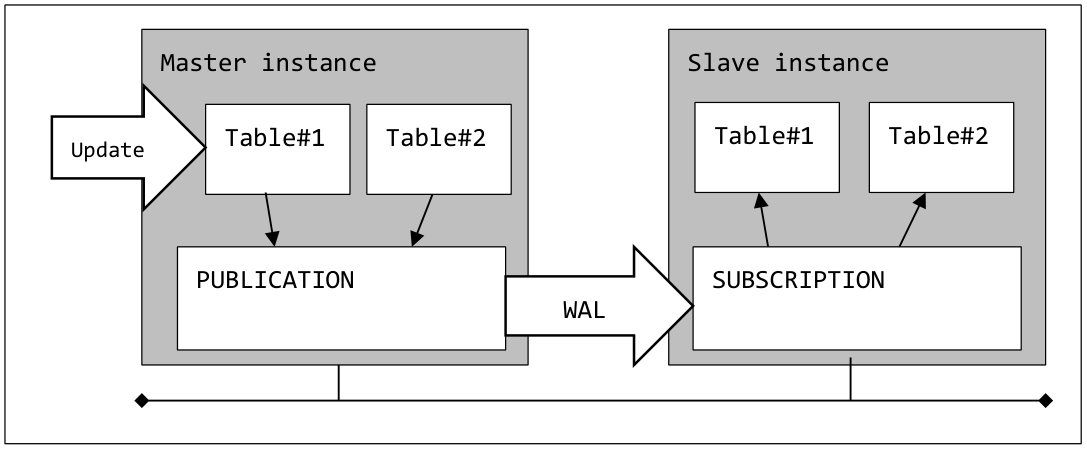PDF page 29
Logical Replication is implemented by the standard replication plug-in pgoutput based on the basis of Logical Decoding implemented in PostgreSQL 9.4. ##### PUBLICATION object {#pg10-p29-publication-object} PUBLICATION is an object created in the master instance. In the PUBLICATION object, register the table to be replicated. Multiple tables can be targeted for replication with a single PUBLICATION object. It is possible to select operations (INSERT / DELETE / UPDATE) to perform replication for each PUBLICATION. By default, all operations (DML) are applied on the slave side. PUBLICATION objects can be created by users with CREATE privilege on the database. In the psql command, a list is displayed with the \dRp command.PDF page 30
#### Syntax 1 - Create PUBLICATION object {#pg10-syntax-1} ```sql CREATE PUBLICATION name [ FOR TABLE [ ONLY ] table_name [*] [, … ] | FOR ALL TABLES ] [ WITH ( options [ = value] [, …] ) ] ``` The FOR TABLE clause specifies the table to be replicated. It is also possible to specify multiple tables separated by commas (,).In the WITH clause, specify the target DML statement. When omitted, all DML are targeted. The "publish" option by specifying separate the DML name with a comma (,), it is possible to specify the DML of interest. If the ONLY clause is omitted, inherited child tables are also subject to replication. When FOR ALL TABLES is specified, all tables in the database are subject to replication. When a table is added on PUBLICATION side, it is automatically registered as replication target. To alter PUBLICATION, execute the ALTER PUBLICATION statement. The replication target table can be added to the PUBLICATION object by specifying the ADD TABLE clause. The DROP TABLE clause deletes replication targets. The SET TABLE clause limits the tables contained in PUBLICATION to the specified table only. To change the DML to be replicated, execute the ALTER PUBLICATION SET statement. #### Syntax 2 - Alter PUBLICATION object {#pg10-syntax-2} ```sql ALTER PUBLICATION name ADD TABLE [ ONLY ] table_name [, table_name … ] ALTER PUBLICATION name SET TABLE [ ONLY ] table_name [, table_name … ] ALTER PUBLICATION name DROP TABLE [ ONLY ] table_name [, table_name … ] ALTER PUBLICATION name SET ( option [ = value ] [ , … ] ) ALTER PUBLICATION name OWNER TO { owner | CURRENT_USER | SESSION_USER } ALTER PUBLICATION name RENAME TO new_name ``` To delete the PUBLICATION object Execute the DROP PUBLICATION statement. #### Syntax 3 - Drop PUBLICATION object {#pg10-syntax-3} ```sql DROP PUBLICATION [IF EXISTS] name [ , … ] [ { CASCADE | RESTRICT } ] ``` A PUBLICATION object can receive replication requests from multiple SUBSCRIPTION. In addition, the table can belong to more than one PUBLICATION at the same time.PDF page 31
##### SUBSCRIPTION object {#pg10-p31-subscription-object} SUBSCRIPTION is an object that connects to the PUBLICATION object and updates the table based on the WAL information received via the wal sender process. The table to be updated is a table with the same name (including the schema name) as the table managed by the connection target PUBLICATION object. To create a SUBSCRIPTION object, execute the CREATE SUBSCRIPTION statement. In the CONNECTION clause, specify the connection string for the instance where the PUBLICATION is created. Specify the name of the database where the PUBLICATION object is created in the dbname parameter. As with streaming replication, it is necessary to connect by users with REPLICATION privilege. It may be necessary to edit the pg_hba.conf file on PUBLICATION side. In the PUBLICATION clause, specify the name of the PUBLICATION object that manages the replication target table. Multiple PUBLICATION objects can be specified. SUPERUSER privilege is required to create SUBSCRIPTION object. In the psql command, a list is displayed with the \dRs command. #### Syntax 4 - Create SUBSCRIPTION object {#pg10-syntax-4} ```sql CREATE SUBSCRIPTION name CONNECTION 'conn_info' PUBLICATION publication_name [, publication_name … ] [ WITH ( option [ = value ] , … ) ] ``` **Table 4.** option specification | Syntax | Description | Note | | --- | --- | --- | | enabled | Enable SUBSCRIPTION | Default | | create_slot | Create Replication Slot | Default | | slot_name =name\| NONE | Name of the Replication Slot | Default is SUBSCRIPTION name | | copy_data | Copy of the initial data | Default | | connect | Connect to PUBLICATION | Default | | synchronous_commit | Overrides configuration parameter | Default "off" | By default, Logical Replication Slot with the same name as SUBSCRIPTION is created in the PUBLICATION instance. It is not checked whether the PUBLICATION object specified in the CREATE SUBSCRIPTION statement actually exists.PDF page 32
#### Syntax 5 - Alter SUBSCRIPTION object {#pg10-syntax-5} ```sql ALTER SUBSCRIPTION name CONNECTION 'connection' ALTER SUBSCRIPTION SET PUBLICATION publication_name [, publication_name …] { REFRESH [ WITH ( option [ = value ] ) | SKIP REFRESH } ALTER SUBSCRIPTION name REFRESH PUBLICATION WITH ( option [, option … ] ) ALTER SUBSCRIPTION name { ENABLE | DISABLE } ALTER SUBSCRIPTION SET ( option [ = value ] [ , … ] ) ALTER SUBSCRIPTION name OWNER TO owner | CURRENT_USER | SESSION_USER ALTER SUBSCRIPTION name RENAME TO new_name ``` To change the SUBSCRIPTION object, execute the ALTER SUBSCRIPTION statement. The same value as the CREATE SUBSCRIPTION statement can be specified in the option clause. Execution of the ALTER SUBSCRIPTION REFRESH PUBLICATION statement is required when adding a table to the PUBLICATION object. To drop the SUBSCRIPTION object, use the DROP SUBSCRIPTION statement. By default, it also deletes the replication slots created on the PUBLICATION side. If the instance on the PUBLICATION side is stopped, execute the DROP SUBSCRIPTION statement after releasing the replication slot with the ALTER SUBSCRIPTION DISABLE statement and the ALTER SUBSCRIPTION SET ( slot_name = NONE ) statement. #### Syntax 6 - Drop SUBSCRIPTION object {#pg10-syntax-6} ```sql DROP SUBSCRIPTION [IF EXISTS] name [ { CASCADE | RESTRICT } ] ``` Since new objects have been added, PUBLICATION and SUBSCRIPTION can now be specified in COMMENT ON and SECURITY LABEL statements. ##### Cascade replication {#pg10-p32-cascade-replication} It was confirmed that the replication environment can be cascaded.PDF page 33
**Figure 5.** Cascade replication 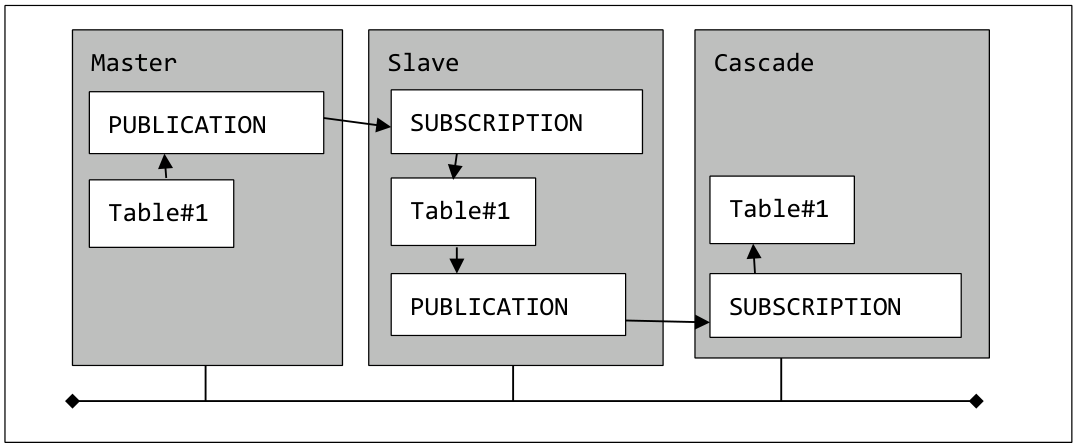PDF page 33
#### 3.3.2 Related resources {#pg10-3-3-2-related-resources} This section describes the objects that constitute Logical Replication and related parameters. ##### Processes {#pg10-p33-processes} Ordinarily, the process "bgworker: logical replication launcher" is running. The worker process "bgworker: logical replication worker for subscription" is invoked for each SUBSCRIPTION in the instance where the SUBSCRIPTION object is created. The SUBSCRIPTION worker process connects to the master instance. In order to forward the WAL to the SUBSCRIPTION, the wal sender process is started on the master instance. ##### Catalogs {#pg10-p33-catalogs} The following catalog has been newly added. **Table 5.** Added catalog | Catalog name | Contents | Instance | | --- | --- | --- | | pg_publication | PUBLICATION information | Master | | pg_publication_rel | Table information of WAL transfer target | Master | | pg_publication_tables | Table information of WAL transfer target | Master | | pg_stat_subscription | WAL information received in SUBSCRIPTION | Slave | | pg_subscription | SUBSCRIPTION information | Slave | | pg_subscription_rel | Replication table information | Slave |PDF page 34
Records are also added to the pg_stat_replication catalog and pg_replication_slots catalog. In the instance where the SUBSCRIPTION object is created, the status of Logical Replication can be checked using the pg_stat_subscription catalog. Users without superuser privilege can view this catalog. **Example 35.** Search pg\_stat\_subscription catalog ```text postgres=> SELECT * FROM pg_stat_subscription ; -[ RECORD 1 ]---------+------------------------------ subid | 16396 subname | sub1 pid | 23275 relid | received_lsn | 0/1650C68 last_msg_send_time | 2017-05-18 23:22:56.654912+09 last_msg_receipt_time | 2017-05-18 23:22:56.654939+09 latest_end_lsn | 0/1650C68 latest_end_time | 2017-05-18 23:22:56.654912+09 ``` ##### Parameters {#pg10-p34-parameters} The following configuration parameters are related to the Logical Replication settings. **Table 6.** Related configuration parameters | Parameter name | Instance | Description | | --- | --- | --- | | max_replication_slots | Master | Maximum number of replication slots | | max_wal_senders | Master | Maximum number of wal senders process | | max_logical_replication_workers | Slave (new) | Maximum number of logical replication worker processes | | wal_level | Master | It must be specified as 'logical' | | max_worker_processes | Master / Slave Maximum number of worker processes | Maximumnumberofworkerprocesses | | max_sync_workers_per_subscription | Slave (new) | Parallel degree setting when copying initial data | ##### Replication Slots {#pg10-p34-replication-slots} The CREATE SUBSCRIPTION statement creates a replication slot with the same name as SUBSCRIPTION in the PUBLICATION instance (by default). If a replication slot with the same namePDF page 35
already exists, the CREATE SUBSCRIPTION statement will fail. **Example 36.** Replication Slot status ```text postgres=> SELECT * FROM pg_replication_slots ; -[ RECORD 1 ]-------+----------- slot_name | sub1 plugin | pgoutput slot_type | logical datoid | 16385 database | postgres temporary | f active | t active_pid | 12140 xmin | catalog_xmin | 606 restart_lsn | 0/535A1AF0 confirmed_flush_lsn | 0/535A1B28 ``` #### 3.3.3 Examples {#pg10-3-3-3-examples} In the example below, the table schema1.data1 is created for replication. Next, the PUBLICATION object is created and the schema1.data1 table is registered in the PUBLICATION object. **Example 37.** Create replication target table \(master \/ slave instance\) ```text postgres=> CREATE TABLE schema1.data1(c1 NUMERIC PRIMARY KEY, c2 VARCHAR(10)) ; CREATE TABLE ``` ```text The PUBLICATION object is created and the schema1.table1 table is added. ``` **Example 38.** PUBLICATION object creation \(master instance\) ```text postgres=> CREATE PUBLICATION pub1 ; CREATE PUBLICATION postgres=> ALTER PUBLICATION pub1 ADD TABLE schema1.data1 ; ALTER PUBLICATION ```PDF page 36
The SUBSCRIPTION object is created. When the SUBSCRIPTION object is created, a replication slot with the same name is created in the PUBLICATION instance. SUPERUSER privilege is required to create SUBSCRIPTION object. **Example 39.** Create SUBSCRIPTION object \(slave instance\) ```text postgres=# CREATE SUBSCRIPTION sub1 CONNECTION 'host=master1 port=5432 user=postgres dbname=postgres' PUBLICATION pub1 ; NOTICE: synchronized table states NOTICE: created replication slot "sub1" on publisher CREATE SUBSCRIPTION ``` #### 3.3.4 Collision and inconsistency {#pg10-3-3-4-collision-and-inconsistency} Both on the PUBLICATION instance and the SUBSCRIPTION instance, the replication target table is updatable. Therefore, there is a possibility that WAL sent from PUBLICATION cannot be applied on SUBSCRIPTION side. If problems such as data collision occur, the subscription worker process stops and restarts at 5 second intervals. The following example is a log when a primary key violation occurs (on the SUBSCRIPTION side). The constraints (PRIMARY KEY, UNIQUE, CHECK) set in the SUBSCRIPTION side table are checked against the data transferred from the PUBLICATION side. **Example 40.** Log that detected primary key violation on SUBSCRIPTION side ```text ERROR: duplicate key value violates unique constraint "data1_pkey" DETAIL: Key (c1)=(14) already exists. LOG: worker process: logical replication worker for subscription 16399 (PID 3626) exited with exit code 1 ``` **Example 41.** Worker restart log ```text LOG: starting logical replication worker for subscription "sub1" LOG: logical replication sync for subscription sub1, table data1 started LOG: logical replication synchronization worker finished processing ``` ```text On the PUBLICATION side, the wal sender process detects disconnection of the session and the following log is output. ```PDF page 37
**Example 42.** Session disconnection log ```text LOG: unexpected EOF on client connection with an open transaction ``` ##### Updating multiple tables with a single transaction {#pg10-p37-updating-multiple-tables-with-a-single-transaction} When multiple tables are updated within a transaction, they are also updated on a SUBSCRIPTION side by transaction basis. For this reason, transaction consistency is maintained on SUBSCRIPTION side as well. In order to resolve the conflict, update the problem tuple on SUBSCRIPTION side. Although there is also a method of referring to the pg_replication_origin_status catalog and a conflict resolution method using the pg_replication_origin_advance function, the author has not tested it. Also, if the table is locked on the SUBSCRIPTION side (ex. LOCK TABLE statement), replication also stops. ##### DELETE / UPDATE target tuple does not exist {#pg10-p37-delete-update-target-tuple-does-not-exist} If on the PUBLICATION UPDATE or DELETE statement is executed and a target tuple does not exist on the SUBSCRIPTION side, no error occurs. **Table 7.** Behavior at mismatch occurrence | Master operation | Mismatch / Collision | | Behavior | | --- | --- | --- | --- | | INSERT | Constraint violation on slave | | Replication stopped | | | Different column definitions (compatible) | Different column definitions (compatible) | Processing continues / No log | | | Different column definitions compatibility) | (no | Replication stopped | | UPDATE | No target tuple in slave Constraint violation on slave | | Processing continues / No log Replication stopped | | DELETE | No target tuple in slave | | Processing continues / No log | | TRUNCATE | Do not propagate | | Processing continues / No log | | ALTER TABLE | Do not propagate | | Processing continues / No log | #### 3.3.5 Restriction {#pg10-3-3-5-restriction} Logical Replication has the following restrictions. ##### Execute permission {#pg10-p37-execute-permission} The SUPERUSER privilege is required to execute the CREATE PUBLICATION FOR ALL TABLES statement. A PUBLICATION object corresponding to an individual table can also be created by a general user.PDF page 38
##### Initial data {#pg10-p38-initial-data} When replicating the table in which data is already stored, existing data is transferred to the SUBSCRIPTION side by default. At that time, existing data on SUBSCRIPTION side will not be deleted. Initial data transfer is done asynchronously using temporary replication slots. The CREATE SUBSCRIPTION statement finish without waiting for the completion of the initial data transfer. ##### Primary key or unique key {#pg10-p38-primary-key-or-unique-key} Primary key (PRIMARY KEY) constraint or unique key (UNIQUE) and NOT NULL constraint are required on the target table to propagate UPDATE or DELETE statement to be replicated. Also, to propagate UPDATE or DELETE statement in the table where the unique key is set, following statements need to be executed. On the PUBLICATION side, ALTER TABLE REPLICA IDENTITY FULL statement or ALTER TABLE REPLICA IDENTITY USING INDEX statement, on the SUBSCRIPTION side, ALTER TABLE REPLICA IDENTITY USING INDEX statement. ##### DDL statement {#pg10-p38-ddl-statement} The ALTER TABLE and TRUNCATE statements do not propagate to the SUBSCRIPTION side. The DDL statement can be executed the table of either side. ##### Character encoding {#pg10-p38-character-encoding} Replication can be executed between databases with different character encoding. Character encoding are converted automatically. ##### Auditing {#pg10-p38-auditing} Data update processed by SUBSCRIPTION is not recorded even if parameter log_statement parameter is set to 'all'. ##### Combination with partition table {#pg10-p38-combination-with-partition-table} Partition parent table cannot be added to PUBLICATION. To replicate partitioned table, it is necessary to add child tables to the PUBLICATION. **Example 43.** Partition tables and replication ```text postgres=> ALTER PUBLICATION pub1 ADD TABLE range1 ; ERROR: "range1" is a partitioned table DETAIL: Adding partitioned tables to publications is not supported. HINT: You can add the table partitions individually. ```PDF page 39
##### In-Instance Replication {#pg10-p39-in-instance-replication} When executing the CREATE SUBSCRIPTION statement, the CREATE SUBSCRIPTION statement hangs by specifying the same instance as the PUBLICATION object in the CONNECTION clause. By creating a Replication Slot in advance and specifying the WITH ( create_slot = false ) clause in the CREATE SUBSCRIPTION statement, it is possible to create an in-instance replication environment. ##### Mutual replication {#pg10-p39-mutual-replication} It is not possible to create mutually updated table structure(multimaster replication) using PUBLICATION and SUBSCRIPTION. Although the CREATE PUBLICATION / CREATE SUBSCRIPTION statements succeed, when executed the replication, the WAL applied to the slave side will return to the master side, so that WAL application error will occur. ##### Trigger execution {#pg10-p39-trigger-execution} Triggers on the SUBSCRIPTION side table are not executed by update processing of Logical Replication.