PDF page 31
The new features on the SQL statement, are explained here. #### 3.4.1 INSERT ON CONFLICT statement {#pg9-5-3-4-1-insert-on-conflict-statement} When INSERT statement is executed under condition that if becomes a constraint violation, automatic switch to the UPDATE statement is now available (called UPSERT statement). To use this feature, specify the ON CONFLICT clause in the INSERT statement. Syntax INSERT INTO … ON CONFLICT [ { (column_name, …) | ON CONSTRAINT constraint_name }] { DO NOTHING | DO UPDATE SET column_name = value } [ WHERE … ] In the ON CONFLICT clause, specify where the constraint violation will occur. ##### Specify a list of column names, or a constraint name in the syntax of the "ON CONSTRAINT {#pg9-5-p31-specify-a-list-of-column-names-or-a-constraint-name-in-the-syntax-of-the-on-constraint} constraint_name". ##### In case of specifying constraints consisting of multiple columns, it is necessary to specify all {#pg9-5-p31-in-case-of-specifying-constraints-consisting-of-multiple-columns-it-is-necessary-to-specify-all} of the column names that are included in the constraint. ##### If you omit the par after ON CONFLICT, all of the constraint violation is checked. This {#pg9-5-p31-if-you-omit-the-par-after-on-conflict-all-of-the-constraint-violation-is-checked-this} omission is available only in case of using DO NOTHING clause. ##### When the constraint violation occurs for other than the specified columns or constraints in the {#pg9-5-p31-when-the-constraint-violation-occurs-for-other-than-the-specified-columns-or-constraints-in-the} ON CONFLICT clause, INSERT statement will result in an error. After the ON CONFLICT clause, the behavior when constraint violation has occurred is described. If you specify a DO NOTHING clause, nothing is done for constraint violations occurred (constraint violation does not occur). If you specify a DO UPDATE clause, UPDATE to the specific columns is executed. Following is the execution examples.PDF page 32
**Example 18.** Prepare table and data ```text postgres=> CREATE TABLE upsert1 (key NUMERIC, val VARCHAR(10)) ; CREATE TABLE postgres=> ALTER TABLE upsert1 ADD CONSTRAINT pk_upsert1 PRIMARY KEY (key) ; ALTER TABLE postgres=> INSERT INTO upsert1 VALUES (100, 'Val 1') ; INSERT 0 1 postgres=> INSERT INTO upsert1 VALUES (200, 'Val 2') ; INSERT 0 1 postgres=> INSERT INTO upsert1 VALUES (300, 'Val 3') ; INSERT 0 1 The following is a description example of the ON CONFLICT clause. Since DO NOTHING is specified in the handling part, nothing is done even if constraint violation occurs. ``` **Example 19.** ON CONFLICT clause samples ```text postgres=> INSERT INTO upsert1 VALUES (200, 'Update 1') ON CONFLICT DO NOTHING ; -- omit constraint name or column INSERT 0 0 postgres=> INSERT INTO upsert1 VALUES (200, 'Update 1') ON CONFLICT(key) DO NOTHING ; -- set column name INSERT 0 0 postgres=> INSERT INTO upsert1 VALUES (200, 'Update 1') ON CONFLICT(val) DO NOTHING ; -- error when no constraint column set ERROR: there is no unique or exclusion constraint matching the ON CONFLICT specification postgres=> INSERT INTO upsert1 VALUES (200, 'Update 1') ON CONFLICT ON CONSTRAINT pk_upsert1 DO NOTHING ; -- set constraint INSERT 0 0 In the DO UPDATE clause, you describes the update process. This is basically the same as the part subsequent the SET clause in the UPDATE statement. If you use an alias EXCLUDED, you can access the records that could not be stored when INSERT statement is executed. ```PDF page 33
**Example 20.** DO UPDATE clause samples ```text postgres=> INSERT INTO upsert1 VALUES (400, 'Upd4') ON CONFLICT DO UPDATE SET val = EXCLUDED.val ; -- No constraint error ERROR: ON CONFLICT DO UPDATE requires inference specification or constraint name LINE 2: ON CONFLICT DO UPDATE SET val = EXCLUDED.val; ^ HINT: For example, ON CONFLICT ON CONFLICT (PDF page 34
**Example 21.** ON CONFLICT Clause and Execution Plan ```text postgres=> EXPLAIN INSERT INTO upsert1 VALUES (200, 'Update 1') ON CONFLICT(key) DO NOTHING ; QUERY PLAN ----------------------------------------------------- Insert on upsert1 (cost=0.00..0.01 rows=1 width=0) Conflict Resolution: NOTHING Conflict Arbiter Indexes: pk_upsert1 -> Result (cost=0.00..0.01 rows=1 width=0) (4 rows) postgres=> EXPLAIN INSERT INTO upsert1 VALUES (400, 'Upd4') ON CONFLICT(key) DO UPDATE SET val = EXCLUDED.val ; QUERY PLAN ----------------------------------------------------- Insert on upsert1 (cost=0.00..0.01 rows=1 width=0) Conflict Resolution: UPDATE Conflict Arbiter Indexes: pk_upsert1 -> Result (cost=0.00..0.01 rows=1 width=0) (4 rows) postgres=> EXPLAIN INSERT INTO upsert1 VALUES (400, 'Upd4') ON CONFLICT(key) DO UPDATE SET val = EXCLUDED.val WHERE upsert1.key = 100 ; QUERY PLAN ----------------------------------------------------- Insert on upsert1 (cost=0.00..0.01 rows=1 width=0) Conflict Resolution: UPDATE Conflict Arbiter Indexes: pk_upsert1 Conflict Filter: (upsert1.key = '100'::numeric) -> Result (cost=0.00..0.01 rows=1 width=0) (5 rows) Current version does not support ON CONFLICT DO UPDATE statement to the remote instance using postgres_fdw module. ```PDF page 35
##### ON CONFLICT clause and the partition table {#pg9-5-p35-on-conflict-clause-and-the-partition-table} ON CONFLICT clause for partition table using the INSERT trigger it will be ignored. **Example 22.** INSERT ON CONLICT statement for the partition table\#1 ```text postgres=> CREATE TABLE main1 (key1 NUMERIC, val1 VARCHAR(10)) ; CREATE TABLE postgres=> CREATE TABLE main1_part100 (CHECK(key1 < 100)) INHERITS (main1) ; CREATE TABLE postgres=> CREATE TABLE main1_part200 (CHECK(key1 >= 100 AND key1 < 200)) INHERITS (main1) ; CREATE TABLE postgres=> ALTER TABLE main1_part100 ADD CONSTRAINT pk_main1_part100 PRIMARY KEY (key1); ALTER TABLE postgres=> ALTER TABLE main1_part200 ADD CONSTRAINT pk_main1_part200 PRIMARY KEY (key1); ALTER TABLE postgres=> CREATE OR REPLACE FUNCTION func_main1_insert() RETURNS TRIGGER AS $$ BEGIN IF (NEW.key1 < 100) THEN INSERT INTO main1_part100 VALUES (NEW.*) ; ELSIF (NEW.key1 >= 100 AND NEW.key1 < 200) THEN INSERT INTO main1_part200 VALUES (NEW.*) ; ELSE RAISE EXCEPTION 'ERROR! key1 out of range.' ; END IF ; RETURN NULL ; END ; $$ LANGUAGE 'plpgsql'; CREATE FUNCTION ```PDF page 36
**Example 23.** INSERT ON CONLICT statement for the partition table\#2 ```text postgres=> CREATE TRIGGER trg_main1_insert BEFORE INSERT ON main1 FOR EACH ROW EXECUTE PROCEDURE func_main1_insert() ; CREATE TRIGGER postgres=> INSERT INTO main1 VALUES (100, 'DATA100') ; INSERT 0 0 postgres=> INSERT INTO main1 VALUES (100, 'DATA100') ; ERROR: duplicate key value violates unique constraint "pk_main1_part200" DETAIL: Key (key1)=(100) already exists. CONTEXT: SQL statement "INSERT INTO main1_part200 VALUES (NEW.*)" PL/pgSQL function func_main1_insert() line 6 at SQL statement postgres=> INSERT INTO main1 VALUES (100, 'DATA100') ON CONFLICT DO NOTHING ; ERROR: duplicate key value violates unique constraint "pk_main1_part200" DETAIL: Key (key1)=(100) already exists. CONTEXT: SQL statement "INSERT INTO main1_part200 VALUES (NEW.*)" PL/pgSQL function func_main1_insert() line 6 at SQL statement ```PDF page 37
#### 3.4.2 ALTER TABLE SET UNLOGGED statement {#pg9-5-3-4-2-alter-table-set-unlogged-statement} When the update transaction occurs on the table, change log is written to WAL. In the standard setting COMMIT statement from the user will wait until the writing to WAL completes. In previous versions of PostgreSQL, if reliability is not important, we were able to create a table that does not perform the writing of the WAL, using the CREATE UNLOGGED TABLE statement. In PostgreSQL 9.5, the control of WAL writing comes to be modified to each table. Syntax - To UNLOGGED TABLE ALTER TABLE table_name SET UNLOGGED Syntax - To ordinary (LOGGED) TABLE ALTER TABLE table_name SET LOGGED **Example 24.** Change to UNLOGGED TABLE ```text postgres=> CREATE TABLE logtbl1 (c1 NUMERIC, c2 VARCHAR(10)) ; CREATE TABLE postgres=> \d+ logtbl1 Table "public.logtbl1" Column | Type | Modifiers | Storage | Stats target | Description --------+-----------------------+-----------+----------+--------------+------------ c1 | numeric | | main | | c2 | character varying(10) | | extended | | postgres=> ALTER TABLE logtbl1 SET UNLOGGED ; ALTER TABLE postgres=> \d+ logtbl1 Unlogged table "public.logtbl1" Column | Type | Modifiers | Storage | Stats target | Description --------+-----------------------+-----------+----------+--------------+------------ c1 | numeric | | main | | c2 | character varying(10) | | extended | | Using the \d+ command, you can see that the normal table is changed to UNLOGGED table. ```PDF page 38
##### Implementation {#pg9-5-p38-implementation} Internally, a new UNLOGGED TABLE (or TABLE) with the same structure is created, and the data are copied. relfilenode columns and relpersistence column of the pg_class catalog is changed. **Example 25.** Change of pg\_class Catalog ```text postgres=> SELECT relname, relfilenode, relpersistence FROM pg_class WHERE relname='logtbl1' ; relname | relfilenode | relpersistence ---------+-------------+---------------- logtbl1 | 16483 | p (1 row) postgres=> ALTER TABLE logtbl1 SET UNLOGGED ; ALTER TABLE postgres=> SELECT relname, relfilenode, relpersistence FROM pg_class WHERE relname='logtbl1' ; relname | relfilenode | relpersistence ---------+-------------+---------------- logtbl1 | 16489 | u (1 row) ``` ##### Changes to INHERIT table {#pg9-5-p38-changes-to-inherit-table} If you change the setting of the inheritance table, each table maintains the independent setting. Even if one of the child table is set to UNLOGGED, the other tables are not affected. #### 3.4.3 IMPORT FOREIGN SCHEMA statement {#pg9-5-3-4-3-import-foreign-schema-statement} In order to access the external table using the FOREIGN DATA WRAPPER, create an external table using the CREATE FOREIGN TABLE statement after you create a SERVER and USER MAPPING. In previous versions, CREATE FOREIGN TABLE statement is executed for each remote reference table, and it is necessary to define the definition of the same column as the remote table again. IMPORT FOREIGN SCHEMA statement performs this in a collectively per schema. IMPORT FOREIGN SCHEMA statement can import not only the table, also views and materialized views that are stored in the schema of the remote instance.PDF page 39
Syntax IMPORT FOREIGN SCHEMA [ { LIMIT TO | EXCEPT } (table_name, …) ] FROM SERVER server_name INTO local_schema [ OPTIONS (option ‘value’ , …) ] **Table 25.** Syntax for IMPORT FOREIGN SCHEMA statement | Clause | Description | | --- | --- | | LIMIT TO | Used to limit the table to be imported. If omitted import all tables | | EXCEPT | | | FROM SERVER | Specify the SERVER object that represents the remote instance witch perform the import. | | INTO | Specify the schema name of the local instance which perform import. | **Example 26.** Execution of the IMPORT FOREIGN SCHEMA statement ```text postgres=# CREATE EXTENSION postgres_fdw ; CREATE EXTENSION postgres=# CREATE SERVER remsvr1 FOREIGN DATA WRAPPER postgres_fdw OPTIONS (host '192.168.1.200', port '5432', dbname 'demodb') ; CREATE SERVER postgres=# CREATE USER MAPPING FOR public SERVER remsvr1 OPTIONS (user 'user1', password 'secret') ; CREATE USER MAPPING postgres=# CREATE SCHEMA schema2 ; CREATE SCHEMA postgres=# IMPORT FOREIGN SCHEMA schema1 FROM SERVER remsvr1 INTO schema2 ; IMPORT FOREIGN SCHEMA ``` ##### Schema to store the imported FOREIGN TABLE must be created in advance. {#pg9-5-p39-schema-to-store-the-imported-foreign-table-must-be-created-in-advance} ##### In the case that the table, which has the same name as the remote schema, exists in the {#pg9-5-p39-in-the-case-that-the-table-which-has-the-same-name-as-the-remote-schema-exists-in-the} local schema specified to import, error occurs and FOREIGN TABLE is not created. ##### If the remote instance does not require a password (trust), IMPORT FOREIGN SCHEMA {#pg9-5-p39-if-the-remote-instance-does-not-require-a-password-trust-import-foreign-schema} statement issued by a general user will fail.PDF page 40
**Example 27.** Behavior that cause an error ```text postgres=# IMPORT FOREIGN SCHEMA public FROM SERVER remsvr1 INTO schemax ; ERROR: schema "schemax" does not exist -- No Local Schema postgres=# IMPORT FOREIGN SCHEMA schema1 FROM SERVER remsvr1 INTO schema1 ; ERROR: relation "data1" already exists -- Exists same name table CONTEXT: importing foreign table "table2" postgres=> IMPORT FOREIGN SCHEMA public FROM SERVER remsvr1 INTO schema1 ; ERROR: password is required DETAIL: Non-superuser cannot connect if the server does not request a password. HINT: Target server's authentication method must be changed. ``` ##### OPTIONS clause {#pg9-5-p40-options-clause} Following options can be specified in the IMPORT FOREIGN SCHEMA statement with OPTIONS clause. **Table 26.** IMPORT FOREIGN SCHEMA statement OPTIONS clause | Option Name | Default | Description | | --- | --- | --- | | import_collate | true | Import COLLATE clause | | import_default | false | Import DEFAULT clause | | import_not_null | true | Import NOT NULL constraint | If DEFAULT clause that uses sequence objects to the remote table has been used with the import_default option set "true", IMPORT FOREIGN SCHEMA statement becomes to error.PDF page 41
**Example 28.** DEFAULT with Sequence ```text (remote) postgres=> CREATE SEQUENCE seq1 ; CREATE SEQUENCE (remote)postgres=> CREATE TABLE data1(c1 NUMERIC DEFAULT nextval('seq1')) ; CREATE TABLE (local) postgres=# IMPORT FOREIGN SCHEMA public FROM SERVER remsvr2 INTO schema1 OPTIONS (import_default 'true') ; ERROR: relation "public.seq1" does not exist CONTEXT: importing foreign table "data1" ``` #### 3.4.4 SELECT SKIP LOCKED statement {#pg9-5-3-4-4-select-skip-locked-statement} When performing an access to the tuple holding the conflicting lock, SQL statement usually waits until the lock is released. NOWAIT clause can be used as a way to generate an error without waiting. In PostgreSQL 9.5, it is possible to perform search skipping a locked tuple. To use this feature, specify the SKIP LOCKED clause in the SELECT statement. **Example 29.** Prepare data and lock tuple ```text postgres=> CREATE TABLE lock1 (key NUMERIC, val TEXT) ; CREATE TABLE postgres=> INSERT INTO lock1 VALUES (generate_series(1, 2000), 'initial') ; INSERT 0 2000 postgres=> BEGIN ; BEGIN postgres=> SELECT * FROM lock1 WHERE key = 1000 FOR SHARE ; key | val ------+--------- 1000 | initial (1 row) The above example create a table and locked a tuple of the "key = 1000" with the FOR SHARE clause. In the following example, we performed a search using SKIP LOCKED clause in the other session. Since tuple of the "key = 1000" conflicts with SELECT statement specifying the FOR UPDATE clause, it becomes wait state under the standard condition, or it causes an error in case that NOWAIT is specified. By specifying the SKIP LOCKED clause, tuples other than "key = 1000" has ```PDF page 42
been successfully retrieved. **Example 30.** SELECT by the other session ```text postgres=> SELECT * FROM lock1 WHERE key IN (999, 1000, 1001) FOR UPDATE SKIP LOCKED ; key | val ------+--------- 999 | initial 1001 | initial (2 rows) ``` #### 3.4.5 CREATE FOREIGN TABLE INHERITS statement {#pg9-5-3-4-5-create-foreign-table-inherits-statement} As inheritance table of an existing table, you can create an external table (FOREIGN TABLE). This feature makes it possible to distribute the processing to multiple hosts with a combination of partitioning and external table. **Figure 1.** FOREIGN TABLE INHERIT 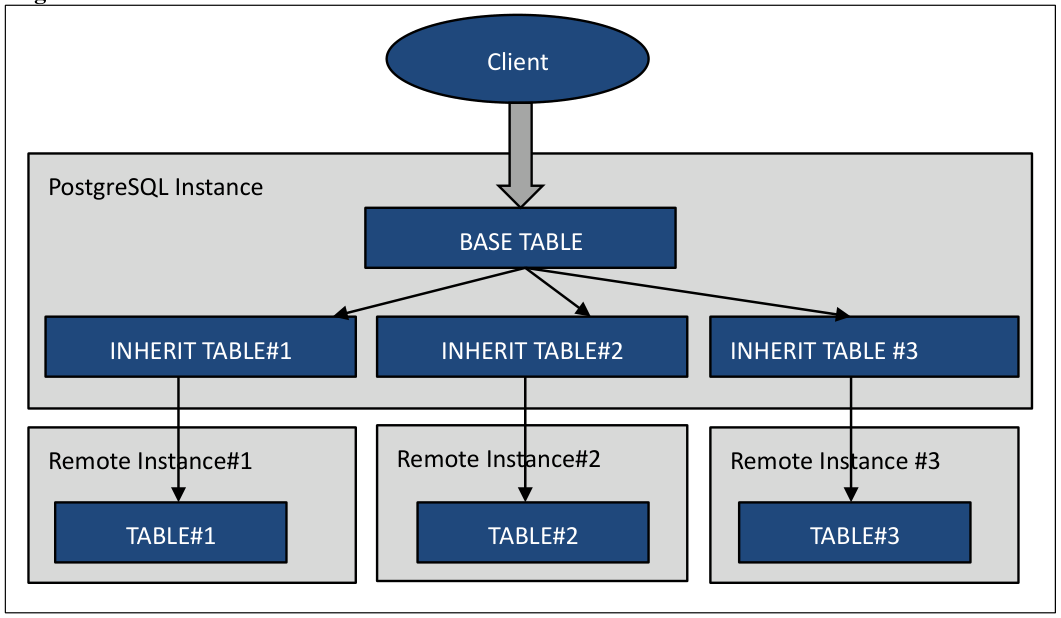PDF page 42
Syntax CREATE FOREIGN TABLE table_name (check_constraints …) INHERITS (parent_table) SERVER server_name OPTIONS (option = 'value' …)PDF page 43
INHERITS clause is different from the previous version. Parent table is specified in INHERITS clause. Example of the implementation and the verification of the execution plan are shown below. **Example 31.** Create parent table ```text postgres=> CREATE TABLE parent1(key NUMERIC, val TEXT) ; CREATE TABLE Create a table (inherit1, inherit2, inherit3) on the remote instance. ``` **Example 32.** Create child table on the remote instance ```text postgres=> CREATE TABLE inherit1(key NUMERIC, val TEXT) ; CREATE TABLE Execute the CREATE FOREIGN TABLE statement to create an external table to the table (inherit1, inherit2, inherit3) on each remote instance. ``` **Example 33.** Create External Tables ```text postgres=# CREATE EXTENSION postgres_fdw ; CREATE EXTENSION postgres=# CREATE SERVER remsvr1 FOREIGN DATA WRAPPER postgres_fdw OPTIONS (host 'remsvr1', dbname 'demodb', port '5432') ; CREATE SERVER postgres=# CREATE USER MAPPING FOR public SERVER remsvr1 OPTIONS (user 'demo', password 'secret') ; CREATE USER MAPPING postgres=# GRANT ALL ON FOREIGN SERVER remsvr1 TO public ; GRANT postgres=> CREATE FOREIGN TABLE inherit1(CHECK(key < 1000)) INHERITS (parent1) SERVER remsvr1 ; CREATE FOREIGN TABLE The changes from the previous versions are: CREATE FOREIGN TABLE statement specified CHECK constraint rather than column definition, and INHERITS clause specified the original table. The above is an example of only one instance, but in fact, you should execute CREATE SERVER statement, CREATE USER MAPPING statement, and CREATE FOREIGN TABLE statement for multiple instances. ```PDF page 44
**Example 34.** Check FOREIGN TABLE Definition with INHERITS Clause ```text postgres=> \d+ inherit2 Foreign table "public.inherit2" Column | Type | Modifiers | FDW Options | Storage | Stats target | Description --------+---------+-----------+-------------+----------+--------------+------------ key | numeric | | | main | | val | text | | | extended | | Check constraints: "inherit2_key_check" CHECK (key >= 1000::numeric AND key < 2000::numeric) Server: remsvr2 Inherits: parent1 When you check the execution plan, you can see that SQL access only to a specific instance due to CHECK constraints. ``` **Example 35.** Check the Execution Plan ```text postgres=> EXPLAIN SELECT * FROM parent1 WHERE key = 1500 ; QUERY PLAN ----------------------------------------------------------------------- Append (cost=0.00..121.72 rows=6 width=64) -> Seq Scan on parent1 (cost=0.00..0.00 rows=1 width=64) Filter: (key = '1500'::numeric) -> Foreign Scan on inherit2 (cost=100.00..121.72 rows=5 width=64) (4 rows) ``` #### 3.4.6 ALTER USER CURRENT_USER statement {#pg9-5-3-4-6-alter-user-current-user-statement} Now it is possible to specify the CURRENT_USER and CURRENT_ROLE for the user name in the ALTER USER / ALTER ROLE statement. You can execute ALTER USER statement for several purpose such as password changes of the connecting user. **Example 36.** CURRENT\_USER Clause ```text postgres=> ALTER USER CURRENT_USER PASSWORD 'secret' ; ALTER ROLE ```PDF page 45
#### 3.4.7 UPDATE SET statement enhancement {#pg9-5-3-4-7-update-set-statement-enhancement} In UPDATE statement which uses the result of SELECT, the FROM clause are no longer required. **Example 37.** Preparation of tables ```text postgres=> CREATE TABLE upd1(c1 NUMERIC, c2 NUMERIC, c3 VARCHAR(10)) ; CREATE TABLE postgres=> CREATE TABLE upd2(c1 NUMERIC, c2 NUMERIC, c3 VARCHAR(10)) ; CREATE TABLE This will update the value of c2, c3 column of the table upd2 with c2, c3 column of the table upd1. At that time, the tuple which has the same value in c1 column is used. ``` **Example 38.** Syntax up to PostgreSQL 9\.4 ```text postgres=> UPDATE upd2 SET c2 = upd1.c2, c3 = upd1.c3 FROM (SELECT * FROM upd1) AS upd1 WHERE upd1.c1 = upd2.c1 ; UPDATE 2 ``` **Example 39.** Syntax for PostgreSQL 9\.5 ```text postgres=> UPDATE upd2 SET (c2, c3) = (SELECT c2, c3 FROM upd1 WHERE upd1.c1 = upd2.c1) ; UPDATE 2 ``` #### 3.4.8 SELECT TABLESAMPLE statement {#pg9-5-3-4-8-select-tablesample-statement} TABLESAMPLE clause, sampling a certain percentage of the record from the table, is now available. Syntax SELECT … FROM table_name … TABLESAMPLE {SYSTEM | BERNOULLI} (percent) [ REPEATABLE (seed) ] You can choose SYSTEM or BERNOULLI as sampling method. SYSTEM uses the tuple entire block sampled. BERNOULLI choose a more constant rate of tuples from sampled block. In 'percent' you specify the sampling percentage (1-100). When you specify the value other than 1 - 100 SELECT statement results in an error. REPEATABLE clause is optional the seed of sampling can be specified.PDF page 46
##### Execution Plan {#pg9-5-p46-execution-plan} Execution plan of TABLESAMPLE is the followings. The cost increases when BERNOULLI is specified. **Example 40.** Execution Plan for TABLESAMPLE SYSTEM ```text postgres=> EXPLAIN ANALYZE SELECT COUNT(*) FROM data1 TABLESAMPLE SYSTEM (10) ; QUERY PLAN ------------------------------------------------------------------------------- Aggregate (cost=341.00..341.01 rows=1 width=0) (actual time=4.914..4.915 rows=1 loops=1) -> Sample Scan (system) on data1 (cost=0.00..316.00 rows=10000 width=0) (actualtime=0.019..3.205 rows=10090 loops=1) Planning time: 0.106 ms Execution time: 4.977 ms (4 rows) ``` **Example 41.** Execution Plan for TABLESAMPLE BERNOULLI ```text postgres=> EXPLAIN ANALYZE SELECT COUNT(*) FROM data1 TABLESAMPLE BERNOULLI (10) ; QUERY PLAN ------------------------------------------------------------------------------- Aggregate (cost=666.00..666.01 rows=1 width=0) (actual time=13.654..13.655 rows=1 loops=1) -> Sample Scan (bernoulli) on data1 (cost=0.00..641.00 rows=10000 width=0) (actual time=0.013..12.121 rows=10003 loops=1) Planning time: 0.195 ms Execution time: 13.730 ms (4 rows) ``` #### 3.4.9 REINDEX SCHEMA statement {#pg9-5-3-4-9-reindex-schema-statement} It is now possible to specify the SCHEMA clause to REINDEX statement. All indexes in the schema will be re-created. If there is an index of other users own in the schema, the indexes to which the execution user of REINDEX can access are reconstructed.PDF page 47
**Example 42.** REINDEX SCHEMA statement ```text postgres=> REINDEX SCHEMA schema1 ; REINDEX postgres=> REINDEX SCHEMA schema2 ; ERROR: must be owner of schema schema2 postgres=> BEGIN ; BEGIN postgres=> REINDEX SCHEMA schema1 ; ERROR: REINDEX SCHEMA cannot run inside a transaction block postgres=> To execute REINDEX SCHEMA statement, the following conditions are required. ``` ##### Being the owner of the schema. {#pg9-5-p47-being-the-owner-of-the-schema} ##### Run within a transaction is impossible. {#pg9-5-p47-run-within-a-transaction-is-impossible} #### 3.4.10 REINDEX (VERBOSE) statement {#pg9-5-3-4-10-reindex-verbose-statement} To REINDEX statement, VERBOSE clause can now be specified to output a detailed message. Similarly. The -v option has been added to reindexdb command. Syntax REINDEX (VERBOSE) {TABLE | DATABASE | SCHEMA} … **Example 43.** REINDEX \(VERBOSE\) ```text postgres=> REINDEX (VERBOSE) TABLE data1 ; INFO: index "idx1_data1" was reindexed DETAIL: CPU 0.00s/0.00u sec elapsed 0.02 sec. INFO: index "pg_toast_16424_index" was reindexed DETAIL: CPU 0.00s/0.00u sec elapsed 0.00 sec. REINDEX ```PDF page 48
#### 3.4.11 ROLLUP, CUBE, GROUPING SETS statement {#pg9-5-3-4-11-rollup-cube-grouping-sets-statement} In SELECT statement, ROLLEUP, CUBE and GROUPING SETS clause is now available to calculate the subtotal value. These specifications are used with GROUP BY clause. Please refer to the manual for the detailed syntax. **Example 44.** ROLLUP \(Output the subtotal values for each column c1\) ```text postgres=> SELECT c1, SUM(c2) FROM role1 GROUP BY ROLLUP (c1) ; c1 | sum ------+------- val1 | 5050 val3 | 5050 val4 | 5050 | 15150 (4 rows) ``` #### 3.4.12 CREATE FOREIGN TABLE (CHECK) {#pg9-5-3-4-12-create-foreign-table-check} In CREATE FOREIGN TABLE statement, now can be describe the CHECK constraints. However constraints specified in the CREATE FOREIGN TABLE statement is not valid for INSERT or UPDATE statement. CHECK constraint becomes effect only in the SELECT statement of the session that set the parameters constraint_exclusion to on.PDF page 49
**Example 45.** CHECK constraint in the CREATE FOREIGN TABLE statement ```text postgres=> CREATE FOREIGN TABLE data1 (c1 NUMERIC, c2 VARCHAR(10), CHECK(c1 > 0)) SERVER remsvr1 ; CREATE FOREIGN TABLE postgres=> INSERT INTO data1 VALUES (-2, 'add') ; INSERT 0 1 postgres=> SELECT * FROM data1 WHERE c1 = -2 ; c1 | c2 ----+----- -2 | add (1 row) postgres=> SET constraint_exclusion = on ; SET postgres=> SELECT * FROM data1 WHERE c1 = -20 ; c1 | c2 ----+---- (0 rows) When you set the parameter constraint_execution to "on", the execution plan will change. Not published a SQL statement to a remote instance in the case of conditions that do not match CHECK constraint in the WHERE clause is written. ```PDF page 50
**Example 46.** Execution plan and CHECK constraint ```text postgres=> SHOW constraint_exclusion ; constraint_exclusion ---------------------- partition (1 row) postgres=> EXPLAIN ANALYZE SELECT COUNT(*) FROM data1 WHERE c1 < 0 ; QUERY PLAN ------------------------------------------------------------------------------------------ Aggregate (cost=178.27..178.28 rows=1 width=0) (actual time=1.411..1.411 rows=1 loops=1) -> Foreign Scan on data1 (cost=100.00..175.42 rows=1138 width=0) (actual time=1.400..1.401 rows=6 loops=1) Planning time: 0.267 ms Execution time: 2.585 ms (4 rows) postgres=> SET constraint_exclusion = on ; SET postgres=> EXPLAIN ANALYZE SELECT COUNT(*) FROM data1 WHERE c1 < 0 ; QUERY PLAN ------------------------------------------------------------------------------------------ Aggregate (cost=0.01..0.02 rows=1 width=0) (actual time=0.005..0.006 rows=1 loops=1) -> Result (cost=0.00..0.01 rows=1 width=0) (actual time=0.001..0.001 rows=0 loops=1) One-Time Filter: false Planning time: 0.351 ms Execution time: 0.038 ms (5 rows) ``` #### 3.4.13 Enhance CREATE EVENT TRIGGER statement {#pg9-5-3-4-13-enhance-create-event-trigger-statement} Table_rewrite event can now be specified in the ON clause of the CREATE EVENT TRIGGER statement. Table_rewrite trigger is executed on the ALTER TABLE statement or the ALTER TYPE statement.PDF page 51
**Example 47.** Enhance CREATE EVENT TRIGGER statement ```text postgres=# CREATE FUNCTION rewrite1() RETURNS event_trigger AS $$ BEGIN RAISE NOTICE 'Rewriting Table % for reason %', pg_event_trigger_table_rewrite_oid()::regclass, pg_event_trigger_table_rewrite_reason() ; END; $$ LANGUAGE plpgsql ; CREATE FUNCTION postgres=# CREATE EVENT TRIGGER rewrite_trg1 ON table_rewrite EXECUTE PROCEDURE rewrite1() ; CREATE EVENT TRIGGER postgres=> ALTER TABLE data1 ALTER COLUMN c1 TYPE VARCHAR(10) ; NOTICE: Rewriting Table data1 for reason 4 ALTER TABLE In the trigger function, it is possible to use the following functions, which get the information of the trigger’s associated table. ``` **Table 27.** Information obtaining functions | Function Name | Description | Return | | --- | --- | --- | | pg_event_trigger_table_rewrite_oidpg_event_trigger_table_rewrite_reason | Trigger occurrence table Trigger occurrence reason | oid | Pg_event_trigger_table_rewrite_reason function returns the OR of the following values. These values are listed in the source code (src/include/commands/event_trigger.h). **Table 28.** Return value of pg\_event\_trigger\_table\_rewrite\_reason function | 2 | Change DEFAULT | ADD COLUMN DEFAULT, etc | | --- | --- | --- | Value Event Executed SQL statementPDF page 52
#### 3.4.14 PL/pgSQL ASSERT statement {#pg9-5-3-4-14-pl-pgsql-assert-statement} ASSERT statement has been added to the PL/pgSQL. ASSERT statement can check the assumed value in the stored procedure. This statement can be ignored using parameters. Syntax ASSERT condition [, 'message' ] Into the 'condition' write a conditional statement to check the value. If the condition becomes FALSE or NULL, ASSERT_EXCEPTION exception is raised. The 'message' is optional. You can specify a string which is displayed when an exception occurs. If omitted, "assertion failed" is output. **Example 48.** ASSERT statement ```text postgres=> CREATE OR REPLACE FUNCTION assert1(NUMERIC) RETURNS NUMERIC AS $$ BEGIN ASSERT $1 < 20 ; ASSERT $1 > 10, 'Assert Message' ; RETURN $1 * 2 ; END; $$ LANGUAGE plpgsql ; CREATE FUNCTION postgres=> SELECT assert1(30) ; ERROR: assertion failed CONTEXT: PL/pgSQL function assert2(numeric) line 3 at ASSERT postgres=> SELECT assert1(5) ; ERROR: Assert Message CONTEXT: PL/pgSQL function assert2(numeric) line 4 at ASSERT ``` ##### Parameter {#pg9-5-p52-parameter} Parameter for controlling the operation of the ASSERT statement is plpgsql.check_asserts. The default value is "on", and ASSERT statement will work. If this parameter is set to "off" (false), ASSERT statement will no longer work.PDF page 53
**Example 49.** Parameter plpgsql\.check\_asserts ```text postgres=> SELECT assert1(5) ; ERROR: Assert Message CONTEXT: PL/pgSQL function assert1(numeric) line 3 at ASSERT postgres=> SET plpgsql.check_asserts = false ; SET postgres=> SELECT assert1(5) ; assert1 --------- 10 (1 row) ``` #### 3.4.15 Additional operators and functions for jsonb type {#pg9-5-3-4-15-additional-operators-and-functions-for-jsonb-type} Operators and functions for jsonb type have been added. ##### "||" operator {#pg9-5-p53-operator} Using the "||" operator, you can perform addition and update of the json elements. Value will be replaced if you add the same key. This operator with the same behavior can be realized also jsonb_concat function. **Example 50.** Add and Replace ```text postgres=> SELECT '{"key":"key1", "val1":"1000"}'::jsonb || '{"val2":"2000"}' ; ?column? ------------------------------------------------- {"key": "key1", "val1": "1000", "val2": "2000"} (1 row) postgres=> SELECT '{"key":"key1", "val1":"1000"}'::jsonb || '{"val1":"3000"}' ; ?column? --------------------------------- {"key": "key1", "val1": "3000"} (1 row) ```PDF page 54
##### "-" operator, "#-" operator {#pg9-5-p54-operator-operator} Using the "-" operator and "#-" operator, you can delete the json element. If the key does not exist, there is no change in the original data. It is also possible to delete the element by specifying number from the array. Element numbers start from 0. These operator with the same behavior can be realized also jsonb_delete function. **Example 51.** Delete element ```text postgres=> SELECT '{"key":"key1", "val1":"1000"}'::jsonb - 'key' ; ?column? ------------------ {"val1": "1000"} (1 row) postgres=> SELECT '["red", "green", "blue"]'::jsonb - 1 ; ?column? ----------------- ["red", "blue"] (1 row) postgres=> SELECT '{"key":"key1", "val1":"1000"}'::jsonb - 'test' ; ?column? --------------------------------- {"key": "key1", "val1": "1000"} (1 row) ``` **Example 52.** Delete elements of the nested structure ```text postgres=> SELECT '{"ename":{"first":"Mike", "last":"Stern"}, "gender":"M"}'::jsonb #- '{"ename","last"}'::text[] ; ?column? --------------------------------------------- {"ename": {"first": "Mike"}, "gender": "M"} (1 row) ```PDF page 55
##### jsonb_set Function {#pg9-5-p55-jsonb-set-function} Jsonb_set function replace or add of elements. new_value parameter value added if create_missing parameter is true and the item designated by path does not exist. Syntax jsonb jsonb_set(target jsonb, path text[], new_value jsonb [, create_missing boolean DEFAULT true]) **Example 53.** Replace element ```text postgres=> SELECT jsonb_set('{"key":"key1", "val1":"1000"}'::jsonb,'{"val1"}','2000') ; jsonb_set ------------------------------- {"key": "key1", "val1": 2000} (1 row) ``` **Example 54.** Add element \#1 ```text postgres=> SELECT jsonb_set('{"key":"key1", "val1":"1000"}'::jsonb,'{"val2"}','2000') ; jsonb_set ----------------------------------------------- {"key": "key1", "val1": "1000", "val2": 2000} (1 row) ``` **Example 55.** Add element \#2 ```text postgres=> SELECT jsonb_set('{"key":"key1", "val1":"1000"}'::jsonb,'{"val2"}','2000', false) ; jsonb_set ----------------------------------------------- {"key": "key1", "val1": "1000", "val1": 2000} (1 row) ```PDF page 56
##### jsonb_pretty Function {#pg9-5-p56-jsonb-pretty-function} Jsonb_pretty function can perform formatting of jsonb data. Syntax jsonb jsonb_pretty(from_json jsonb) **Example 56.** Formatting jsonb ```text postgres=> SELECT jsonb_pretty('{"key":"key1", "val1":"1000", "arr1":["itm1","itm2"]}'::jsonb) ; jsonb_pretty -------------------- { + "key": "key1",+ "arr1": [ + "itm1", + "itm2" + ], + "val1": "1000"+ } (1 row) ``` ##### jsonb_strip_nulls Function {#pg9-5-p56-jsonb-strip-nulls-function} Jsonb_strip_nulls function removes the null fields from jsonb data. Syntax jsonb jsonb_strip_nulls(from_json jsonb) json json_strip_nulls(from_json json) **Example 57.** Omit null fields\. ```text postgres=> SELECT json_strip_nulls('[{"f1":1,"f2":null},2,null,3]') ; json_strip_nulls --------------------- [{"f1":1},2,null,3] ```PDF page 57
#### 3.4.16 Additional Functions {#pg9-5-3-4-16-additional-functions} Following function have been enhanced in PostgreSQL 9.5. ##### width_bucket Function {#pg9-5-p57-width-bucket-function} To width_bucket function, the version with anyelement type and anyarray type parameter has been added. ##### generate_series Function {#pg9-5-p57-generate-series-function} Parameters of generate_series function were bigint type, integer type, or timestamp type; now numeric type is also supported. Thus it is now possible to include a decimal point in the increment of value. **Example 58.** Enhancement of generate\_series Function ```text postgres=> SELECT generate_series (1.2, 2.1, 0.3) ; generate_series ----------------- 1.2 1.5 1.8 2.1 (4 rows) ``` ##### Unverified Functions {#pg9-5-p57-unverified-functions} The following functions have been added, but the behavior is not yet verified. ##### array_agg (support for anynoarray type) {#pg9-5-p57-array-agg-support-for-anynoarray-type} ##### array_agg_array* {#pg9-5-p57-array-agg-array} ##### array_position {#pg9-5-p57-array-position} ##### array_positions {#pg9-5-p57-array-positions} ##### bernoulli {#pg9-5-p57-bernoulli} ##### binary_upgrade_* {#pg9-5-p57-binary-upgrade} ##### bound_box {#pg9-5-p57-bound-box} ##### box (support for polygon type) {#pg9-5-p57-box-support-for-polygon-type} ##### brin* {#pg9-5-p57-brin} ##### bttextsortsupport {#pg9-5-p57-bttextsortsupport} ##### dist_cpoint {#pg9-5-p57-dist-cpoint} ##### dist_polyp {#pg9-5-p57-dist-polyp}PDF page 58
##### dist_ppoly {#pg9-5-p58-dist-ppoly} ##### gist_bbox_distance {#pg9-5-p58-gist-bbox-distance} ##### gist_box_fetch {#pg9-5-p58-gist-box-fetch} ##### gist_point_fetch {#pg9-5-p58-gist-point-fetch} ##### gistcanreturn {#pg9-5-p58-gistcanreturn} ##### inet_gist_fetch {#pg9-5-p58-inet-gist-fetch} ##### inet_merge {#pg9-5-p58-inet-merge} ##### inet_same_family {#pg9-5-p58-inet-same-family} ##### int8_avg_accum_inv {#pg9-5-p58-int8-avg-accum-inv} ##### json_strip_nulls {#pg9-5-p58-json-strip-nulls} ##### jsonb_agg {#pg9-5-p58-jsonb-agg} ##### jsonb_agg_finalfn {#pg9-5-p58-jsonb-agg-finalfn} ##### jsonb_agg_transfn {#pg9-5-p58-jsonb-agg-transfn} ##### jsonb_build_* {#pg9-5-p58-jsonb-build} ##### jsonb_object* {#pg9-5-p58-jsonb-object} ##### max (support timestamp without time zone type) {#pg9-5-p58-max-support-timestamp-without-time-zone-type} ##### min (support timestamp without time zone type) {#pg9-5-p58-min-support-timestamp-without-time-zone-type} ##### mxid_age {#pg9-5-p58-mxid-age} ##### network_larger {#pg9-5-p58-network-larger} ##### network_smaller {#pg9-5-p58-network-smaller} ##### numeric_poly_* {#pg9-5-p58-numeric-poly} ##### numeric_sortsupport {#pg9-5-p58-numeric-sortsupport} ##### pg_ddl_command_* {#pg9-5-p58-pg-ddl-command} ##### pg_event_trigger_ddl_commands {#pg9-5-p58-pg-event-trigger-ddl-commands} ##### pg_event_trigger_table_rewite_* {#pg9-5-p58-pg-event-trigger-table-rewite} ##### pg_get_object_address {#pg9-5-p58-pg-get-object-address} ##### pg_identify_object_as_address {#pg9-5-p58-pg-identify-object-as-address} ##### pg_last_committed_xact {#pg9-5-p58-pg-last-committed-xact} ##### pg_ls_dir (add missing_ok, include_dot_dirs parameters) {#pg9-5-p58-pg-ls-dir-add-missing-ok-include-dot-dirs-parameters} ##### pg_read_binary_file (add missing_ok parameter) {#pg9-5-p58-pg-read-binary-file-add-missing-ok-parameter} ##### pg_read_file (add missing_ok parameter) {#pg9-5-p58-pg-read-file-add-missing-ok-parameter} ##### pg_replication_origin* {#pg9-5-p58-pg-replication-origin} ##### pg_show_all_file_settings {#pg9-5-p58-pg-show-all-file-settings} ##### pg_show_replication_origin_status {#pg9-5-p58-pg-show-replication-origin-status} ##### pg_stat_file (add missing_ok parameter) {#pg9-5-p58-pg-stat-file-add-missing-ok-parameter} ##### pg_stat_get_snapshot_timestamp {#pg9-5-p58-pg-stat-get-snapshot-timestamp}PDF page 59
##### pg_xact_commit_timestamp {#pg9-5-p59-pg-xact-commit-timestamp} ##### range_gist_fetch {#pg9-5-p59-range-gist-fetch} ##### range_merge {#pg9-5-p59-range-merge} ##### regnamespace* {#pg9-5-p59-regnamespace} ##### regrole* {#pg9-5-p59-regrole} ##### row_security_active {#pg9-5-p59-row-security-active} ##### system {#pg9-5-p59-system} ##### timestamp_izone_transform {#pg9-5-p59-timestamp-izone-transform} ##### timestamp_zone_transform {#pg9-5-p59-timestamp-zone-transform} ##### to_jsonb {#pg9-5-p59-to-jsonb} ##### to_regnamespace {#pg9-5-p59-to-regnamespace} ##### to_regrole {#pg9-5-p59-to-regrole} ##### tsm_* {#pg9-5-p59-tsm}