PostgreSQL 10 New Features
PostgreSQL 10 New Features
WITH EXAMPLES · ENGLISH SOURCE EDITION
Explore the features, SQL examples, and compatibility changes documented by Noriyoshi Shinoda.
This book describes the Beta 1 source document. Its examples and compatibility notes reflect that snapshot.
Contents
Reference indexes
The opening chapter includes the first numbered table, Table 1. The indexes below collect the book’s other native numbered components.
Tables
- Table 1 — Version
- Table 2 — Examples notation
- Table 3 — Syntax rules
- Table 4 — option specification
- Table 5 — Added catalog
- Table 6 — Related configuration parameters
- Table 7 — Behavior at mismatch occurrence
- Table 8 — Added system catalog list
- Table 9 — pg_hba_file_rules catalog
- Table 10 — pg_partitioned_table catalog
- Table 11 — pg_publication catalog
- Table 12 — pg_publication_rel catalog
- Table 13 — pg_publication_tables catalog
- Table 14 — pg_sequence catalog
- Table 15 — pg_sequences catalog
- Table 16 — pg_stat_subscription catalog
- Table 17 — pg_statistic_ext catalog
- Table 18 — pg_subscription catalog
- Table 19 — pg_subscription_rel catalog
- Table 20 — System catalog with columns added
- Table 21 — Changed name
- Table 22 — Added role
- Table 23 — Value to be output to the wait_event_type column
- Table 24 — Added column (pg_policy catalog)
- Table 25 — Added column (pg_policies catalog)
- Table 26 — Added parameters
- Table 27 — Changed configuration parameters (from pg_settings catalog)
- Table 28 — Parameters with default values changed
- Table 29 — Deprecated parameters
Examples
- Example 1 — Create LIST partition table
- Example 2 — Create child table
- Example 3 — Reference table definition
- Example 4 — Execution of INSERT statement on parent table
- Example 5 — Obtain partition information
- Example 6 — Create RANGE Partition Table
- Example 7 — Create child table
- Example 8 — Reference table definition
- Example 9 — Execution of INSERT statement on parent table
- Example 10 — Access to child table
- Example 11 — UNBOUNDED designation
- Example 12 — Split UNBOUNDED partition
- Example 13 — Create a table with the same structure as the parent table
- Example 14 — Attach a partition
- Example 15 — Detach a partition
- Example 16 — TRUNCATE for parent table
- Example 17 — COPY for parent table
- Example 18 — Adding and deleting columns from the parent table
- Example 19 — Hierarchical partition
- Example 20 — Partition-identifiable SQL and execution plan
- Example 21 — Partition-unspecified SQL and execution plan
- Example 22 — Information of the parent table
- Example 23 — Information of child table
- Example 24 — Partition using function
- Example 25 — RANGE partition and NULL value
- Example 26 — Partition with different structure child table
- Example 27 — Add primary key to parent table
- Example 28 — Update partitioned column
- Example 29 — ATTACH of the partition containing the tuple
- Example 30 — Partition where column values overlap
- Example 31 — ATTACH for FOREIGN TABLE
- Example 32 — SQL executed on the remote instance
- Example 33 — fail of INSERT statement
- Example 34 — Index creation failure
- Example 35 — Search pg_stat_subscription catalog
- Example 36 — Replication Slot status
- Example 37 — Create replication target table (master / slave instance)
- Example 38 — PUBLICATION object creation (master instance)
- Example 39 — Create SUBSCRIPTION object (slave instance)
- Example 40 — Log that detected primary key violation on SUBSCRIPTION side
- Example 41 — Worker restart log
- Example 42 — Session disconnection log
- Example 43 — Partition tables and replication
- Example 44 — Parallel query with PREPARE and EXECUTE statements
- Example 45 — Parallel Index Scan
- Example 46 — Parallel Index Only Scan
- Example 47 — SubPlan and parallel query
- Example 48 — Parallel Merge Join
- Example 49 — Parallel Bitmap Heap Scan
- Example 50 — Reference pg_sequences catalog
- Example 51 — Search for a sequence (PostgreSQL 9.6)
- Example 52 — Search for a sequence (PostgreSQL 10)
- Example 53 — Referencing pg_stat_activity catalog
- Example 54 — Create temporary replication slot
- Example 55 — Instance start log (partially omitted)
- Example 56 — Create hash index (PostgreSQL 10)
- Example 57 — Create hash index (PostgreSQL 9.6)
- Example 58 — Custom Scan Callback
- Example 59 — Inner Unique Join
- Example 60 — EXPLAIN SUMMARY
- Example 61 — Execute VACUUM VERBOSE statement
- Example 62 — Quorum-based synchronous replication
- Example 63 — Creating tables and POLICY (PERMISSIVE + RESTRICTIVE)
- Example 64 — Confirmation of execution plan (PERMISSIVE + RESTRICTIVE)
- Example 65 — Create POLICIES in RESTRICTIVE mode
- Example 66 — Confirmation of execution plan (RESTRICTIVE + RESTRICTIVE)
- Example 67 — UPDATE statement with ROW keyword
- Example 68 — Creating extended statistics with the CREATE STATISTICS statement
- Example 69 — Confirm the information of the table that created the extended statistics
- Example 70 — Confirm extended statistics
- Example 71 — GENERATED ALWAYS
- Example 72 — OVERRIDING SYSTEM VALUE clause
- Example 73 — GENERATED BY DEFAULT
- Example 74 — Change of ENUM type by ALTER TYPE statement
- Example 75 — Specify SMALLINT type in CREATE SEQUENCE statement
- Example 76 — COPY statement for VIEW
- Example 77 — Enhancement of BRIN index
- Example 78 — UNENCRYPTED clause
- Example 79 — Delete element from JSONB array
- Example 80 — pg_current_logfile function
- Example 81 — xmltable function
- Example 82 — regexp_match function
- Example 83 — pg_ls_logdir / pg_ls_waldir functions
- Example 84 — txid_status function
- Example 85 — to_date (PostgreSQL 9.6)
- Example 86 — to_date (PostgreSQL 10)
- Example 87 — make_date (PostgreSQL 9.6)
- Example 88 — make_date (PostgreSQL 10)
- Example 89 — execute method / cursor method
- Example 90 — subtransaction syntax
- Example 91 — Lack max_logical_replication_workers parameters
- Example 92 — Parameter log_line_prefix default
- Example 93 — Default setting of pg_hba.conf file
- Example 94 — Display table information (PostgreSQL 9.6)
- Example 95 — Display table information (PostgreSQL 10)
- Example 96 — Added output of \timing command
- Example 97 — \gx command
- Example 98 — \set command
- Example 99 — \if command
- Example 100 — -Ft option and -Xstream option
- Example 101 — Temporary replication slot creation log.
- Example 102 — Error when there is no margin in the number of replication slots
- Example 103 — Output in --verbose mode
- Example 104 — SQL for local execution
- Example 105 — Remote execution SQL (from log_statement = 'all' log)
- Example 106 — FULL JOIN between remote tables
- Example 107 — Program specified file_fdw module
- Example 108 — Examples of programs executed
- Example 109 — Execution of bt_index_check function
- Example 110 — pgstathashindex function
- Example 111 — GiST index creation for columns of UUID type and ENUM type
- Example 112 — pg_stat_statements view
Figures
Source edition
The source chapter order, wording, examples, and publication credits are retained. PDF page markers link the reading edition to the original document. Source identity and coverage · About the collection
1 About This Document
PDF page 6
1.1 Purpose
The purpose of this document is to provide information of the major new features of PostgreSQL 10, the Beta 1 version being published.
1.2 Audience
This document is written for engineers who already have knowledge of PostgreSQL, such as installation, basic management, etc.
1.3 Scope
This document describes the major difference between PostgreSQL 9.6 and PostgreSQL 10 Beta 1. As a general rule, this document examines the functions that users can see when they see changes. It does not describe and verify all new features. In particular, the following new functions are not included.
Bug fix
Performance improvement by changing internal behavior
Improvement of regression test
Operability improvement by psql command tab input
Improvement of pgbench command (partly described)
Improve documentation, modify typo in the sources
1.4 Software Version
This document is being verified for the following versions and platforms.
| Software | Versions |
|---|---|
| PostgreSQL | PostgreSQL 9.6.3 (for comparison) PostgreSQL 10 Beta 1 (May 15, 2017 21:27:43) |
| Operating System | Red Hat Enterprise Linux 7 Update 1 (x86-64) |
1.5 Question, Comment, and Responsibility
The contents of this document are not an official opinion of the Hewlett-Packard Enterprise Japan Co, Ltd. The author and affiliation company do not take any responsibility about the problem caused by the mistake of contents. If you have any comments for this document, please contact to Noriyoshi Shinoda (noriyoshi.shinoda@hpe.com) Hewlett-Packard Enterprise Japan Co, Ltd.
PDF page 7
1.6 Notation
This document contains examples of the execution of the command or SQL statement. Execution examples are described according to the following rules:
| Notation | Description |
|---|---|
| # | Shell prompt for Linux root user |
| $ | Shell prompt for Linux general user |
| bold | User input string |
| postgres=# | psql command prompt for PostgreSQL administrator |
| postgres=> | psql command prompt for PostgreSQL general user |
| underline | Important output items |
The syntax is described in the following rules:
| Notation | Description |
|---|---|
| Italic | Replaced by the name of the object which users use, or the other syntax |
| [ ABC ] | Indicate that it can be omitted |
| { A | B } | Indicate that it is possible to select A or B |
| … | General syntax, it is the same as the previous version |
2 Version Notation
PDF page 8
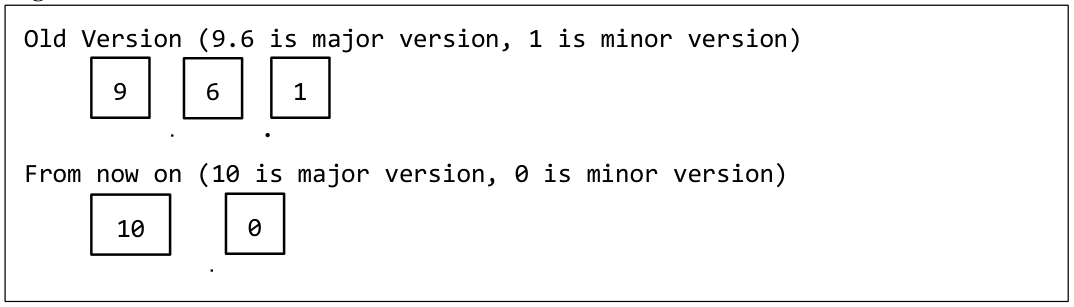
The notation of major version and minor version is changed from PostgreSQL 10. In the past, the first two numbers indicated major versions, but only the first number will indicate the major version in the future.
PDF page 8
PDF page 9
3 New Features
3 Overview
PDF page 9
More than 100 new features have been added to PostgreSQL 10. Here are some typical new features and benefits.
3.1.1 For large amount data
Native Partition Table
Native Partition Table is provided as a method of physically partitioning a large scale table. Unlike table partitioning using conventional inheritance table, performance during data insertion has been greatly improved. Providing the Native Partition Table makes building a large database easier.
Logical Replication
With the Logical Replication feature, it is possible to replicate only some tables between multiple instances. In traditional streaming replication, slave side instances were read-only, but tables synchronized by Logical Replication are updatable. Therefore, it is possible to create an index for analysis query to the slave side instance. Details are described in “3.3 Logical Replication”.
Enhancement of Parallel Query
In PostgreSQL 9.6, a parallel query feature was provided to improve the query performance for large tables. Parallel query was used only in “Seq Scan” in PostgreSQL 9.6, but parallel queries are now available in many situations such as “Index Scan”, “Merge Join”, “Bitmap Join” and so on. It is expected to improve query performance for large amount tables. Details are described in “3.4 Extended Parallel Query”.
3.1.2 For reliability improvement
Quorum-based synchronous replication for arbitrarily selecting instances for synchronous replication is now available (3.7 Quorum-base synchronous replication). Hash index that did not output WAL before PostgreSQL 9.6 now output WAL. For this reason, hash index is also available in replication environments (3.5.7 Hash index WAL).
PDF page 10
3.1.3 For maintenance task
Wait events that are output in the pg_stat_activity catalog has been increased significantly. Information of all backend processes can now be referred (3.5.2 catalog change). A dedicated role to check the system load has been added (3.5.8 Addition of role).
3.1.4 Incompatibility
Unfortunately, some features of PostgreSQL 10 are incompatible with previous versions.
Change name
All the name XLOG was unified to WAL. For this reason, directory names in the database cluster, utility command names, function names, parameter names, and error messages named XLOG have been changed. For example, the pg_xlog directory in the database cluster has been changed to the pg_wal directory. The pg_receivexlog command has been changed to the pg_receivewal command. The default value of the directory where the log file is output has been changed from pg_log to log. Details are described in “3.5.4 Change from XLOG to WALL”.
Default behavior of pg_basebackup utility
By default WAL streaming is used in PostgreSQL 10. Also, the -x parameter has been deprecated. Details are described in “3.11.3 pg_basebackup”.
Wait mode of pg_ctl utility
By default, the behavior has been changed to wait for processing to complete on all operations. In the previous version, pg_ctl command did not wait for the completion of processing in instance startup processing etc. Details are described in “3.11.2 pg_ctl”.
Deprecated of plain password store
It is no longer possible to save the password without encrypting it. This will improve security. Details are described in “3.9.12 CREATE USER statement” and “3.10.2 Changed parameters”.
Deprecated parameters
The parameter min_parallel_relation_size has been changed to min_parallel_table_scan_size. The parameter sql_inheritance has been deprecated. Details are described in “3.10.4 Obsolete parameters”.
PDF page 11
Functions behavior changed
The to_date and to_timestamp functions have changed behavior. As a result of strict checking of the numerics of each element part of the date/time, errors will occur with values that were not problematic in the previous version. Also, the make_date function can now specify a date in BC. Details are described in “3.9.13 Function”.
4 Native Partition Table
PDF page 12
3.2.1 Overview
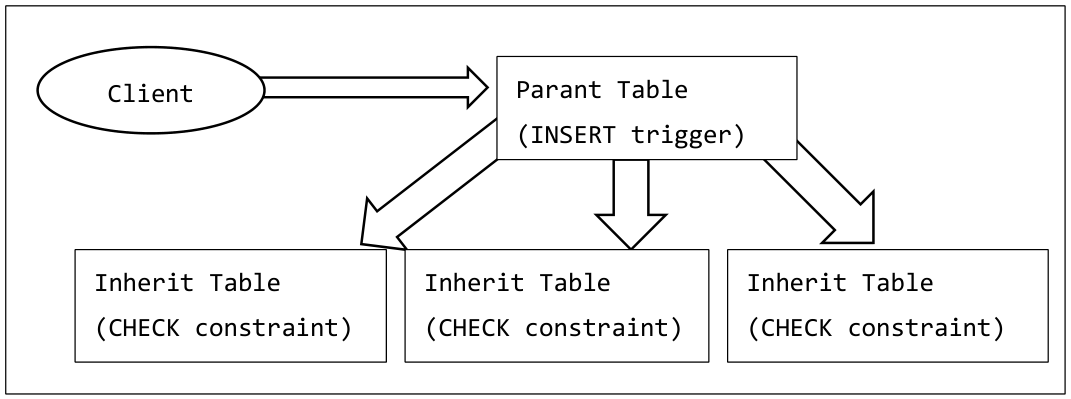
Traditional PostgreSQL used the function of the inheritance table as a method of physically partitioning a large table. The inheritance table creates multiple child tables for the parent table and maintains the consistency of data by CHECK constraints and triggers. The application can access the parent table and transparently use the data of the child table. However, this method had the following disadvantages.
Data consistency depends on the CHECK constraint specified individually in the child table
INSERT statements for the parent table need to redirect to child tables by triggers so that it is slower
PDF page 12
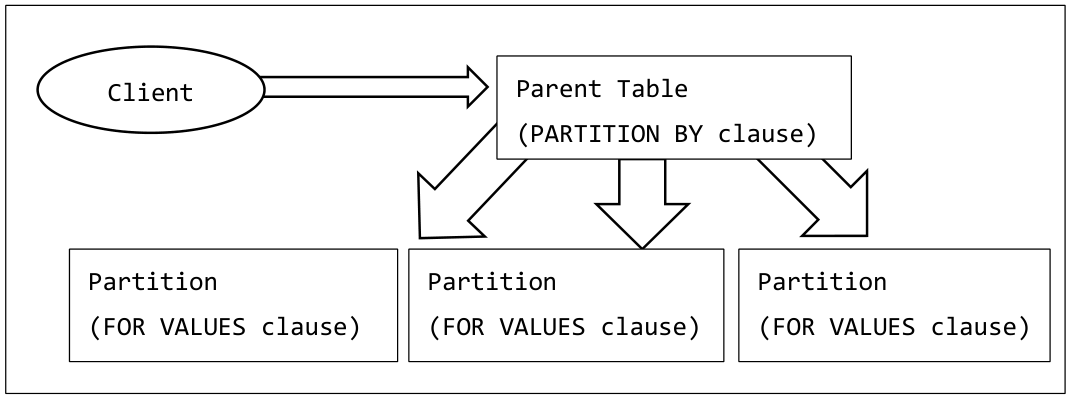
In PostgreSQL 10, partition table feature uses a more sophisticated table distribution method. It is the same as the conventional inheritance table that the partition table consists of child tables having the same structure as the parent table accessed by the application. However, INHERIT specification, CHECK constraint, trigger are unnecessary, so that addition or deletion of the child table can be done easily. In PostgreSQL 10, the column (or calculated value) to be specified for partitioning table. RANGE partitions that specify the range of values to be stored and LIST partitions that specify only specific values are available. The type of the partition is determined when creating the parent table.
PDF page 13
PDF page 13
3.2.2 List Partition Table
The LSIT partition table is a way to group multiple partitions that can only store certain values. To create a list partition table, first create a parent table accessed by the application, specifying the PARTITION BY LIST clause in the CREATE TABLE statement. In the LIST clause, specify the column name (or calculated value) to be partitioned. Only one column name can be specified. At this point the INSERT statement for the table fails. For tables created with PARTITION BY clause, the value of the “relkind” column in the pg_class catalog is ‘p’.
PDF page 14
PDF page 15
Obtaining partition information
The pg_get_partkeydef function can be used to obtain the partition method and column information. Restrictions on each partition can be obtained with the pg_get_partition_constraintdef function.
3.2.3 Range Partition Table
The RANGE partition table is a way to group multiple partitions that can store a range of specific values. To create a range partition table, first create a parent table accessed by the application. Specify the PARTITION BY RANGE clause in the CREATE TABLE statement. In the RANGE clause, specify the column name (or calculated value) to be partitioned. Multiple column names can be specified by separating them with a comma (,). A NOT NULL constraint is automatically set for the partitioned columns (except for calculated values). At this point the INSERT statement for the table fails.
PDF page 16
PDF page 17
UNBOUNDED specification of range
UNBOUNDED can be specified in the FROM clause or TO clause of the RANGE partition in addition to concrete values. This designation can create partitions that do not limit the lower limit (FROM) or upper limit (TO) range. In the example below, two tables are specified with a value less than 100 and a value of 100 or more as the partition of the prange1 table.
PDF page 18
A partition that specifies “a value to divide a partition containing an existing UNBOUNDED value” can not be added.
3.2.4 Existing tables and partitions
Validation of how to register an existing table in the partition table and remove it from the partition table.
ATTACH of child table
An existing table can be attached as a partition (child table) in a parent table. The child table must be created in the same column configuration as the parent table. Also, it is possible to detach a table registered as a partition into a normal table.
PDF page 19
Objects that can be registered as partitions are limited to tables or FOREIGN TABLE.
DETACH of child table
To remove the partitioned child table from the parent table, execute the ALTER TABLE DETACH statement
3.2.5 Operation on partition table
Validation of the behavior when executing DDL or COPY statement for the parent table or child table.
TRUNCATE for parent table
Execution of the TRUNCATE statement for the parent table propagates to all partitions.
COPY for parent table
The COPY statement for the parent table propagates to the child table.
PDF page 20
DROP parent table
Dropping the parent table also drops all child tables. The DROP TABLE statement for the child table drops only the child table.
Add / delete columns to the parent table
When adding / deleting a column to / from the parent table, the child table is changed in the same way. However, columns that are partition keys cannot be deleted. Also, if the partition is FOREIGN TABLE, column addition is not done automatically.
PDF page 21
TEMPORARY table
A TEMPORARY table can be used for both parent table and partitioned child table. However, if the parent table is a temporary table, the partition table must also be a temporary table.
UNLOGGED table
An UNLOGGED table can be used for parent table or partition table.
Hierarchical structure
By partitioning different columns, hierarchical partition table can be created. In the example below, a table partitioned by column c2 is added under the table partitioned by column c1.
PDF page 22
3.2.6 Execution Plan
If there is a condition to specify the partition to be accessed in the WHERE clause, an execution plan that accesses only specific partitions is created.
PDF page 23
3.2.7 Catalog
Information on the partitioned parent table can be checked in the pg_partitioned_table catalog. Below is the table information of which name part1, LIST partition (partstrat = ’l’), attached table number 2 (partnatts = 2).
PDF page 24
3.2.8 Restriction
The partition table has the following restrictions.
Number of partitioning columns
Only one column can be specified in the PARTITION BY LIST clause of the CREATE TABLE statement. In the column name part, it is possible to specify a calculation expression enclosed in functions and parentheses.
PDF page 25
NULL for partitioning column
Null values cannot be stored in partitioned columns of RANGE partitions. For a list partition, it can be stored by creating a partition containing NULL values.
Restriction of child table
The child table must have the same structure as the parent table. Excess and deficiency or data type mismatch of column are not allowed.
Primary Key Constraint / Unique Constraint / Check Constraint
Primary key constraint (or unique constraint) cannot be specified in the parent table. The uniqueness
PDF page 26
of the entire partition table depends on the primary key setting of the child table. CHECK constraints on the parent table can be specified. When creating a child table, the CHECK constraint is automatically added to the child table.
INSERT ON CONFLICT statement
The INSERT ON CONFLICT statement for the parent table cannot be executed.
UPDATE of partitioning column
When updating the value of a partitioned column, it can be updated only to the value contained in the FOR VALUES clause of the child table. It cannot be updated to a value that cannot be included in the child table.
ATTACHing of already stored data table
ATTACHing a child table that stores data already to the parent table is possible. However, in that case, all tuples are checked whether they can be included in the partition.
PDF page 27
Partition where column values overlap
RANGE partitions with overlapping ranges and LIST partitions with the same value cannot be created. In the example below, an attempt is made to attach partitions with column values 100 to 200 and 150 to 300 partitions, but it occurs an error.
Specify FOREIGN TABLE as a child table
FOREIGN TABLE can be specified as child table. However, in this case, aggregation push-downis not executed.
PDF page 28
Index
It is necessary to create an index for each child table. Indexes cannot be created on the parent table.
5 Logical Replication
PDF page 29
3.3.1 Overview
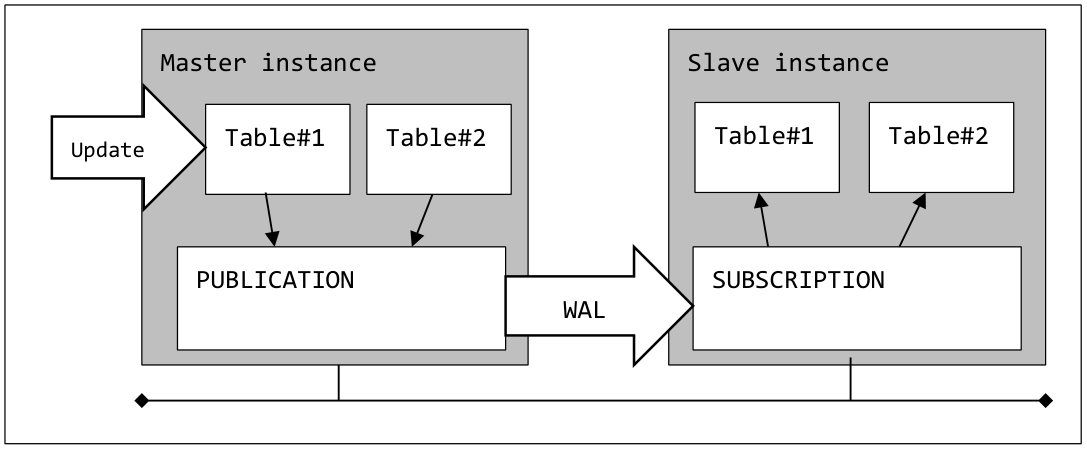
Logical Replication is a function to perform replication between instances for each table. In PostgreSQL 10, in order to realize the Logical Replication function, PUBLICATION object managing the master table and UBSCRIPTION object created in the slave instance are constructed. Replication is performed between tables of the same name including the schema name on the master side and the slave side. Slony-I is existing software with equivalent functions, but it differs in that Logical Replication does not use triggers and the slave side table is also updatable.
PDF page 29
Logical Replication is implemented by the standard replication plug-in pgoutput based on the basis of Logical Decoding implemented in PostgreSQL 9.4.
PUBLICATION object
PUBLICATION is an object created in the master instance. In the PUBLICATION object, register the table to be replicated. Multiple tables can be targeted for replication with a single PUBLICATION object. It is possible to select operations (INSERT / DELETE / UPDATE) to perform replication for each PUBLICATION. By default, all operations (DML) are applied on the slave side. PUBLICATION objects can be created by users with CREATE privilege on the database. In the psql command, a list is displayed with the \dRp command.
PDF page 30
Syntax 1 - Create PUBLICATION object
The FOR TABLE clause specifies the table to be replicated. It is also possible to specify multiple tables separated by commas (,).In the WITH clause, specify the target DML statement. When omitted, all DML are targeted. The “publish” option by specifying separate the DML name with a comma (,), it is possible to specify the DML of interest. If the ONLY clause is omitted, inherited child tables are also subject to replication. When FOR ALL TABLES is specified, all tables in the database are subject to replication. When a table is added on PUBLICATION side, it is automatically registered as replication target. To alter PUBLICATION, execute the ALTER PUBLICATION statement. The replication target table can be added to the PUBLICATION object by specifying the ADD TABLE clause. The DROP TABLE clause deletes replication targets. The SET TABLE clause limits the tables contained in PUBLICATION to the specified table only. To change the DML to be replicated, execute the ALTER PUBLICATION SET statement.
Syntax 2 - Alter PUBLICATION object
To delete the PUBLICATION object Execute the DROP PUBLICATION statement.
Syntax 3 - Drop PUBLICATION object
A PUBLICATION object can receive replication requests from multiple SUBSCRIPTION. In addition, the table can belong to more than one PUBLICATION at the same time.
PDF page 31
SUBSCRIPTION object
SUBSCRIPTION is an object that connects to the PUBLICATION object and updates the table based on the WAL information received via the wal sender process. The table to be updated is a table with the same name (including the schema name) as the table managed by the connection target PUBLICATION object. To create a SUBSCRIPTION object, execute the CREATE SUBSCRIPTION statement. In the CONNECTION clause, specify the connection string for the instance where the PUBLICATION is created. Specify the name of the database where the PUBLICATION object is created in the dbname parameter. As with streaming replication, it is necessary to connect by users with REPLICATION privilege. It may be necessary to edit the pg_hba.conf file on PUBLICATION side. In the PUBLICATION clause, specify the name of the PUBLICATION object that manages the replication target table. Multiple PUBLICATION objects can be specified. SUPERUSER privilege is required to create SUBSCRIPTION object. In the psql command, a list is displayed with the \dRs command.
Syntax 4 - Create SUBSCRIPTION object
| Syntax | Description | Note |
|---|---|---|
| enabled | Enable SUBSCRIPTION | Default |
| create_slot | Create Replication Slot | Default |
| slot_name =name| NONE | Name of the Replication Slot | Default is SUBSCRIPTION name |
| copy_data | Copy of the initial data | Default |
| connect | Connect to PUBLICATION | Default |
| synchronous_commit | Overrides configuration parameter | Default “off” |
By default, Logical Replication Slot with the same name as SUBSCRIPTION is created in the PUBLICATION instance. It is not checked whether the PUBLICATION object specified in the CREATE SUBSCRIPTION statement actually exists.
PDF page 32
Syntax 5 - Alter SUBSCRIPTION object
To change the SUBSCRIPTION object, execute the ALTER SUBSCRIPTION statement. The same value as the CREATE SUBSCRIPTION statement can be specified in the option clause. Execution of the ALTER SUBSCRIPTION REFRESH PUBLICATION statement is required when adding a table to the PUBLICATION object. To drop the SUBSCRIPTION object, use the DROP SUBSCRIPTION statement. By default, it also deletes the replication slots created on the PUBLICATION side. If the instance on the PUBLICATION side is stopped, execute the DROP SUBSCRIPTION statement after releasing the replication slot with the ALTER SUBSCRIPTION DISABLE statement and the ALTER SUBSCRIPTION SET ( slot_name = NONE ) statement.
Syntax 6 - Drop SUBSCRIPTION object
Since new objects have been added, PUBLICATION and SUBSCRIPTION can now be specified in COMMENT ON and SECURITY LABEL statements.
Cascade replication
It was confirmed that the replication environment can be cascaded.
PDF page 33
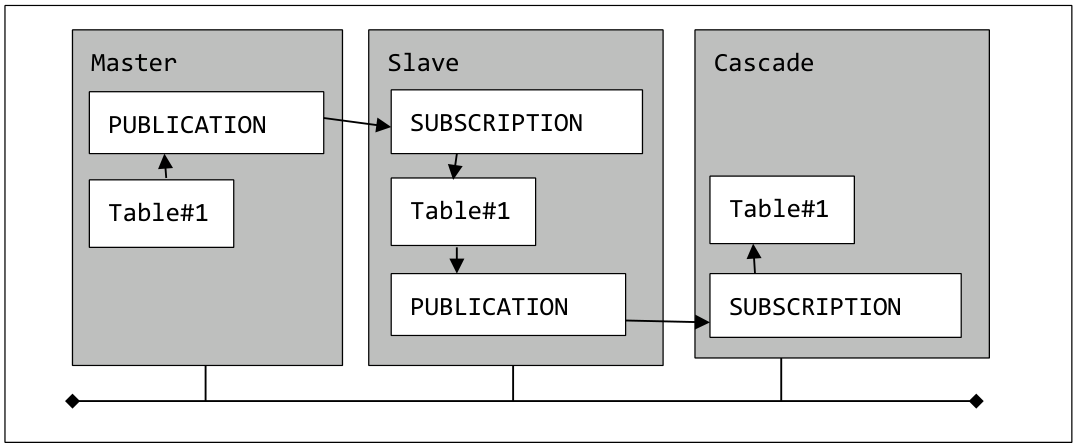
PDF page 33
3.3.2 Related resources
This section describes the objects that constitute Logical Replication and related parameters.
Processes
Ordinarily, the process “bgworker: logical replication launcher” is running. The worker process “bgworker: logical replication worker for subscription” is invoked for each SUBSCRIPTION in the instance where the SUBSCRIPTION object is created. The SUBSCRIPTION worker process connects to the master instance. In order to forward the WAL to the SUBSCRIPTION, the wal sender process is started on the master instance.
Catalogs
The following catalog has been newly added.
| Catalog name | Contents | Instance |
|---|---|---|
| pg_publication | PUBLICATION information | Master |
| pg_publication_rel | Table information of WAL transfer target | Master |
| pg_publication_tables | Table information of WAL transfer target | Master |
| pg_stat_subscription | WAL information received in SUBSCRIPTION | Slave |
| pg_subscription | SUBSCRIPTION information | Slave |
| pg_subscription_rel | Replication table information | Slave |
PDF page 34
Records are also added to the pg_stat_replication catalog and pg_replication_slots catalog. In the instance where the SUBSCRIPTION object is created, the status of Logical Replication can be checked using the pg_stat_subscription catalog. Users without superuser privilege can view this catalog.
Parameters
The following configuration parameters are related to the Logical Replication settings.
| Parameter name | Instance | Description |
|---|---|---|
| max_replication_slots | Master | Maximum number of replication slots |
| max_wal_senders | Master | Maximum number of wal senders process |
| max_logical_replication_workers | Slave (new) | Maximum number of logical replication worker processes |
| wal_level | Master | It must be specified as ’logical' |
| max_worker_processes | Master / Slave Maximum number of worker processes | Maximumnumberofworkerprocesses |
| max_sync_workers_per_subscription | Slave (new) | Parallel degree setting when copying initial data |
Replication Slots
The CREATE SUBSCRIPTION statement creates a replication slot with the same name as SUBSCRIPTION in the PUBLICATION instance (by default). If a replication slot with the same name
PDF page 35
already exists, the CREATE SUBSCRIPTION statement will fail.
3.3.3 Examples
In the example below, the table schema1.data1 is created for replication. Next, the PUBLICATION object is created and the schema1.data1 table is registered in the PUBLICATION object.
PDF page 36
The SUBSCRIPTION object is created. When the SUBSCRIPTION object is created, a replication slot with the same name is created in the PUBLICATION instance. SUPERUSER privilege is required to create SUBSCRIPTION object.
3.3.4 Collision and inconsistency
Both on the PUBLICATION instance and the SUBSCRIPTION instance, the replication target table is updatable. Therefore, there is a possibility that WAL sent from PUBLICATION cannot be applied on SUBSCRIPTION side. If problems such as data collision occur, the subscription worker process stops and restarts at 5 second intervals. The following example is a log when a primary key violation occurs (on the SUBSCRIPTION side). The constraints (PRIMARY KEY, UNIQUE, CHECK) set in the SUBSCRIPTION side table are checked against the data transferred from the PUBLICATION side.
PDF page 37
Updating multiple tables with a single transaction
When multiple tables are updated within a transaction, they are also updated on a SUBSCRIPTION side by transaction basis. For this reason, transaction consistency is maintained on SUBSCRIPTION side as well. In order to resolve the conflict, update the problem tuple on SUBSCRIPTION side. Although there is also a method of referring to the pg_replication_origin_status catalog and a conflict resolution method using the pg_replication_origin_advance function, the author has not tested it. Also, if the table is locked on the SUBSCRIPTION side (ex. LOCK TABLE statement), replication also stops.
DELETE / UPDATE target tuple does not exist
If on the PUBLICATION UPDATE or DELETE statement is executed and a target tuple does not exist on the SUBSCRIPTION side, no error occurs.
| Master operation | Mismatch / Collision | Behavior | |
|---|---|---|---|
| INSERT | Constraint violation on slave | Replication stopped | |
| Different column definitions (compatible) | Different column definitions (compatible) | Processing continues / No log | |
| Different column definitions compatibility) | (no | Replication stopped | |
| UPDATE | No target tuple in slave Constraint violation on slave | Processing continues / No log Replication stopped | |
| DELETE | No target tuple in slave | Processing continues / No log | |
| TRUNCATE | Do not propagate | Processing continues / No log | |
| ALTER TABLE | Do not propagate | Processing continues / No log |
3.3.5 Restriction
Logical Replication has the following restrictions.
Execute permission
The SUPERUSER privilege is required to execute the CREATE PUBLICATION FOR ALL TABLES statement. A PUBLICATION object corresponding to an individual table can also be created by a general user.
PDF page 38
Initial data
When replicating the table in which data is already stored, existing data is transferred to the SUBSCRIPTION side by default. At that time, existing data on SUBSCRIPTION side will not be deleted. Initial data transfer is done asynchronously using temporary replication slots. The CREATE SUBSCRIPTION statement finish without waiting for the completion of the initial data transfer.
Primary key or unique key
Primary key (PRIMARY KEY) constraint or unique key (UNIQUE) and NOT NULL constraint are required on the target table to propagate UPDATE or DELETE statement to be replicated. Also, to propagate UPDATE or DELETE statement in the table where the unique key is set, following statements need to be executed. On the PUBLICATION side, ALTER TABLE REPLICA IDENTITY FULL statement or ALTER TABLE REPLICA IDENTITY USING INDEX statement, on the SUBSCRIPTION side, ALTER TABLE REPLICA IDENTITY USING INDEX statement.
DDL statement
The ALTER TABLE and TRUNCATE statements do not propagate to the SUBSCRIPTION side. The DDL statement can be executed the table of either side.
Character encoding
Replication can be executed between databases with different character encoding. Character encoding are converted automatically.
Auditing
Data update processed by SUBSCRIPTION is not recorded even if parameter log_statement parameter is set to ‘all’.
Combination with partition table
Partition parent table cannot be added to PUBLICATION. To replicate partitioned table, it is necessary to add child tables to the PUBLICATION.
PDF page 39
In-Instance Replication
When executing the CREATE SUBSCRIPTION statement, the CREATE SUBSCRIPTION statement hangs by specifying the same instance as the PUBLICATION object in the CONNECTION clause. By creating a Replication Slot in advance and specifying the WITH ( create_slot = false ) clause in the CREATE SUBSCRIPTION statement, it is possible to create an in-instance replication environment.
Mutual replication
It is not possible to create mutually updated table structure(multimaster replication) using PUBLICATION and SUBSCRIPTION. Although the CREATE PUBLICATION / CREATE SUBSCRIPTION statements succeed, when executed the replication, the WAL applied to the slave side will return to the master side, so that WAL application error will occur.
Trigger execution
Triggers on the SUBSCRIPTION side table are not executed by update processing of Logical Replication.
6 Enhancement of Parallel Query
PDF page 40
In PostgreSQL 10, the processing that can use parallel queries has been expanded.
3.4.1 PREPARE / EXECUTE statement
Parallel queries can now be executed even in search processing using PREPARE and EXECUTE statements. Parallel processing was not executed in that process in PostgreSQL 9.6.
PDF page 41
3.4.2 Parallel Index Scan
Parallel queries are now also used for Index Scan and Index Only Scan.
PDF page 42
3.4.3 SubPlan
Parallel queries can now be used with SELECT statements that has SubPlan.
3.4.4 Parallel Merge Join / Gather Merge
Parallel queries are now available even when Merge Join is chosen. Gather Merge which gathers results while Merge by parallel processing is now available.
PDF page 43
3.4.5 Parallel bitmap heap scan
Bitmap Heap Scan has supported parallel query.
7 Architecture
PDF page 44
3.5.1 Added Catalogs
With the additional features, the following system catalogs have been added.
| Catalog name | Description |
|---|---|
| pg_hba_file_rules | Referencing pg_hba.conf file |
| pg_partitioned_table | Partitioning table information |
| pg_publication | PUBLICATION object for Logical Replication |
| pg_publication_rel | Target table list for Logical Replication |
| pg_publication_tables | Target table list for Logical Replication |
| pg_sequence | SEQUENCE object list |
| pg_sequences | SEQUENCE object list |
| pg_stat_subscription | Status for Logical Replication |
| pg_statistic_ext | Extended statistics view |
| pg_subscription | SUBSCRIPTION object for Logical Replication |
| pg_subscription_rel | Target table list for Logical Replication |
pg_hba_file_rules catalog
The pg_hba_file_rules catalog can refer to the contents of the pg_hba.conf file. When changing the file, the contents of the view are reflected immediately. Comment only lines are not included.
PDF page 45
| Column name | Data type | Description |
|---|---|---|
| line_number | integer | Line number in the file |
| type | text | Connection type of local, host, etc |
| database | text[] | Target database or all, replication |
| user_name | text[] | Username or all |
| address | text | TCP/IP address |
| netmask | text | Net mask |
| auth_method | text | Authentication method |
| options | text[] | Options |
| error | text | Error messages |
pg_partitioned_table catalog
The pg_partitioned_table catalog stores information on the parent table on partitioning table.
| Column name | Data type | Description |
|---|---|---|
| partrelid | oid | OID for the table |
| partstrat | char | Partitioning method (list = ’l’, range = ‘r’) |
| partnatts | smallint | Number of attached partitions |
| partattrs | int2vector | Array of partition column values |
| partclass | oidvector | The data type of the partition key. |
| partcollation | oidvector | Collation information of partition-key columns |
| partexprs | pg_node_tree | Information on partitioning columns |
pg_publication catalog
The pg_publication catalog stores information on PUBLICATION objects used in Logical Replication.
PDF page 46
| Column name | Data type | Description |
|---|---|---|
| pubname | name | Name of the PUBLICATION |
| pubowner | oid | Owner of the PUBLICATION object |
| puballtables | boolean | If true, this publication automatically includes all tables in the database |
| pubinsert | boolean | If true, INSERT operations are replicated for tables |
| pubupdate | boolean | If true, UPDATE operations are replicated for tables |
| pubdelete | boolean | If true, UPDATE operations are replicated for tables |
pg_publication_rel catalog
The pg_publication_rel catalog stores the information of the replication target table contained in the PUBLICATION object.
| Column name | Data type | Description |
|---|---|---|
| prpubidprrelid | oid | OID of the PUBLICATION object OID of the target table |
pg_publication_tables catalog
The pg_publication_tables catalog stores the information of the replication target table contained in the PUBLICATION object.
| Column name | Data type | Description |
|---|---|---|
| pubname | name | Name of the PUBLICATION object |
| schemaname | name | Name of the schema |
| tablename | name | Name of the target table |
pg_sequence catalog
The pg_sequence catalog that provides a list of SEQUENCE objects has been added. This catalog can be searched by general users.
PDF page 47
| Column name | Data type | Description |
|---|---|---|
| seqrelid | oid | OID of the object |
| seqtypid | oid | Data type of the SEQUENCE |
| seqstart | bigint | Start value |
| seqincrement | bigint | Incremental value |
| seqmax | bigint | Maximum sequence value |
| seqmin | bigint | Minimum sequence value |
| seqcache | bigint | Number of caches |
| seqcycle | boolean | Indicate whether to cyclic |
pg_sequences catalog
The pg_sequences catalog that provides a list of SEQUENCE object has been added. Although this catalog can be searched by general users, the last_value column is NULL if the nextval function has not been executed yet or if the search user does not have USAGE or SELECT privilege on that SEQUENCE.
| Column name | Data type | Description |
|---|---|---|
| schemaname | name | Name of the schema |
| sequencename | name | Name of the SEQUENCE object |
| sequenceowner | name | Name of the owner |
| data_type | regtype | Data type of the SEQUENCE |
| start_value | bigint | Start value |
| min_value | bigint | Minimum value |
| max_value | bigint | Maximum value |
| increment_by | bigint | Incremental value |
| cycle | boolean | Indicate whether to cyclic |
| cache_size | bigint | Number of caches |
| last_value | bigint | Last sequence value or NULL |
PDF page 48
PDF page 49
pg_stat_subscription catalog
The pg_stat_subscription catalog stores WAL information received by the SUBSCRIPTION object. This catalog can refer to data only while the replication process is running.
| Column name | Data type | Description |
|---|---|---|
| subid | oid | OID of the SUBSCRIPTION |
| subname | name | Name of the SUBSCRIPTION |
| pid | integer | Process id of the logical replication worker |
| relid | oid | OID of the table |
| received_lsn | pg_lsn | Received LSN |
| last_msg_send_time | timestamp with time zone | Message send time |
| last_msg_receipt_time | timestamp with time zone | Message receive time |
| latest_end_lsn | pg_lsn | Latest end LSN |
| latest_end_time | timestamp with time zone | Latest end timestamp |
pg_statistic_ext catalog
The pg_statistic_ext catalog stores information on extended statistics created with the CREATE STATISTICS statement.
PDF page 50
| Column name | Data type | Description |
|---|---|---|
| stxrelid | oid | OID of the statistics acquisition table |
| stxname | name | Name of the extended statistics |
| stxnamespace | oid | OID of the namespace |
| stxowner | oid | Owner of extended statistics |
| stxkeys | int2vector | Array of column numbers from which extended statistics were obtained |
| stxkind | “char”[] | Types of the statistics activated |
| stxndistinct | pg_ndistinct | Serialized N-distinct value |
| stxdependencies | pg_dependencies | Column dependencies |
pg_subscription catalog
The pg_subscription catalog stores information on the SUBSCRIPTION object used by Logical Replication. This catalog can only be viewed by users with SUPERUSER privilege.
| Column name | Data type | Description |
|---|---|---|
| subdbid | oid | OID of database constituting SUBSCRIPTION |
| subname | name | Name of the SUBSCRIPTION object |
| subowner | oid | Owner’s OID |
| subenabled | boolean | Is the object valid? |
| subconninfo | text | Connection information to PUBLICATION instance |
| subslotname | name | Name of the replication slot |
| subsynccommit | text | Synchronous COMMIT setting value |
| subpublications | text[] | Array of PUBLICATION names |
pg_subscription_rel catalog
The pg_subscription_rel catalog stores the information on table targeted by the SUBSCRIPTION object used in Logical Replication.
PDF page 51
| Column name | Data type | Description |
|---|---|---|
| srsubid | oid | OID of SUBSCRIPTION object |
| srrelid | oid | OID of target table |
| srsubstate | “char” | Status i = initializing, d = data transferring, s = synchronizing, r = normal |
| srsublsn | pg_lsn | The last LSN of the s or r state of srsubstate column |
3.5.2 Modified catalogs
The following catalogs have been changed.
| Catalog name | Added column | Data Type | Description |
|---|---|---|---|
| pg_class | relispartition | boolean | Partition parent table |
| relpartbound | pg_node_tree | Partitioning information | |
| pg_replication_slots | temporary | boolean | Indicate a temporary slot |
| pg_policy | polpermissive | boolean | PERMISSIVE mode |
| pg_policies | permissive | text | PERMISSIVE mode |
| pg_stat_replication | write_lag | interval | Write lag |
| flush_lag | interval | Flush lag | |
| replay_lag | interval | Replay lag | |
| pg_collation | collprovider | char | Provider information |
| collversion | text | Version information | |
| pg_stat_activity | backend_type | text | Type of process |
| pg_attribute | attidentity | char | GENERATED column |
pg_stat_activity catalog
The statuses of all backend processes except the postmaster process are now displayed in the pg_stat_activity catalog. The type of backend process can be confirmed by backend_type column.
PDF page 52
3.5.3 Enhancement of libpq library
The following enhancements have been added to the PostgreSQL Client library libpq.
Multi-instance specification
Settings for connecting to multiple instances which are already supported in the JDBC Driver are also implemented in the libpq library. As described below, multiple host names and port numbers can be described in comma-separated form.
Syntax 7 - Multi-instance specification
Multiple values can be specified with the comma (,) separator in the environment variables PGHOST and PGPORT. Along with this, it is now possible to specify multiple values for the –host and –port parameters of the psql and pg_basebackup commands
Added target_session_attrs attribute
Target_session_attrs has been added as a new connection attribute. This parameter can be specified as “any” if the instance to be connected can be hot standby, or “read-write” if the instance is writable. A similar specification can be specified for the environment variable PGTARGETSESSIONATTRS. Internally, it seems to be use the SHOW transaction_read_only statement to determine the connection
PDF page 53
destination.
Added passfile attribute
“passfile” has been added as a new connection attribute. In the past, it was specified with the environment variable PGPASSFILE etc.
3.5.4 Change from XLOG to WAL
The name of XLOG used in the function, directory name, and utility was unified in WAL. Also, the pg_clog directory has been changed to the pg_xact directory. The default output directory name of the log file has been changed due to the effect of changing the default value of the parameter log_directory. The name “location” indicating the location of WAL has been changed to “lsn”.
| Category | change | After changing |
|---|---|---|
| Directories | pg_xlog | pg_wal |
| pg_clog | pg_xact | |
| pg_log | log | |
| Utilities | pg_receivexlog | pg_receivewal |
| pg_resetxlog | pg_resetwal | |
| pg_xlogdump | pg_waldump | |
| pg_basebackup –xlog-method | pg_basebackup –wal-method | |
| pg_basebackup –xlogdir | pg_basebackup –waldir | |
| initdb –xlogdir | initdb –waldir | |
| Functions | pg xlog location diff___ | pg_wal_location_diff |
| pg_switch_xlog | pg_switch_wal | |
| pg_current_xlog_* | pg_current_wal_* | |
| pg xlogfile*_ | pg_walfile* | |
| pg_is_xlog_replay_replay_paused | pg_is_wal_replay_replay_paused | |
| pg_last_xlog_* | pg_last_wal_* | |
| pg location_ | pg_lsn | |
| Catalog | pg_stat_replication Catalog | pg_stat_replication Catalog |
| - sent location_ | sent_lsn | |
| - write location_ | write_lsn | |
| - flush location_ | flush_lsn | |
| - replay location_ | replay_lsn |
PDF page 54
At the same time, the string XLOG included in the error message has also been changed to WAL. It has been changed to the following message.
Failed while allocating a WAL reading processor.
could not read two-phase state from WAL at …
expected two-phase state data is not present in WAL at …
Failed while allocating a WAL reading processor.
WAL redo at %X/%X for %s
Forces a switch to the next WAL file if a new file has not been started within N seconds. The description of the parameter archive_timeout has been changed as follows.
Forces a switch to the next WAL file if a new file has not been started within N seconds.
3.5.5 Temporary replication slot
Replication slots can be used for building a streaming replication environment or for the pg_basebackup command. In PostgreSQL 10, temporary replication slots can now be created. A temporary replication slot is the same as a normal replication slot except that it is automatically deleted by session termination. To create a temporary replication slot, specify true for the third parameter of the pg_create_physical_replication_slot function or pg_create_logical_replication_slot function. Along with this, “temporary” column has been added to the pg_replication_slots catalog.
3.5.6 Change instance startup log
The listen address and port number are now output to the instance startup log.
PDF page 55
3.5.7 WAL of hash index
Hash index of previous versions did not generate WAL on update. In PostgreSQL 10, it now generate WAL, so it can now be used in streaming replication environments. The warnings outputted in the CREATE INDEX USING HASH statement are no longer output.
3.5.8 Added roles
The following roles have been added. All roles do not have “login” privilege.
| Role | Description |
|---|---|
| pg_read_all_settings | All configuration parameters can be referred. |
| pg_read_all_stats | All pg_stat_ * views can be referred. |
| pg_stat_scan_tables | Execute the monitoring function to take AccessShareLock lock |
| pg_monitor | All of the above 3 roles have authority |
PDF page 56
Registering the following Contrib modules, execute permissions for function are automatically granted to the roles above.
pg_buffercache
pg_freespacemap
pg_stat_statements
pg_visibility
pgstattuple
3.5.9 Custom Scan Callback
A new callback called at the end of the parallel query has been added. It is explained in the manual “58.3. Executing Custom Scans” as follows.
3.5.10 Size of WAL file
The choice of WAL file size determined by the –with-wal-segsize option of the “configure” command has increased. 128, 256, 512, 1024 can be used in addition to the conventional 1 to 64.
3.5.11 ICU
ICU can be used for locale function. Specify –with-icu when executing “configure” command. When building in Linux environment, installation of libicu package and libicu-devel package is necessary.
3.5.12 EUI-64 data type
The data type macaddr8 indicating the EUI-64 address is now available.
3.5.13 Unique Join
PDF page 57
In the execution plan displayed by EXPLAIN VERBOSE statement, it will appear as “Inner Unique: true”.
3.5.14 Shared Memory Address
When the EXEC_BACKEND macro is defined and installed, the environment variable PG_SHMEM_ADDR can be used. Specify the start address of System V shared memory used as part of the cache. Internally it is digitized with the strtoul function and used as the second parameter of the shmat system call.
8 Monitoring
PDF page 58
3.6.1 Monitor wait events
Wait events that are shown in the wait_event_type and wait_event columns of the pg_stat_activity catalog have been added. LWLockNamed and LWLockTranche that were output in the wait_event_type column in PostgreSQL 9.6 have been renamed to LWLock.
| wait_event_type | Description | Change |
|---|---|---|
| column | ||
| LWLockLockBufferPin | Light weight lock wait Lock wait Waiting for buffer | Renamed |
| Activity | Waiting for processing acceptance of background processes | Added |
| Client | A state in which the client is waiting for processing | Added |
| Extension | Wait for background worker | Added |
| IPC | A state waiting for processing from another process | Added |
| Timeout | Waiting for timeout | Added |
| IO | Waiting for I / O | Added |
3.6.2 EXPLAIN SUMMARY statement
A SUMMARY clause has been added to the EXPLAIN statement to output only the execution plan generation time.
3.6.3 VACUUM VERBOSE statement
Oldest xmin and frozen pages are now output as the output of the VACUUM VERBOSE statement.
PDF page 59
9 Quorum-based Synchronous Replication
PDF page 60
In PostgreSQL 9.5 and earlier, only one instance was available for synchronous replication. In PostgreSQL 9.6, synchronous replication can be performed on multiple instances. PostgreSQL 10 implements Quorum-based synchronous replication, which arbitrarily selects an instance to perform synchronous replication. The synchronous replication environment is set by the synchronous_standby_names configuration parameter as before.
Syntax 8 - Up to PostgreSQL 9.5
Syntax 9 - PostgreSQL 9.6
Syntax 10 - PostgreSQL 10
Specifying FIRST or omitting it will have the same behavior as PostgreSQL 9.6. Priorities are determined in the order described in the parameter application_name, and synchronous replication is performed for the number of instances specified by num_sync. If ANY is specified, it will not depend on the order of the instances specified in parameter application_name, and will determine the completion of synchronous replication when WAL is transferred to the slave instance specified by num_sync. If ANY is specified for the configuration parameter synchronous_standby_names, “quorum” is output in the sync_state column of the pg_stat_replication catalog.
PDF page 61
10 Enhancement of Row Level Security
PDF page 62
3.8.1 Overview
When multiple policies were set for a table, policies were determined by OR condition in PostgreSQL
9.6 and earlier. In PostgreSQL 10 it is possible to specify a policy with an AND condition. The AS
PERMISSIVE clause and the AS RESTRICTIVE clause can now be specified in the CREATE POLICY statement that create the policy. When specifying the AS PERMISSIVE clause, the restriction becomes loose (OR), and if AS RESTRICTIVE is specified, the limit becomes strict (AND). When designation is omitted, it becomes the same as in the previous version. Along with this, a column indicating condition specification has been added to the pg_policy catalog and the pg_policies catalog.
| Column name | Data type | Description |
|---|---|---|
| polpermissive | boolean | POLICY mode (PERMISSIVE in the case of true) |
| Column name | Data type | Description |
|---|---|---|
| permissive | text | POLICY mode (PERMISSIVE or RESTRICTIVE) |
Syntax 11 - CREATE POLICY statement
3.8.2 Validation of multiple POLICY setting
The author set multiple POLICY for the table and verified the effect. POLICY pol1 in PERMISSIVE mode and POLICY pol2, pol3 in RESTRICTIVE mode were prepared for the table poltbl1 and veryfied by combining them.
PDF page 63
PDF page 64
In the above example, the setting of the table poltbl1 shows that POLICY pol2 is RESTRICTIVE.
PDF page 65
11 Enhancement of SQL Statement
PDF page 66
This section explains enhancement of SQL statements.
3.9.1 UPDATE statement and ROW keyword
The ROW keyword can be used for UPDATE statement.
3.9.2 CREATE STATISTICS statement
With the CREATE STATISTICS statement, it is now possible to gather statistical information on multiple column correlations. The timing at which the statistical values are actually collected is when the ANALYZE statement is executed.
Syntax 12 - CREATE STATISTICS statement
For stat_name, specify the name of the extended statistics. It can also be qualified with a schema name. At least two columns must be specified. For stat_type, “dependencies”, “ndistinct” can be specified. If omitted, both are assumed to be specified. To alter the extended statistics, execute the ALTER STATISTICS statement.
Syntax 13 - ALTER STATISTICS statement
To drop extended extensions, execute the DROP STATISTICS statement.
Syntax 14 - DROP STATISTICS statement
PDF page 67
PDF page 68
3.9.3 GENERATED AS IDENTITY column
The GENERATED AS IDENTITY constraint has been added to the CREATE TABLE statement to automatically assign a unique value to a column. It is almost the same function as the “serial” type which can be used in the conventional version, but some specifications are different. The GENERATED AS IDENTITY constraint can be added to more than one column. Both the serial type and the GENERATED AS IDENTITY constraint internally use the SEQUENCE object.
Syntax 15 - CREATE TABLE statement (column definition)
SMALLINT, INT, BIGINT can be used for the data type (type). When creating a table using the LIKE clause, the GENERATED constraint is not inherited. Only the NOT NULL constraint is inherited. To add a GENERATED AS IDENTITY constraint to an existing column, execute the ALTER TABLE statement. A NOT NULL constraint is required for the specified column.
Syntax 16 - ALTER TABLE statement (add constraint)
Syntax 17 - ALTER TABLE statement (drop constraint)
Syntax 18 - ALTER TABLE statement (update constraint)
Information on the columns created with the above syntax is stored in the “columns” table of the information_schema schema. In the past, the is_identity column was “NO”, and the other information was NULL.
GENERATED ALWAYS
Columns specified with GENERATED ALWAYS are prohibited from setting column values from the application by the INSERT statement or updating to values other than the DEFAULT value by the
PDF page 69
UPDATE statement.
GENERATED BY DEFAULT
When GENERATED BY DEFAULT clause is specified, the automatic numbering column is updatable. It has the same behavior as the “serial” type column.
PDF page 70
3.9.4 ALTER TYPE statement
It is possible to change the name of the ENUM type by using the ALTER TYPE statement.
Syntax 19 - ALTER TYPE RENAME VALUE statement
3.9.5 CREATE SEQUENCE statement
The data type can be specified in the CREATE SEQUENCE statement. The data types that can be specified are SMALLINT, INTEGER, and BIGINT (default). The range of sequence values is limited to the range of data types.
Syntax 20 - CREATE SEQUENCE statement
PDF page 71
3.9.6 COPY statement
A COPY statement can now be executed on a simple view with the INSTEAD OF INSERT trigger.
3.9.7 CREATE INDEX statement
“autosummarize” can now be specified in the WITH clause of the CREATE INDEX statement that creates a BRIN index. When this is specified, it specifies that summarization is performed on the
PDF page 72
previous page when data is inserted in the page.
3.9.8 CREATE TRIGGER statement
The REFERENCING clause can be used in the CREATE TRIGGER statement. It became possible to specify the table name to store the update difference. This setting can be set only for AFTER trigger.
Syntax 21 - CREATE TRIGGER statement
3.9.9 DROP FUNCTION statement
More than one FUNCTION can now be specified in the DROP FUNCTION statement. To specify multiple FUNCTIONs, separate them with a comma (,).
PDF page 73
3.9.10 ALTER DEFAULT PRIVILEGE statement
The ON SCHEMAS clause can now be specified in the GRANT and REVOKE clauses of the ALTER DEFAULT PRIVILEGE statement. In the conventional version, it was ON FUNCTIONS, ON SEQUENCES, ON TABLES, and ON TYPES only.
3.9.11 CREATE SERVER statement
The IF NOT EXISTS clause is now available in CREATE SERVER and CREATE USER MAPPING statements.
3.9.12 CREATE USER statement
The UNENCRYPTED clause can no longer be used in CREATE USER, CREATE ROLE, and ALTER USER statements. Passwords are no longer stored in the pg_shadow catalog without being converted.
3.9.13 Functions
The following functions have been added or enhanced.
Delete element from JSONB array
Elements can be deleted from the JSONB array.
PDF page 74
pg_current_logfile
The pg_current_logfile function returns the path of the output log file. Path including configuration parameter log_directory can be acquired. NULL is returned if the configuration parameter log_destination is set to “syslog” or the configuration parameter logging_collector is set to “off”. SUPERUSER privilege is required to execute this function.
xmltable
An xmltable function is provided that obtains tabular output from XML data. In order to use this function, it is necessary to specify –with-libxml as a parameter of the “configure” command at the time of installation. Also, in order to build the binary with the –with-libxml parameter, the following packages need to be installed (For Red Hat Enterprise Linux 7).
libxml2 (version >= 2.6.23)
libxml2-devel
xz-devel
PDF page 75
regexp_match
The regexp_match function to perform pattern matching has been added. Unlike conventional regexp_matches, it returns an array of text type. The citext Contrib module also has a regexp_match function corresponding to the citext type.
PDF page 76
pg_ls_logdir / pg_ls_waldir
These functions return the name, size, update date and time of the log file list and WAL file list. Execution of these functions requires SUPERUSER privilege.
txid_status
The txid_status function has been added to check the status of transactions. By specifying the transaction ID, the status of the corresponding transaction is returned.
PDF page 77
JSON / JSONB type
The following functions correspond to JSON type and JSONB type.
to_tsvector
ts_headline
pg_stop_backup
The pg_stop_backup function has added a parameter wait_for_archive, which specifies to wait for WAL’s archive. By default (true), it waits for WAL archive as before.
PDF page 78
pg_import_system_collations
The pg_import_system_collations function imports information into the PostgreSQL instance when a new Collation is installed in the OS. SUPERUSER privilege is required to execute this function.
Syntax 22 - pg_import_system_collations
to_date / to_timestamp
The to_date function and to_timestamp functions are now strictly checked for the input values of each field. For PostgreSQL 10, the value automatically calculated in the conventional version is an error.
make_date
Negative values (BC) can now be specified for parameters specifying years.
PDF page 79
3.9.14 Procedural language
This section explains the enhancement of procedural language.
PL/Python
Plan.execute and plan.cursor statements have been added.
PL/Tcl
Transactions with “subtransaction” syntax can now be executed.
PDF page 80
12 Change of Configuration Parameters
PDF page 81
In PostgreSQL 10 the following parameters have been changed.
3.10.1 Added parameters
The following parameters have been added.
| Parameter name | Description (context) | Default |
|---|---|---|
| enable_gathermerge | Enable execution plan Gather Merge (user) | on |
| max_parallel_workers | Maximum number of parallel worker process (user) | 8 |
| max_sync_workers_per_subscription | Maximum number of synchronous workers for SUBSCRIPTION (sighup) | 2 |
| wal_consistency_checking | Check the consistency of WAL on the standby instance (superuser) | - |
| max_logical_replication_workers | Maximum number of Logical Replication worker process (postmaster) | 4 |
| max_pred_locks_per_relation | Maximum number of pages that can be Predicate- Lock before locking the entire relation (sighup) | -2 |
| max_pred_locks_per_page | Maximum number of records that can be Predicate-Lock before locking the entire page (sighup) | 2 |
| min_parallel_table_scan_size | Minimum table size at which Parallel table scan are considered (user) | 8MB |
| min_parallel_index_scan_size | Minimum table size at which Parallel index scan are considered (user) | 512kB |
Parameter max_parallel_workers
Specifies the maximum number of parallel query worker processes that can run concurrently in the instances. The default value is 8. In the old version, the max_worker_processes parameter was the upper limit. If this value is set to 0, the parallel query is invalidated.
Parameter max_logical_replication_workers
Specifies the maximum value of the Logical Replication Worker processes to be started for each SUBSCRIPTION. Even if the value of this parameter is less than the required value, CREATE
PDF page 82
SUBSCRIPTION statement will not fail. The following logs are periodically output when replication starts.
Parameter wal_consistency_checking
This parameter is used for bug checking of the WAL re-execution program in the replication environment. For the parameter, specify the object type to be checked with a comma (,) delimiter. The following values are available: all, hash, heap, heap 2, btree, gin, gist, sequence, spgist, brin, generic.
Parameter max_pred_locks_per_page
Specifies the maximum number of tuple locks to transition to page lock.
Parameter max_pred_locks_per_relation
Specifies the maximum number of page locks to transition to relation lock.
3.10.2 Changed parameters
The setting range and options were changed for the following configuration parameters.
PDF page 83
| ssl | changed to sighup |
|---|---|
| ssl_ca_file | The value of the context column has been changed to sighup |
| ssl_cert_file | The value of the context column has been changed to sighup |
| ssl_ciphers | The value of the context column has been changed to sighup |
| ssl_crl_file | The value of the context column has been changed to sighup |
| ssl_ecdh_curve | The value of the context column has been changed to sighup |
| ssl_key_file | The value of the context column has been changed to sighup |
| ssl_prefer_server_ciphers | The value of the context column has been changed to sighup |
| bgwriter_lru_maxpages | The value of max_val column was changed to INT_MAX / 2 |
| archive_timeout | The value of the short_desc column has changed |
| server_version_num | The value of max_val / min_val column was changed to 100000 |
| password_encryption | The value of the vartype was changed to enum. “md5” or “scram-sha- 256” can specified. “on” is a alias for “md5” |
| max_wal_size | The value of the unit column has been changed to 1MB |
| min_wal_size | The value of the unit column has been changed to 1MB |
Parameter name Changes
3.10.3 Parameters with default values changed
The default values of the following configuration parameters have been changed.
| Parameter name | PostgreSQL 9.6 | PostgreSQL 10 |
|---|---|---|
| hot_standby | off | on |
| log_line_prefix | '' | %m [%p] |
| max_parallel_workers_per_gather | 0 | 2 |
| max_replication_slots | 0 | 10 |
| max_wal_senders | 0 | 10 |
| password_encryption | on | md5 |
| server_version | 9.6.3 | 10beta1 |
| server_version_num | 90603 | 100000 |
| wal_level | minimal | replica |
| log_directory | pg_log | log |
PDF page 84
Parameter log_line_prefix
The parameter default value has been changed.
3.10.4 Deprecated parameters
The following parameters are deprecated.
| Parameter name | Alternative value |
|---|---|
| min_parallel_relation_sizesql_inheritance | Changed to min_parallel_table_scan_size None (same as ‘on’) |
3.10.5 New function of authentication method
The following changes were made to the pg_hba.conf file.
Specify the RADIUS server
The specification of the RADIUS server necessary for RADIUS authentication changed from “radiusserver” to “radiusservers”. Multiple servers separated by commas can be specified.
Added SCRAM authentication
Scram-sha-256 can be specified for the authentication method in pg_hba.conf. This is an implementation of SCRAM-SHA-256 as specified in RFC 5802 and 7677. Scram-sha-256 can also be specified for configuration parameter password_encryption.
PDF page 85
3.10.6 Default value of authentication setting
The replication related default value contained in the pg_hba.conf file has been changed. By default, the local connection is set to the “trust” setting.
3.10.7 Other parameter change
The parameter recovery_target_lsn related to “Point In Time Recovery” has been added to the recovery.conf file. For this parameter, specify the recovery complete LSN.
13 Change of Utility
PDF page 86
This section explain the major function enhancement points of utility commands.
3.11.1 psql
The following functions have been added to the psql command.
\d command
The format of table information outputted by \d command has been changed. “Modifier” column that was conventionally used has been divided into Collation, Nullable, and Default.
Additional information of the \timing command
The \timing command controls the output of the execution time of the SQL statement. In the new version, time format that is easy to understand has been added to the execution time output. When the SQL execution time is less than 1 second, it is outputted in the same format as the old version.
PDF page 87
\gx command
The \gx command reruns the most recently executed SQL statement in the extended format.
\set command
More parameters have been displayed by the \set command.
PDF page 88
\if, \elif, \else, \endif command
It is now possible to perform conditional branching within the psql command. Conditional branching can be performed between \if, \else, and \endif, and the commands there between are treated as a block. For \If command and \elif command, the parameters that can determined True or False must be specified. It is also possible to nest conditional statements.
3.11.2 pg_ctl
The following functions have been added to the pg_ctl command.
Wait for promotion
The pg_ctl command can specify an option ‘-w’ to wait for the standby instance to be promoted. In the past, it was necessary to refer to the trigger file to confirm completion of promotion.
Added aliases for options
“–wait” and “–no-wait " can be used as aliases for option “-w” and “-W “. Also, “–options” can be used for “-o” to specify options.
Wait for startup (-w) to default
By default, all operations have become to wait for operation completion (–wait). In the past, the default behavior of instance startup and promotion processing did not wait for operation completion.
3.11.3 pg_basebackup
The following changes have been added to the pg_basebackup command.
PDF page 89
Change default mode
The default WAL transfer mode is now Stream. For this reason, connections to multiple wal sender processes are used by default.
Discontinue the -x option
The -x option (–xlog option) has been deprecated.
Change the -X option
For -X option, value “none” which means that transaction log does not included in the backup can be specified now. Also, the long option name has been changed from “–xlog-method” to “–wal-method”.
Change the –xlogdir option
The option name has been changed from “–xlogdir” to “–waldir”.
-Ft option and -Xstream option combination
The option to output backup data to tar file -Ft and the -Xstream option can now be used at the same time. In this case, the pg_wal.tar file in which transaction logs are stored in the directory specified by the -D option is output.
Using temporary replication slots
When the slot name (-S) is not specified (and –no-slot is not specified), temporary replication slot is
PDF page 90
used. Below is the log when log_replication_commands parameter is set to “on”. Temporary slots with names starting with pg_basebackup_ have been created.
Cleanup on error
When an error occurs during the pg_basebackup command or when a signal received, the file in the directory specified by the -D parameter will be deleted. If you do not want the delete operation, you can specify the parameter –no-clean (or -n).
–verbose mode output
More detailed information is displayed when parameter –verbose (or -v) is specified.
PDF page 91
3.11.4 pg_dump
The following options have been added.
-B (–no-blobs)
Exclude large objects
–no-subscriptions
Exclude SUBSCRIPTION objects used for Logical Replication
–no-publications
Exclude PUBLICATION objects used for Logical Replication
–no-sync
Does not execute sync system call after writing file. By default, the sync call is executed to ensure a reliable write operation.
3.11.5 pg_dumpall
The following options have been added.
–no-sync
Does not execute sync system call after writing file. By default, the sync call is executed to ensure a reliable write operation.
–no-role-passwords
Does not dump role’s password.
–no-subscriptions
Exclude SUBSCRIPTION objects used for Logical Replication
–no-publications
PDF page 92
Exclude PUBLICATION objects used for Logical Replication
3.11.6 pg_recvlogical
The -E option (–endpos option) to terminate the program after receiving the specified LSN has been added
3.11.7 pgbench
“–log-prefix” parameter to change the prefix string of the log file has been added. The default value is “pgbench_log” as in the previous version. In addition to the above, some new functions were provided to the pgbench command, but no verification has been done.
3.11.8 initdb
“–noclean” and “–nosync” options have been changed to “–no-clean” and “–no-sync” option.
3.11.9 pg_receivexlog
The name of the command was changed to pg_receivewal. The –compress parameter can now be specified to compress the output WAL file. Compression ratio can be specified from 0 to 9. In order to use this function it is necessary to build in the environment where the libz library is installed.
3.11.10 pg_restore
The following options have been added.
-N (–exclude-schema)
To specify the name of the schema not to be restored has been added.
–no-subscriptions
Exclude SUBSCRIPTION objects used for Logical Replication
–no-publications
Exclude PUBLICATION objects used for Logical Replication
3.11.11 pg_upgrade
Internally it treats tables and sequences as separate objects.
PDF page 93
3.11.12 createuser
“–unencrypted” option (-N option) has been deprecated.
3.11.13 createlang / droplang
The createlang command, droplang command has been deprecated.
14 Contrib Modules
PDF page 94
This section describes the new features of the Contrib module.
3.12.1 postgres_fdw
The following enhancements have been added to the postgres_fdw module.
Push-down of aggregation processing
It is now possible to push down of FULL JOIN between remote tables.
Push down of FULL JOIN
Pushdown is now done when doing FULL JOIN between remote tables.
PDF page 95
3.12.2 file_fdw
A “program” option to run the application has been added. The program option is specified instead of the filename option indicating the file name. When the SELECT statement for FOREIGN TABLE is executed, the specified program is automatically executed. The content that the executed program outputs to the standard output is returned to the application as tuples.
PDF page 96
In the above example, when FOREIGN TABLE tfile1 is searched, the program file_fdw.py is executed. The program uses standard output as follows.
3.12.3 amcheck
The amcheck module to check the consistency of the BTree index has been added to the Contrib module. The following functions have been added to this module.
bt_index_check(index regclass) Checks the integrity of the specified BTree index
bt_index_parent_check(index regclass) Checks the consistency of parent-child index In the example below, the bt_index_check function is executed for the index (idx1_check1) where some data is corrupted.
3.12.4 pageinspect
The following functions corresponding to Hash Index have been added.
PDF page 97
hash_page_type
hash_page_stats
hash_page_items
hash_metapage_info
page_checksum
bt_page_items(IN page bytea)
3.12.5 pgstattuple
The following functions have been added.
- pgstathashindex Provides information on Hash Index.
3.12.6 btree_gist / btree_gin
GiST indexes can now be created in UUID type columns and ENUM type columns. GIN index can be created in ENUM type columns.
PDF page 98
3.12.7 pg_stat_statements
The format of the SQL statement stored in the query column of the pg_stat_statements view has been changed. The literal value of the WHERE clause was conventionally output as a question mark (?), but it has been changed to $ {N} (N = 1, 2, …).
3.12.8 tsearch2
The tsearch2 module has been deleted.
15 URL List
The links in this chapter are preserved from the source PDF’s URL list.
PDF page 99
16 Change History
This chapter preserves the source document’s revision history and publication credits.
PDF page 100
Change history
| Version | Date | Author | Description |
|---|---|---|---|
| 0.1 | Apr 4, 2017 | Noriyoshi Shinoda | Create internal review version Reviewers: Satoshi Nagayasu (Uptime Technologies, LCC.) Tomoo Takahashi (HPE) |
| 0.9 | May 21, 2017 | Noriyoshi Shinoda | Tomoo Takahashi (HPE) Recheck completed to respond to for PostgreSQL 10 Beta 1 |
| 1.0 | May 22, 2017 | Noriyoshi Shinoda | Create a public version |