PostgreSQL 9.5 New Features
PostgreSQL 9.5 New Features
WITH EXAMPLES · ENGLISH SOURCE EDITION
Explore the features, SQL examples, and compatibility changes documented by Noriyoshi Shinoda.
This book describes the Alpha 2 source document. Its examples and compatibility notes reflect that snapshot.
Contents
Reference indexes
The opening chapter includes the first numbered table, Table 1. The indexes below collect the book’s other native numbered components.
Tables
- Table 1 — Version
- Table 2 — Examples notation
- Table 3 — Syntax rule
- Table 4 — Added system Catalogs
- Table 5 — pg_file_settings Catalog
- Table 6 — pg_policy Catalog
- Table 7 — pg_policies Catalog
- Table 8 — pg_stat_ssl Catalog
- Table 9 — pg_transform Catalog
- Table 10 — Modified catalogs
- Table 11 — Added column to pg_replication_slots Catalog
- Table 12 — Added column to pg_settings Catalog
- Table 13 — Added columns to pg_stat_statements Catalog
- Table 14 — Added columns to pg_tables Catalog
- Table 15 — Changed in Contrib modules
- Table 16 — Added Hook
- Table 17 — Environment variables for OOM Killer support
- Table 18 — Command-line parameters
- Table 19 — Added / modified backslash command
- Table 20 — Added Parameters
- Table 21 — Changed Parameters
- Table 22 — Parameters the default value of which is changed
- Table 23 — Alternative parameters for checkpoint_segments
- Table 24 — Executed triggers
- Table 25 — Syntax for IMPORT FOREIGN SCHEMA statement
- Table 26 — IMPORT FOREIGN SCHEMA statement OPTIONS clause
- Table 27 — Information obtaining functions
- Table 28 — Return value of pg_event_trigger_table_rewrite_reason function
- Table 29 — Syntax for CREATE POLICY statement
- Table 30 — Choices for Parameter row_security
- Table 31 — Functions that have been added to the pageinspect module
- Table 32 — Data Type
Examples
- Example 1 — Reload parameter file
- Example 2 — Join pg_stat_replication Catalog and pg_replication_slots Catalog
- Example 3 — Archiving of last segment
- Example 4 — Error messages on parameter settings
- Example 5 — Error messages during target instance start
- Example 6 — Execute pg_rewind command
- Example 7 — --jobs parameter’s limit
- Example 8 — --jobs parameter and processes
- Example 9 — Setting the pager_min_lines
- Example 10 — \set ECHO errors
- Example 11 — Error message
- Example 12 — \watch output \timing information
- Example 13 — Output of -latency-limit parameter
- Example 14 — Behavior at the specified -f parameter
- Example 15 — reindexdb -v Option
- Example 16 — Setting parameter for each table
- Example 17 — Error by pause_at_recovery_target setting
- Example 18 — Prepare table and data
- Example 19 — ON CONFLICT clause samples
- Example 20 — DO UPDATE clause samples
- Example 21 — ON CONFLICT Clause and Execution Plan
- Example 22 — INSERT ON CONLICT statement for the partition table#1
- Example 23 — INSERT ON CONLICT statement for the partition table#2
- Example 24 — Change to UNLOGGED TABLE
- Example 25 — Change of pg_class Catalog
- Example 26 — Execution of the IMPORT FOREIGN SCHEMA statement
- Example 27 — Behavior that cause an error
- Example 28 — DEFAULT with Sequence
- Example 29 — Prepare data and lock tuple
- Example 30 — SELECT by the other session
- Example 31 — Create parent table
- Example 32 — Create child table on the remote instance
- Example 33 — Create External Tables
- Example 34 — Check FOREIGN TABLE Definition with INHERITS Clause
- Example 35 — Check the Execution Plan
- Example 36 — CURRENT_USER Clause
- Example 37 — Preparation of tables
- Example 38 — Syntax up to PostgreSQL 9.4
- Example 39 — Syntax for PostgreSQL 9.5
- Example 40 — Execution Plan for TABLESAMPLE SYSTEM
- Example 41 — Execution Plan for TABLESAMPLE BERNOULLI
- Example 42 — REINDEX SCHEMA statement
- Example 43 — REINDEX (VERBOSE)
- Example 44 — ROLLUP (Output the subtotal values for each column c1)
- Example 45 — CHECK constraint in the CREATE FOREIGN TABLE statement
- Example 46 — Execution plan and CHECK constraint
- Example 47 — Enhance CREATE EVENT TRIGGER statement
- Example 48 — ASSERT statement
- Example 49 — Parameter plpgsql.check_asserts
- Example 50 — Add and Replace
- Example 51 — Delete element
- Example 52 — Delete elements of the nested structure
- Example 53 — Replace element
- Example 54 — Add element #1
- Example 55 — Add element #2
- Example 56 — Formatting jsonb
- Example 57 — Omit null fields.
- Example 58 — Enhancement of generate_series Function
- Example 59 — Enable Row Level Security to the table
- Example 60 — CREATE POLICY statement
- Example 61 — Effect of the policy
- Example 62 — Create the table and store the data
- Example 63 — Create index and check
- Example 64 — Check the size of files (storage)
- Example 65 — Execution plan for BTREE index
- Example 66 — Execution plan for BRIN index (default parameter value)
- Example 67 — Execution plan for BRIN index (pages_per_range=64)
- Example 68 — Execution plan for BRIN index (pages_per_range=512)
- Example 69 — Example of brin_page_items function
- Example 70 — Obtain of options information
- Example 71 — Parameter cluster_name
- Example 72 — Additional sort information
- Example 73 — Log of slave instance connection
- Example 74 — Log of pg_basebackup command
- Example 75 — search pg_class catalog
Figures
Source edition
The source chapter order, wording, examples, and publication credits are retained. PDF page markers link the reading edition to the original document. Source identity and coverage · About the collection
1 About This Document
PDF page 4
1.1 Purpose
The purpose of this document is to provide information of the major new features of PostgreSQL 9.5, the current Alpha version being published.
1.2 Audience
installation, basic management, and so forth.
1.3 Scope
This document describes the major difference between PostgreSQL 9.4 and PostgreSQL 9.5 Alpha 2. It does not mean that all of the new features is examined.
1.4 Software Version
This document is intended for the following versions of the software as a general rule:
| Software | Version |
|---|---|
| PostgreSQL | PostgreSQL 9.4.4 (for comparison) PostgreSQL 9.5 Alpha 2 (Aug. 3, 2015, 8:41 p.m.) |
| Operating System | Red Hat Enterprise Linux 7 Update 1 (x86-64) |
1.5 Question, Comment, and Responsibility
The contents of this document is not an official opinion of the Hewlett-Packard Corporation. The author and affiliation company do not take any responsibility about the problem caused by the mistake of contents. If you have any comments for this document, please contact to Noriyoshi Shinoda (noriyoshi.shinoda@hp.com) Hewlett-Packard Japan Co, Ltd.
PDF page 5
1.6 Notation
This document contains examples of the execution of the command or SQL statement. Execution examples are described according to the following rules:
| Notation | Description |
|---|---|
| # | Shell prompt for Linux root user |
| $ | Shell prompt for Linux general user |
| bold | User input string |
| postgres=# | psql command prompt for PostgreSQL administrator |
| postgres=> | psql command prompt for PostgreSQL general user |
| underline | Important output items |
The syntax is described in the following rules:
| Notation | Description |
|---|---|
| Italic | Replaced by the name of the object which users use, or the other syntax |
| [ ABC ] | Indicate that it can be omitted |
| { A | B } | Indicate that it is possible to select A or B |
| … | General syntax, it is the same as the previous version |
2 New Feature Overview
PDF page 6
PostgreSQL 9.5 has many new features and improvements.
2.1 Improve Performance
Performance has been improved in the following part:
Use 128-bit integer for the aggregate functions
Index-Only Scan on the GiST index
Lock reduction for BTree index
Improve performance of the CRC calculation algorithm
Improve performance for sort of text and numeric data type
Improve performance for KNN-GiST
Aggressive update of the local xmin
Abbreviated Keys
and so forth
2.2 Added Features
The major additional features are listed below. The number in parentheses is the number of the chapter in this document for details.
Row Level Security (3.5)
BRIN Index (3.6)
WAL compression at the Full Page Write (3.3.1)
Process name and the database cluster corresponding (3.7.1)
Pg_rewind command (3.2.1)
Improvement the various utilities (3.2)
Added Contrib modules (3.1.5)
Add information for EXPLAIN statement (3.7.2)
Output log regarding replication command (3.7.3)
Standby Actions (3.3.5)
ASSERT statement on PL/pgSQL (3.4.14)
Split parameters checkpoint_segments (3.3.4)
and so forth
2.3 SQL Improvements
The following SQL statements are newly supported. The number in parentheses is the number of the chapter in this document for details.
INSERT ON CONFLICT (3.4.1)
PDF page 7
ALTER TABLE SET UNLOGGED (3.4.2)
IMPORT FOREIGN SCHEMA (3.4.3)
SEELECT SKIP LOCKED (3.4.4)
CREATE FOREIGN TABLE INHERITS (3.4.5)
ALTER USER CURRENT_USER (3.4.6)
UPDATE SET enhancement (3.4.7)
TABLESAMPLE (3.4.8)
REINDEX SCHEMA (3.4.9)
REINDEX VERBOSE (3.4.10)
GROUPING SETS, CUBE and ROLLUP (3.4.11)
Add jsonb operators (3.4.12)
CREATE POLICY (3.5)
CREATE FOREIGN TABLE (CHECK) (3.4.15)
CREATE EVENT TRIGGER enhancement (3.4.16)
CREATE | ALTER | COMMENT ON TRANSFORM
CREATE | ALTER DATABASE ALLOW_CONNECTIONS
CREATE | ALTER DATABASE IS_TEMPLATE
Add IF NOT EXISTS Clause for some statement
and so forth
Other new features are described in the PostgreSQL 9.5 Alpha Documentation Appendix E. Release Notes (http://www.postgresql.org/docs/9.5/static/release-9-5.html).
PDF page 8
3 New Feature Details
3 Architecture
PDF page 8
3.1.1 New WAL format
XLogRecordBlockHeader structure is newly defined in src/include/access/xlogrecord.h. It is used in the output of the WAL file.
3.1.2 WAL compression
Specifying the parameter wal_compression to “on”, the WAL of Full Page Write (during the first update after CHECKPOINT completed) will be compressed and written. WAL pages are compressed by a PGLZ method, which is implemented in pglz_compress functions in the source code src/common/pg_lzcompress.c. Since the default value for the parameter wal_compression is “off”, this feature does not work under normal condition.
3.1.3 Added System Catalogs
With the addition of new features, the following system catalogs have been added.
| Catalog Name | Description |
|---|---|
| pg_file_settings | Parameter file and setting information |
| pg_policy | Row level security policies for tables |
| pg_policies | Row level security applied table information |
| pg_replication_origin | Unverified |
| pg_replication_origin_status | Unverified |
| pg_stat_ssl | Connected user information which use SSL |
| pg_transform | Unverified |
pg_file_settings Catalog
Information of the loaded parameter file name (postgresql.conf, postgresql.auto.conf, etc) and parameters are stored in this catalog. The entity of this catalog is pg_show_all_file_settings function.
PDF page 9
| Column Name | Data Type | Description |
|---|---|---|
| sourcefile | text | Parameter filename (Full-path) |
| sourceline | integer | Line number in the parameter file |
| seqno | integer | Serial number through the multiple files |
| name | text | Parameter name |
| setting | text | Parameter value |
| applied | boolean | True if the value can be applied successfully |
| error | text | If not null, an error message indicating why this entry could not be applied |
This catalog has the following features:
Every time search is performed for pg_file_settings catalogs, the parameter file is parsed.
Requires SUPERUSER privileges to search.
This catalog also supports ‘include’ syntax in postgresql.conf file.
pg_policy Catalog
This catalog provide the information about POLICY objects to be used in the Row Level Security feature. This catalog is created for each database.
PDF page 10
| Column Name | Data Type | Description |
|---|
polname name The name of the policy polrelid oid OID of the table to which the policy is applies polcmd char The command type to which the policy is applied:
SELECT = r
INSERT = a
UPDATE = w
DELETE = d
ALL = *
polroles oid[] Array of role OID to which the policy is applied polqual pg_node_tree Conditions checked in the USING clause polwithcheck pg_node_tree Conditions checked in the WITH CHECK clause
pg_policies Catalog
In this catalog, information on the table, to which the policy has been applied, is stored. This catalog created for each database.
| Column Name | Data Type | Description |
|---|---|---|
| schemaname | name | Schema name of the policy applied table |
| tablename | name | Policy applied table name |
| policyname | name | POLICY object name |
| roles | name[] | Policy target roll |
| cmd | text | Policy target command |
| qual | text | WHERE clause to check the policy |
| with_check | text | WITH check clause |
pg_stat_ssl Catalog
This catalog provides the SSL information about sessions that are connected to the instance.
PDF page 11
| Column Name | Data Type | Description | Note |
|---|---|---|---|
| pid | integer | Backend process ID | Same as pg_stat_activity.pid |
| ssl | boolean | Is SSL connection? | |
| version | text | SSL version | |
| cipher | text | SSL cipher | |
| bits | integer | SSL bit | |
| compressionclientdn | boolean | Is compressed? | |
| text | Client DN |
pg_transform Catalog
This catalog stores transform information that you created in the CREATE TRANSFORM statement. Details of the CREATE TRANSFORM statement and this catalog are unverified.
| Column Name | Data Type | Description |
|---|---|---|
| trftype | oid | OID of the data type to which this transform is applied |
| trflang | oid | OID of the language to which this transform is applied |
| trffromsql | regproc | OID of the input function which converts the data type |
| trftosql | regproc | OID of the output function which converts the data type |
3.1.4 Modified Catalogs
The following System catalogs have been changed.
| pg_settings | Add pending_restart column |
|---|---|
| pg_tables | Add rowsecurity column |
| pg_stat_statements | Add some statistic columns (pg_stat_statements Contrib module) |
| pg_authid | Add rolbypassrls column, remove rolcatupdate column |
Catalog Name Changed pg_replication_slots Add active_pid column
pg_replication_slots Catalog
Process ID column of wal sender process has been added. This makes it possible of binding to pg_stat_replication catalog.
PDF page 12
| Column | Data Type | Description |
|---|---|---|
| active_pid | integer | Process ID of wal sender process |
Following example shows join of pg_stat_replication and pg_replication_slots catalog, and display the correspondence of host name and the slot name of the slave instance. Since in some cases the slot is not used, LEFT OUTER JOIN clause is used.
pg_settings Catalog
Pending_restart column has been added. In spite of this change, the parameter which wait the restart can be checked. The value of this column becomes true when the parameter file is reloaded after changing the file, or after executing ALTER SYSTEM statement. This value is not changed by executing ALTER SYSTEM statement alone. Once pending_restart column becomes true, it will not be changed if the parameter value will be set to the original value.
| Column Name | Data Type | Description |
|---|---|---|
| pending_restart | boolean | Changed in the configuration file and waiting a restart |
pg_stat_statements Catalog
In the pg_stat_statements catalog, that is created on registering a Contrib module pg_stat_statements, the columns which contain the execution time of maximum / minimum / average / standard derivation of the SQL statements.
PDF page 13
| Column Name | Data Type | Description |
|---|---|---|
| min_time | doubleprecision | Minimum time spent in the statement |
| max_time | doubleprecision | Maximum time spent in the statement |
| mean_time | doubleprecision | Average time spent in the statement |
| stddev_time | doubleprecision | Population standard deviation of time spent in the statement |
pg_tables Catalog
Into the pg_tables catalog, which provides table information, rowsecurity column has been added. This column indicates whether Row Level Security feature is used or not. This column is true for the table of which has a setting of ENABLE ROW LEVEL SECURITY. It is false in the case of policy settings only.
| Column Name | Data Type | Description |
|---|---|---|
| rowsecurity | boolean | True if Row Level Security is enabled on the table |
3.1.5 Modified Contrib modules
In PostgreSQL 9.5, some Contrib module have been changed. Some commands widely used before have been moved from the Contrib module to PostgreSQL bin.
PDF page 14
| Module Name | Changed | Note |
|---|---|---|
| hstore_plperlhstore_plpythonltree_plpythontsm_system_rowstsm_system_time | Newly added | |
| pg_archivecleanup | Move to PostgreSQL bin | |
| pg_test_fsync | Move to PostgreSQL bin | |
| pg_test_timing | Move to PostgreSQL bin | |
| pg_upgrade | Move to PostgreSQL bin | |
| pg_xlogdumppgbench | Move to PostgreSQL bin | |
| test_parser | Move to test/modules | Change directory |
| test_shm_mq | Move to test/modules | Change directory |
| worker_spi | Move to test/modules | Change directory |
| pg_stat_statements | Added some features | Add some columns |
| pageinspectpgcryptopg_buffercache | Added some features Add function Added some features | Add functions for BRIN index |
3.1.6 Interface, API, Hook
Infrastructure for expanding the PostgreSQL has been developed.
Parallel processing Infrastructure
APIs for performing the parallel processing has been implemented. An explanation of the way to use dynamic shared memory and worker process has been described in the “src/backend/access/transam/README.parallel” file.
Custom Scan/Join Interface
Features to call hook functions to replace the execution plan have been provided. The following hooks have been added.
PDF page 15
| Hook | Description | Definition |
|---|---|---|
| set_rel_pathlist_hookset_join_pathlist_hook | Hook function for Custom Scan Hook function for Custom Join | src/include/optimizer/paths.h |
3.1.7 OOM Killer support
Environment variables to control Linux OOM killer have been added. However, in Linux, it needs root user privileges to write /proc/self/oom_score_adj file.
| Variable name | Description |
|---|---|
| PG_OOM_ADJUST_FILEPG_OOM_ADJUST_VALUE | File to set the weighting Value to set the weighting |
3.1.8 Archiving of last WAL segment
WAL file the slave instance is written partway will be output as “.partial” extension file after standby promotion.
4 Utilities
PDF page 16
The following sections describe the major enhancements of the utility commands.
3.2.1 pg_rewind
Pg_rewind command has been added in PostgreSQL 9.5.
Overview
Pg_rewind command is a tool to build replication environment. Unlike pg_basebackup command, this command can synchronize to an existing database cluster. It will be used to resynchronization of the promoted slave instance and the old master instance.
Command Parameters
Following parameters can be specified to pg_rewind command.
| Parameter Name | Description |
|---|---|
| -D / –target-pgdata | Existing data directory to modify |
| –source-pgdata | Source data directory to sync with |
| –source-server | Source server to sync with |
| -P / –progress | Output progress messages |
| -n / –dry-run | Stop before modifying anything |
| –debug | Output a lot of debug messages |
| -V / –version | Output version information, then exit |
| -? / –help | Output usage information |
Conditions for executing
To run the pg_rewind command, there are some conditions. pg_rewind command is to check the conditions to run from the contents of the pg_control file of source and target. It is necessary either to specify the parameters wal_log_hints of PostgreSQL instance to “on” (the default value: “off”), or to enable the function of the data checksum. The parameters full_page_writes is also need to be set to “on” (the default value: “on”).
PDF page 17
Execution procedure
Pg_rewind should be executed according to the procedure listed below. In the following example, the old master instance is set to be the new slave instance using the promotion of the slave instance. 1. Setup the parameters of the master instance Setup the parameters in pg_hba.conf and postgresql.conf file. Reload the parameter file, if necessary. 2. Stop the target instance Stop the old master instance. 3. Execute pg_rewind command Run the pg_rewind command on the host of the old master instance. First specify with the -n parameter, and after the test, run without the -n parameter.
PDF page 18
Exit status
Pg_rewind command returns 0 when the process is completed successfully. If it fails then exits with 1.
3.2.2 pg_ctl
PDF page 19
3.2.3 vacuumdb
The –jobs parameter has been added to use multiple cores actively. You can specify the number of jobs of parallel processing for the –jobs parameter. The range of the number of the jobs is more than one, less than “macro FD_SETSIZE - 1” (in Red Hat Enterprise Linux 7 1,023 or less).
Relationship between –jobs parameter and the number of session
When a number is specified to –jobs parameter, the same number of sessions as the number specified in the parameter are created. In case that VACUUM is performed for all database (–all specified), this command processes each database in parallel. In case that VACUUM is performed on a single database, it processes each table in parallel. The default value for this parameter is 1; it leads the same behavior as previous versions. In the following example, 10 postgres processes have started because ‘-jobs=10’ is specified.
PDF page 20
PDF page 21
3.2.4 pg_dump
The following enhancements have been implemented.
Add –enable-row-security parameter
At default, pg_dump command gets a dump by specifying the row_security parameter to “off”. Data acquisition will result in an error in case of connecting with user privileges that cannot bypass the Row Level Security. By specifying the –enable-row-security parameter, the dump file contains only the data that has the authority contained. Error in Alpha 2 will occur.
Add –snapshot parameter
Specify the snapshot ID created with pg_export_snapshot function. You can get a dump using the specified snapshot ID.
Enhance output at the –verbose parameter
Schema name is included in the log that is output when you specify the –verbose parameter.
Obsolete –ignore-version parameter
–ignore-version parameter was made obsolete. pg_dumpall command, pg_restore command has also been modified as well.
3.2.5 psql
The following features have been added to the psql command.
pager_min_lines parameter
Pager_min_lines parameter has been added. If this parameter is specified, pager is not used when the number of rows of output is less than the specified value. The default value is 0, and pager works in accordance with the number of rows of the terminal. This setting did not work at the author environment.
PDF page 22
\set ECHO errors
If you specify a \set ECHO errors, statement which you are trying to run is displayed in case of an error.
Display schema name error
A message is added to indicate the error occurrence location in the case a schema name which does not exist is specified.
\watch output \timing information
The output of the \watch command, are now added to the results of \timing command.
PDF page 23
Backslash Command
The following enhancements have been implemented. Require superuser privilege for \db+ command. In previous version, general user can execute \db+ command.
| \dT+ | Additional information | data type of the owner has been added. |
|---|
Command Modification Description
3.2.6 pgbench
Some new features have been provided for pgbench command.
–latency-limit parameter
Parameter –latency-limit (-L) can now be specified in the parameters of the pgbench command. If you specify a value in milliseconds for this parameter, the transaction rate of which the duration is shorter than the specified time is displayed.
PDF page 24
Behavior change at the specified -f parameter
Behavior of the command in case of using a custom script (-f option), and not specifying the -n option, has been changed. In previous versions, VACUUM is performed to each table which pgbench created, and ended the command if the table does not exist. In PostgreSQL 9.5, it has been changed to continue the processing the custom scripts even if VACUUM process fails.
PDF page 25
3.2.7 pg_receivexlog
To the pg_receivexlog command, parameters for controlling the replication slot was added. Slot name is specified using –slot parameters as in the previous version.
–create-slot
Create a slot with the name specified in -slot parameter, and continues to receive WAL data. If there is no margin in the parameter max_replication_slots of the PostgreSQL instance, or if the slot having the same name already exists, then an error occurs.
–drop-slot
Remove the specified slot, and exit the command.
–synchronous
Flush the WAL data to disk immediately after it has been received
3.2.8 reindexdb
“-v” “-verbose” option has been added to output a detailed information. “REINDEX (VERBOSE) DATABASE database_name” statement is executed internally.
PDF page 26
5 Changes of Parameters
PDF page 27
The following parameters have been changed in PostgreSQL 9.5.
3.3.1 Added Parameters
The following parameters have been added.
| Parameter Name | Description | Default Value |
|---|---|---|
| cluster_name | The name that is included in process titles | '' |
| gin_pending_list_limit | Maximum size of the GIN pending list | 4MB |
| row_security | Enable Row Level Security feature. available value: on, off and force | on |
| track_commit_timestamp | Output the last commit time of the transaction to WAL | off |
| wal_compression | WAL compression at the full page write | off |
| log_replication_commands | Output log about replication command | off |
| max_wal_size | WAL size to start the checkpoint; the range of values: 2 - 2147483647 | 1GB |
| min_wal_size | WAL size to start the recycling the WAL files; the range of values: 2 - 2147483647 | 80MB |
| operator_precedence_warning | Output a warning to the SQL that has a possibility of changing that the result due to the change in priorities | off |
| wal_retrieve_retry_interval | The re-acquisition interval of the WAL data in milliseconds | 5s |
wal_retrieve_retry_interval parameter
Wal_retrieve_retry_interval has been parameterized from the fixed value setting in the previous version. The default value of 5 seconds is the same behavior as the previous version.
3.3.2 Changed Parameters
The following parameters are changed in the range of setting or the options.
PDF page 28
| Parameter Name | Modification |
|---|---|
| log_autovacuum_min_duration | Can be specified for each table |
| archive_mode | “always” can be specified |
| trace_sort | The output of the additional information |
| debug_assertions | Became read-only |
| local_preload_libraries | Allow set by ALTER ROLE SET statement |
log_autovacuum_min_duration
Parameter log_autovacuum_min_duration can now be specified for each table.
archive_mode
“always” has been added to the choice of the parameter archive_mode. There is no difference between “on” and “always” except the slave instance in the replication environment. If this parameter is specified to “always” in the slave instance, archiver process is started, and the archive log is output.
PDF page 29
3.3.3 Parameters changed the default value
The default values of the following parameters have been changed.
| Parameter Name | PostgreSQL 9.4 | PostgreSQL 9.5 |
|---|---|---|
| server_version 9.4.4 | server_version 9.4.4 | 9.5alpha2 |
| server_version_num 90404 | server_version_num 90404 | 90500 |
| search_path | “$user”,public | “$user”, public |
3.3.4 Obsoleted Parameter
The following parameters are obsoleted.
Obsoleted checkpoint_segments
Parameter checkpoint_segments, which determine the occurrence time of the checkpoint, is obsolete and has been divided into parameter max_wal_size and min_wal_size.
| Parameter Name | Description | Default Value |
|---|---|---|
| max_wal_size | Maximum size to let the WAL grow to between automatic WAL checkpoints. | 1GB |
| min_wal_size | As long as WAL disk usage stays below this setting. | 80MB |
In previous version, parameters checkpoint_segments, was used for both starting the checkpoint and recycling the WAL file. Therefore, when the interval of the checkpoint was extended, a lot of WAL file was created. This feature has been changed so as to control the two functions by separate parameters in the PostgreSQL 9.5.
Obsoleted ssl_renegotiation_limit
Parameter ssl_renegotiation_limit is obsoleted.
3.3.5 Changed parameters in recovery.conf File
The following parameters of the recovery.conf file has been changed.
PDF page 30
Added recovery_target_action parameter
Parameter recovery_target_action has been added. This parameter has extended the pause_at_recovery_target parameter of the previous version more generally. The operation in case it reaches the recovery target can be specified. You can specify the following values.
pause (default value)
Wait in a state where instance has reached the target.
promote
Complete the recovery, and accept the user’s connection.
shutdown
Complete the recovery, and stop the instance. Renaming recovery.conf file will not be performed.
Obsoleted parameter
Parameter pause_at_recovery_target has been removed. As an alternative parameter, abovementioned recovery_target_action is used. When the parameter pause_at_recovery_target is specified in recovery.conf file, the following message is logged and instance cannot be started.
6 Enhancement for SQL Statement
PDF page 31
The new features on the SQL statement, are explained here.
3.4.1 INSERT ON CONFLICT statement
When INSERT statement is executed under condition that if becomes a constraint violation, automatic switch to the UPDATE statement is now available (called UPSERT statement). To use this feature, specify the ON CONFLICT clause in the INSERT statement. Syntax INSERT INTO … ON CONFLICT [ { (column_name, …) | ON CONSTRAINT constraint_name }] { DO NOTHING | DO UPDATE SET column_name = value } [ WHERE … ] In the ON CONFLICT clause, specify where the constraint violation will occur.
Specify a list of column names, or a constraint name in the syntax of the “ON CONSTRAINT
constraint_name”.
In case of specifying constraints consisting of multiple columns, it is necessary to specify all
of the column names that are included in the constraint.
If you omit the par after ON CONFLICT, all of the constraint violation is checked. This
omission is available only in case of using DO NOTHING clause.
When the constraint violation occurs for other than the specified columns or constraints in the
ON CONFLICT clause, INSERT statement will result in an error. After the ON CONFLICT clause, the behavior when constraint violation has occurred is described. If you specify a DO NOTHING clause, nothing is done for constraint violations occurred (constraint violation does not occur). If you specify a DO UPDATE clause, UPDATE to the specific columns is executed. Following is the execution examples.
PDF page 32
PDF page 33
Relation between ON CONFLICT Clause and Trigger
How the trigger works during the execution of INSERT ON CONFLICT statement is verified. BEFORE INSERT trigger has always been executed. If the record is updated by DO UPDATE statement, BEFORE INSERT trigger and BEFORE / AFTER UPDATE trigger worked. Only BEFORE INSERT trigger was executed if the UPDATE is not performed by the WHERE clause.
| Triggers | Success | DO | DATE | DATE |
|---|---|---|---|---|
| INSERT | NOTHING | (UPDATED) | (NO UPDATE) | |
| BEFORE INSERT | Execute | Execute | Execute | Execute |
| AFTER INSERT | Execute | - | - | - |
| BEFORE UPDATE | - | - | Execute | - |
| AFTER UPDATE | - | - | Execute | - |
ON CONFLICT clause and Execution Plan
By executing ON CONFLICT clause, the execution plan will change. When you run the EXPLAIN statement, Conflict Resolution, Conflict Arbiter Indexes, and Conflict Filter appear in the execution plan. Actual output is shown in the following example.
PDF page 34
PDF page 35
ON CONFLICT clause and the partition table
ON CONFLICT clause for partition table using the INSERT trigger it will be ignored.
PDF page 36
PDF page 37
3.4.2 ALTER TABLE SET UNLOGGED statement
When the update transaction occurs on the table, change log is written to WAL. In the standard setting COMMIT statement from the user will wait until the writing to WAL completes. In previous versions of PostgreSQL, if reliability is not important, we were able to create a table that does not perform the writing of the WAL, using the CREATE UNLOGGED TABLE statement. In PostgreSQL 9.5, the control of WAL writing comes to be modified to each table. Syntax - To UNLOGGED TABLE ALTER TABLE table_name SET UNLOGGED
Syntax - To ordinary (LOGGED) TABLE ALTER TABLE table_name SET LOGGED
PDF page 38
Implementation
Internally, a new UNLOGGED TABLE (or TABLE) with the same structure is created, and the data are copied. relfilenode columns and relpersistence column of the pg_class catalog is changed.
Changes to INHERIT table
If you change the setting of the inheritance table, each table maintains the independent setting. Even if one of the child table is set to UNLOGGED, the other tables are not affected.
3.4.3 IMPORT FOREIGN SCHEMA statement
In order to access the external table using the FOREIGN DATA WRAPPER, create an external table using the CREATE FOREIGN TABLE statement after you create a SERVER and USER MAPPING. In previous versions, CREATE FOREIGN TABLE statement is executed for each remote reference table, and it is necessary to define the definition of the same column as the remote table again. IMPORT FOREIGN SCHEMA statement performs this in a collectively per schema. IMPORT FOREIGN SCHEMA statement can import not only the table, also views and materialized views that are stored in the schema of the remote instance.
PDF page 39
Syntax IMPORT FOREIGN SCHEMA [ { LIMIT TO | EXCEPT } (table_name, …) ] FROM SERVER server_name INTO local_schema [ OPTIONS (option ‘value’ , …) ]
| Clause | Description |
|---|---|
| LIMIT TO | Used to limit the table to be imported. If omitted import all tables |
| EXCEPT | |
| FROM SERVER | Specify the SERVER object that represents the remote instance witch perform the import. |
| INTO | Specify the schema name of the local instance which perform import. |
Schema to store the imported FOREIGN TABLE must be created in advance.
In the case that the table, which has the same name as the remote schema, exists in the
local schema specified to import, error occurs and FOREIGN TABLE is not created.
If the remote instance does not require a password (trust), IMPORT FOREIGN SCHEMA
statement issued by a general user will fail.
PDF page 40
OPTIONS clause
Following options can be specified in the IMPORT FOREIGN SCHEMA statement with OPTIONS clause.
| Option Name | Default | Description |
|---|---|---|
| import_collate | true | Import COLLATE clause |
| import_default | false | Import DEFAULT clause |
| import_not_null | true | Import NOT NULL constraint |
If DEFAULT clause that uses sequence objects to the remote table has been used with the import_default option set “true”, IMPORT FOREIGN SCHEMA statement becomes to error.
PDF page 41
3.4.4 SELECT SKIP LOCKED statement
When performing an access to the tuple holding the conflicting lock, SQL statement usually waits until the lock is released. NOWAIT clause can be used as a way to generate an error without waiting. In PostgreSQL 9.5, it is possible to perform search skipping a locked tuple. To use this feature, specify the SKIP LOCKED clause in the SELECT statement.
PDF page 42
been successfully retrieved.
3.4.5 CREATE FOREIGN TABLE INHERITS statement
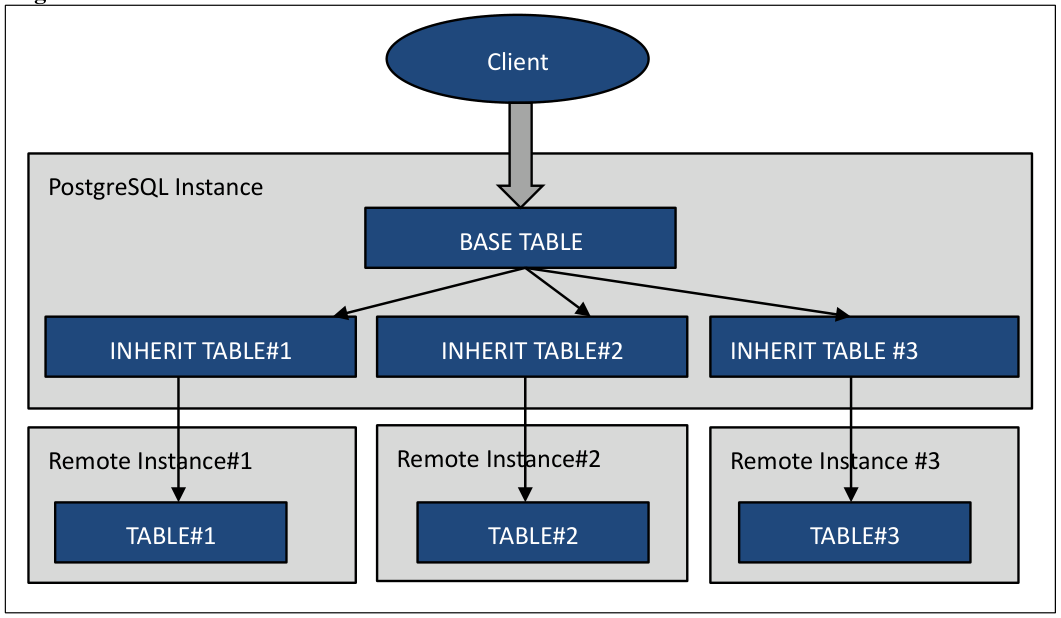
As inheritance table of an existing table, you can create an external table (FOREIGN TABLE). This feature makes it possible to distribute the processing to multiple hosts with a combination of partitioning and external table.
PDF page 42
Syntax CREATE FOREIGN TABLE table_name (check_constraints …) INHERITS (parent_table) SERVER server_name OPTIONS (option = ‘value’ …)
PDF page 43
INHERITS clause is different from the previous version. Parent table is specified in INHERITS clause. Example of the implementation and the verification of the execution plan are shown below.
PDF page 44
3.4.6 ALTER USER CURRENT_USER statement
Now it is possible to specify the CURRENT_USER and CURRENT_ROLE for the user name in the ALTER USER / ALTER ROLE statement. You can execute ALTER USER statement for several purpose such as password changes of the connecting user.
PDF page 45
3.4.7 UPDATE SET statement enhancement
In UPDATE statement which uses the result of SELECT, the FROM clause are no longer required.
3.4.8 SELECT TABLESAMPLE statement
TABLESAMPLE clause, sampling a certain percentage of the record from the table, is now available. Syntax SELECT … FROM table_name … TABLESAMPLE {SYSTEM | BERNOULLI} (percent) [ REPEATABLE (seed) ] You can choose SYSTEM or BERNOULLI as sampling method. SYSTEM uses the tuple entire block sampled. BERNOULLI choose a more constant rate of tuples from sampled block. In ‘percent’ you specify the sampling percentage (1-100). When you specify the value other than 1 - 100 SELECT statement results in an error. REPEATABLE clause is optional the seed of sampling can be specified.
PDF page 46
Execution Plan
Execution plan of TABLESAMPLE is the followings. The cost increases when BERNOULLI is specified.
3.4.9 REINDEX SCHEMA statement
It is now possible to specify the SCHEMA clause to REINDEX statement. All indexes in the schema will be re-created. If there is an index of other users own in the schema, the indexes to which the execution user of REINDEX can access are reconstructed.
PDF page 47
Being the owner of the schema.
Run within a transaction is impossible.
3.4.10 REINDEX (VERBOSE) statement
To REINDEX statement, VERBOSE clause can now be specified to output a detailed message. Similarly. The -v option has been added to reindexdb command. Syntax REINDEX (VERBOSE) {TABLE | DATABASE | SCHEMA} …
PDF page 48
3.4.11 ROLLUP, CUBE, GROUPING SETS statement
In SELECT statement, ROLLEUP, CUBE and GROUPING SETS clause is now available to calculate the subtotal value. These specifications are used with GROUP BY clause. Please refer to the manual for the detailed syntax.
3.4.12 CREATE FOREIGN TABLE (CHECK)
In CREATE FOREIGN TABLE statement, now can be describe the CHECK constraints. However constraints specified in the CREATE FOREIGN TABLE statement is not valid for INSERT or UPDATE statement. CHECK constraint becomes effect only in the SELECT statement of the session that set the parameters constraint_exclusion to on.
PDF page 49
PDF page 50
3.4.13 Enhance CREATE EVENT TRIGGER statement
Table_rewrite event can now be specified in the ON clause of the CREATE EVENT TRIGGER statement. Table_rewrite trigger is executed on the ALTER TABLE statement or the ALTER TYPE statement.
PDF page 51
| Function Name | Description | Return |
|---|---|---|
| pg_event_trigger_table_rewrite_oidpg_event_trigger_table_rewrite_reason | Trigger occurrence table Trigger occurrence reason | oid |
Pg_event_trigger_table_rewrite_reason function returns the OR of the following values. These values are listed in the source code (src/include/commands/event_trigger.h).
| 2 | Change DEFAULT | ADD COLUMN DEFAULT, etc |
|---|
Value Event Executed SQL statement
PDF page 52
3.4.14 PL/pgSQL ASSERT statement
ASSERT statement has been added to the PL/pgSQL. ASSERT statement can check the assumed value in the stored procedure. This statement can be ignored using parameters. Syntax ASSERT condition [, ‘message’ ]
Into the ‘condition’ write a conditional statement to check the value. If the condition becomes FALSE or NULL, ASSERT_EXCEPTION exception is raised. The ‘message’ is optional. You can specify a string which is displayed when an exception occurs. If omitted, “assertion failed” is output.
Parameter
Parameter for controlling the operation of the ASSERT statement is plpgsql.check_asserts. The default value is “on”, and ASSERT statement will work. If this parameter is set to “off” (false), ASSERT statement will no longer work.
PDF page 53
3.4.15 Additional operators and functions for jsonb type
Operators and functions for jsonb type have been added.
“||” operator
Using the “||” operator, you can perform addition and update of the json elements. Value will be replaced if you add the same key. This operator with the same behavior can be realized also jsonb_concat function.
PDF page 54
“-” operator, “#-” operator
Using the “-” operator and “#-” operator, you can delete the json element. If the key does not exist, there is no change in the original data. It is also possible to delete the element by specifying number from the array. Element numbers start from 0. These operator with the same behavior can be realized also jsonb_delete function.
PDF page 55
jsonb_set Function
Jsonb_set function replace or add of elements. new_value parameter value added if create_missing parameter is true and the item designated by path does not exist. Syntax jsonb jsonb_set(target jsonb, path text[], new_value jsonb [, create_missing boolean DEFAULT true])
PDF page 56
jsonb_pretty Function
Jsonb_pretty function can perform formatting of jsonb data. Syntax jsonb jsonb_pretty(from_json jsonb)
jsonb_strip_nulls Function
Jsonb_strip_nulls function removes the null fields from jsonb data. Syntax jsonb jsonb_strip_nulls(from_json jsonb) json json_strip_nulls(from_json json)
PDF page 57
3.4.16 Additional Functions
Following function have been enhanced in PostgreSQL 9.5.
width_bucket Function
To width_bucket function, the version with anyelement type and anyarray type parameter has been added.
generate_series Function
Parameters of generate_series function were bigint type, integer type, or timestamp type; now numeric type is also supported. Thus it is now possible to include a decimal point in the increment of value.
Unverified Functions
The following functions have been added, but the behavior is not yet verified.
array_agg (support for anynoarray type)
array_agg_array*
array_position
array_positions
bernoulli
binary_upgrade_*
bound_box
box (support for polygon type)
brin*
bttextsortsupport
dist_cpoint
dist_polyp
PDF page 58
dist_ppoly
gist_bbox_distance
gist_box_fetch
gist_point_fetch
gistcanreturn
inet_gist_fetch
inet_merge
inet_same_family
int8_avg_accum_inv
json_strip_nulls
jsonb_agg
jsonb_agg_finalfn
jsonb_agg_transfn
jsonb_build_*
jsonb_object*
max (support timestamp without time zone type)
min (support timestamp without time zone type)
mxid_age
network_larger
network_smaller
numeric_poly_*
numeric_sortsupport
pg_ddl_command_*
pg_event_trigger_ddl_commands
pg_event_trigger_table_rewite_*
pg_get_object_address
pg_identify_object_as_address
pg_last_committed_xact
pg_ls_dir (add missing_ok, include_dot_dirs parameters)
pg_read_binary_file (add missing_ok parameter)
pg_read_file (add missing_ok parameter)
pg_replication_origin*
pg_show_all_file_settings
pg_show_replication_origin_status
pg_stat_file (add missing_ok parameter)
pg_stat_get_snapshot_timestamp
PDF page 59
pg_xact_commit_timestamp
range_gist_fetch
range_merge
regnamespace*
regrole*
row_security_active
system
timestamp_izone_transform
timestamp_zone_transform
to_jsonb
to_regnamespace
to_regrole
tsm_*
7 Row Level Security
PDF page 60
3.5.1 What is Row Level Security
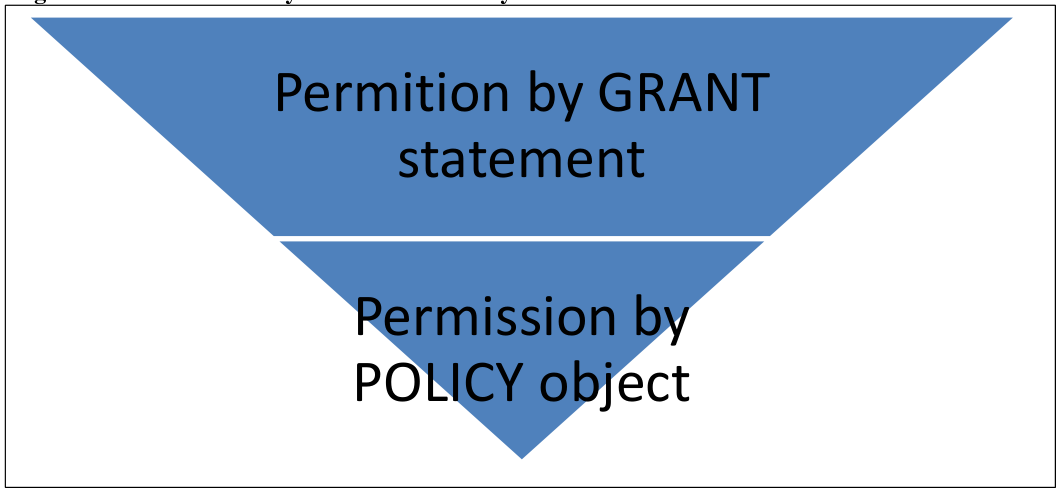
In previous PostgreSQL, the privilege to access to tables and columns is specified by GRANT statement. This style is available even in PostgreSQL 9.5. Row Level Security is a feature that allows you to limit the tuples (records), which were allowed in the GRANT statement also with tuple level. Row Level Security to by the access restriction you create an object called POLICY.
PDF page 60
3.5.2 Preparation
In order to use Row Level Security, execute the ALTER TABLE ENABLE ROW LEVEL SECURITY statement to the table to be restricted by policy. By default Row Level Security setting of the table is disabled. To disable the setting for the table, run the ALTER TABLE DISABLE ROW LEVEL SECURITY statement.
PDF page 61
3.5.3 Create POLICY object
To specify access privileges for a table, create the policy. Policy is created with the CREATE POLICY statement. General users can create POLICY. Syntax CREATE POLICY policy_name ON table_name [ FOR { ALL | SELECT | INSERT | UPDATE | DELETE } ] [ TO { roles | PUBLIC, …} ] USING (condition) [ WITH CHECK (check_condition) ]
PDF page 62
| Clause | Description |
|---|---|
| policy_name | Specify the policy name |
| ON | Specify the table name to which the policy is applied |
| FOR | Operation name to apply the policy or ALL |
| TO | Target role name to allow policy or PUBLIC |
| USING | Specify conditions for permission to access the tuple (Same syntax as WHERE clause). Only the tuples in which the condition specified by USING clause becomes TRUE is returned to the user |
| WITH CHECK | Specify the conditions for rows that can be updated by the UPDATE statement. You can not specify the CHECK clause in the policy for the SELECT statement |
In the example below, the POLICY to the table poltbl1 is created. Since TO clause is omitted, the subject is all users (PUBLIC), the operation is executed to all the SQL (FOR ALL), performed tuple is the one whose “uname” column’s value is the same as the current username (current_user function).
PDF page 63
User “user1”, who is the owner of the table poltbl1, stores 3 records (2-12 lines).
Although table tblpol1 is searched with the privilege of user “user2”, only one record whose
“uname” column’s value is “user2” is referenced (15-19 lines).
The user was trying to change the value of “uname” column, however, because of the
deviation of the condition specified in USING clause of the CREATE POLICY statement, UPDATE statement failed (20-21 lines).
PDF page 64
To change or delete policy setting is performed in ALTER POLICY statement or DROP POLICY statement, respectively.
3.5.4 Parameter Settings
Feature of Row Level Security is controlled by the parameter row_security. It can take the following values.
| Value | Description |
|---|---|
| on | Enable the feature of Row Level Security. This is the default value. |
| off | Disable the feature of Row Level Security. |
| force | It will force the feature of Row Level Security. The policy will be enforced and even the table owner will not be able to access the data which violates the policy. Therefore, even the owner of the table will not be able to access the data with policy violations. |
User Privileges
User with SUPERUSER privilege will be able to bypass the policy setting. User with BYPASSRLS privilege can bypass the policy by setting the parameter row_security to off (row_security can be set per session). General user who don’t have BYPASSRLS privileged cannot access the table. NOBYPASSRLS is specified as the default of CREATE USER statement.
8 BRIN Index
PDF page 65
3.6.1 What is BRIN Index
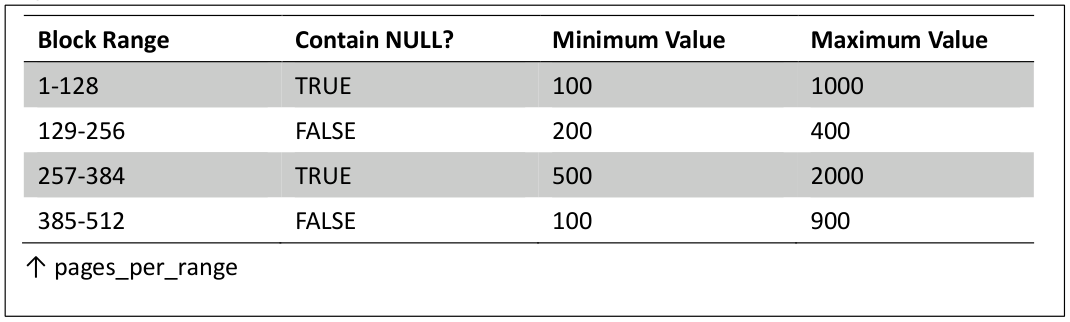
BRIN index (Block Range Index) is the physical format of the newly added index. Traditional BTREE index saves the location of accurate tuples for a column value. While this method is fast for the search by index, there was a disadvantage that the capacity of the index itself increased. BRIN index saves the maximum value and the minimum value of the column values in the block together. This achieved both high query speed and reduction of storage capacity. In particular, it can be expected to be effective as an index to the table that contains a large number of tuples.
PDF page 65
In the BRIN index, pages_per_range parameter as can be specified the additional option. In this parameter, the number of pages used by the index of the entry is specified. The default value is 128. The minimum value of this option is 1, and the maximum is 131,072.
Syntax
To create BRIN index, specify USING BRIN clause in the CREATE INDEX statement. Syntax CREATE INDEX index_name ON table_name USING BRIN (column_name, …) [ WITH (pages_per_range = value) ]
3.6.2 Examples
The following are examples of creating a BRIN index. First create the table and store the data.
PDF page 66
PDF page 67
PDF page 68
PDF page 69
PDF page 70
3.6.3 Information confirming
To the Contrib module pageinspect, following functions have been added to retrieve information of BRIN index.
| Function name | Description |
|---|---|
| brin_page_type | Get the page type of index page |
| brin_metapage_info | Get a variety of information in the index metadata |
| brin_revmap_data | Get a list of tuples from the map page |
| brin_page_items | Get the stored data from the data page |
PDF page 71
9 Other New Features
PDF page 72
3.7.1 Process Name
If a character string is specified to the new parameter cluster_name, specified string is given to the process name. Characters that can be specified in the parameter cluster_name is an ASCII characters (0x20 - 0x7E). The other characters are output after being converted to a question mark (?). The following example shown the process name that was specified as “cluster1” to cluster_name parameter. Postmaster process is not affected by this parameter.
PDF page 73
3.7.2 Output of EXPLAIN statement
In the output of EXPLAIN VERBOSE statement, additional information about the sort is now added. Underlined parts of the following example are the output added in PostgreSQL 9.5.
3.7.3 Log for Replication Command
When you set the parameters log_replication_commands to “on” the master instance of the replication environment, the log of the replication operations which wal sender process executed is output. If this parameter is set to be “on”, the message of which the output LOG level log is output. In case of default value (“off”), the log is output at DEBUG1 level. The beginning of the log is “received replication command:”, followed by a replication-related command. For example, the following log is output when the slave instance connects.
PDF page 74
3.7.4 Cast Type
Newly added Cast type is utilized to convert oid type to object name. The following data types can be used.
| Data Type | Description |
|---|---|
| regnamespaceregrole | Get schema name Get role name |
In the following example, I have searched the schema name, table name, the owner name from pg_class catalog. Since “relowner” column, “relnamespace” column is type oid, type conversion is executed.
10 Bibliography
The links in this chapter are preserved from the source PDF’s URL list.
PDF page 75
11 Modification History
This chapter preserves the source document’s revision history and publication credits.
PDF page 76
History
Change history
| Ver# | Date | Author | Description |
|---|---|---|---|
| 0.1 | July 6, 2015 | Noriyoshi Shinoda | Created for HP internal review. (Alpha 1) Reviewers are: Tomoo Takahashi Akiko Takeshima Takahiro Kitayama Yoshiko Shinoda Reviewers are: Tomoo Takahashi Akiko Takeshima Takahiro Kitayama Yoshiko Shinoda |
1.0 August 7, 2015 Noriyoshi Shinoda Created to be published to the Internet. (Alpha 2)