PostgreSQL 9.6 New Features
PostgreSQL 9.6 New Features
WITH EXAMPLES · ENGLISH SOURCE EDITION
Explore the features, SQL examples, and compatibility changes documented by Noriyoshi Shinoda.
This book describes the Beta 1 source document. Its examples and compatibility notes reflect that snapshot.
Contents
Reference indexes
The opening chapter includes the first numbered table, Table 1. The indexes below collect the book’s other native numbered components.
Tables
- Table 1 — Version
- Table 2 — Examples notation
- Table 3 — Syntax rule
- Table 4 — Added system Catalogs
- Table 5 — pg_config Catalog
- Table 6 — pg_stat_wal_receiver Catalog
- Table 7 — pg_stat_progress_vacuum Catalog
- Table 8 — pg_init_privs Catalog
- Table 9 — Modified catalogs
- Table 10 — Added column to pg_replication_slots Catalog
- Table 11 — Added columns to pg_stat_activity Catalog
- Table 12 — Added column to pg_proc Catalog
- Table 13 — Added columns to pg_aggregate Catalog
- Table 14 — Columns of pg_am Catalog
- Table 15 — Changed in Contrib modules
- Table 16 — Functions in the pg_visibility module
- Table 17 — Added and modified backslash commands
- Table 18 — Added Parameters
- Table 19 — Changed Parameters
- Table 20 — Parameters the default value of which is changed
- Table 21 — Added functions
- Table 22 — Related parameters for parallel processing
- Table 23 — The output of the EXPLAIN statement
- Table 24 — Major PARALLEL UNSAFE standard functions
- Table 25 — Major RESTRICTED PARALLEL SAFE standard functions
- Table 26 — The value of wait_event_type column
Examples
- Example 1 — Query for pg_config Catalog
- Example 2 — Query for pg_stat_wal_receiver Catalog
- Example 3 — Query for pg_stat_progress_vacuum Catalog
- Example 4 — fetch_size option
- Example 5 — Executed SQL statement (from log file)
- Example 6 — Specify extensions option
- Example 7 — pg_visibility module
- Example 8 — Creating a bloom module and the execution plan
- Example 9 — Execution of heap_page_items function
- Example 10 — Specifying the prompt
- Example 11 — Reference of the VIEW definition
- Example 12 — Executes the output result
- Example 13 — \watch and \pset title
- Example 14 — Specify the --slot option
- Example 15 — Automatic termination of the idle transaction
- Example 16 — Change of SYSLOG output
- Example 17 — Parameter log_line_prefix
- Example 18 — Parameter wal_level
- Example 19 — Specify the DELETE statement to COPY statement
- Example 20 — No RETURNING clause error
- Example 21 — ALTER TABLE ADD COLUMN IF NOT EXISTS statement
- Example 22 — Enhancement of the ALTER TABLESPACE statement
- Example 23 — CREATE EXTENSION CASCADE statement
- Example 24 — Function jsonb_insert
- Example 25 — num_nulls / num_nonnulls functions
- Example 26 — current_setting function
- Example 27 — Execute pg_control_init function
- Example 28 — Execute pg_control_checkpoint function
- Example 29 — Execute pg_control_recovery function
- Example 30 — pg_current_xlog_flush_location function
- Example 31 — parse_ident function
- Example 32 — pg_size_bytes function
- Example 33 — pg_blocking_pids function
- Example 34 — pg_start_backup / pg_stop_backup functions
- Example 35 — Execution plan of parallel processing.
- Example 36 — Execution plan of parallel processing
- Example 37 — The difference of the execution plan by the use of PARALLEL UNSAFE function
- Example 38 — User-defined functions and PARALLEL SAFE
- Example 39 — The part of create_parallel_paths function
- Example 40 — Waiting by two LOCK TABLE IN EXCLUSIVE statements
- Example 41 — Waiting by SELECT FOR UPDATE statement and UPDATE statement
- Example 42 — Sort Push-down
- Example 43 — DELETE statement in PostgreSQL 9.5
- Example 44 — DELETE statement in PostgreSQL 9.6
- Example 45 — Join Push-down
- Example 46 — Multiple synchronous standby server replication
- Example 47 — Role names starting from "pg_"
Source edition
The source chapter order, wording, examples, and publication credits are retained. PDF page markers link the reading edition to the original document. Source identity and coverage · About the collection
1 About This Document
PDF page 4
1.1 Purpose
The purpose of this document is to provide information of the major new features of PostgreSQL 9.6, the Beta 1 version being published.
1.2 Audience
installation, basic management, and so forth.
1.3 Scope
This document describes the major difference between PostgreSQL 9.5 and PostgreSQL 9.6 Beta 1. It does not mean that all of the new features is examined.
1.4 Software Version
This document is intended for the following versions of the software as a general rule:
| Software | Version |
|---|---|
| PostgreSQL | PostgreSQL 9.5.3 (for comparison) PostgreSQL 9.6 Beta 1 (May 9, 2016, 9:04 p.m.) |
| Operating System | Red Hat Enterprise Linux 7 Update 1 (x86-64) |
1.5 Question, Comment, and Responsibility
The contents of this document is not an official opinion of the Hewlett-Packard Enterprise Corporation. The author and affiliation company do not take any responsibility about the problem caused by the mistake of contents. If you have any comments for this document, please contact to Noriyoshi Shinoda (noriyoshi.shinoda@hpe.com) Hewlett-Packard Enterprise Japan Co, Ltd.
PDF page 5
1.6 Notation
This document contains examples of the execution of the command or SQL statement. Execution examples are described according to the following rules:
| Notation | Description |
|---|---|
| # | Shell prompt for Linux root user |
| $ | Shell prompt for Linux general user |
| bold | User input string |
| postgres=# | psql command prompt for PostgreSQL administrator |
| postgres=> | psql command prompt for PostgreSQL general user |
| underline | Important output items |
The syntax is described in the following rules:
| Notation | Description |
|---|---|
| Italic | Replaced by the name of the object which users use, or the other syntax |
| [ ABC ] | Indicate that it can be omitted |
| { A | B } | Indicate that it is possible to select A or B |
| … | General syntax, it is the same as the previous version |
2 New Feature Overview
PDF page 6
PostgreSQL 9.6 has many new features and improvements.
2.1 Improve Performance
Performance has been improved in the following part:
Use quicksort to external sort
Estimate accuracy improvement of the GROUP BY clause
Use a foreign key to the predicted join
Writing performance improvement such as checkpoint and bgwriter
The execution of the Index Only Scan with
partial indexes
Speed up CREATE INDEX CONCURRENTLY statement
And so force
2.2 Added Features
The major additional features are listed below. The number in parentheses is the number of the chapter in this document for details.
Parallel Seq Scan (3.5)
Monitoring Wait Stats (3.6)
Enhancement of FOREIGN DATA WRAPPER object (3.7)
Synchronous replication with multiple synchronous standby servers (3.8)
Avoid Full-Table Vacuum (3.1.4)
Snapshot Too Old implementation by configurable timeout (3.3.1)
Improvement of various Contrib module (3.1.3)
Improvement of various utilities (3.2)
Catalog for Activity of WAL receiver (3.1.1)
Generic WAL Records
Non-exclusive base online backup (3.4.7)
And so force
PDF page 7
2.3 SQL Improvements
The following SQL statements are newly supported. The number in parentheses is the number of the chapter in this document for details.
COPY enhancement (3.4.1)
ALTER TABLE ADD COLUMN enhancement (3.4.2)
ALTER TABLESPACE SET enhancement (3.4.3)
CREATE EXTENSION enhancement (3.4.4)
ALTER OPERATOR enhancement (3.4.5)
CREATE / ALTER FUNCTION PARALLEL SAFE / UNSAFE (3.5)
CREATE ACCESS METHOD statement added
CREATE TABLE … LIKE enhancement
Added functions (3.4.6 / 3.4.7)
And so force
Other new features are described in the PostgreSQL 9.6 Beta Documentation Appendix E. Release Notes (http://www.postgresql.org/docs/9.6/static/release-9-6.html).
PDF page 8
3 New Feature Details
3 Architecture
PDF page 8
3.1.1 Added System Catalogs
Along with the addition of new features, the following system catalogs have been added.
| Catalog Name | Description |
|---|---|
| pg_config | PostgreSQL binary’s install information |
| pg_stat_wal_receiver | Activity of wal receiver process |
| pg_stat_progress_vacuum | Activity of vacuum process progress |
| pg_init_privs | Initial privilege settings for object |
pg_config Catalog
This catalog exposes the information of various macros that are specified at compile time of PostgreSQL binary. Previously, pg_config command provides the information. Entity of this catalog is pg_config function. This catalog is only readable by a superuser.
| Column Name | Data Type | Description |
|---|---|---|
| namesetting | text | Macro name Setting value |
PDF page 9
pg_stat_wal_receiver Catalog
This catalog provides information about the state of a slave instance’s WAL receiver process in replication environment. This catalog is readable by the general user.
| Column Name | Data Type | Description |
|---|---|---|
| pid | integer | Process ID of wal receiver |
| status | text | Activity Status |
| receive_start_lsn | pg_lsn | First transaction log position |
| receive_start_tli | integer | First timeline number |
| received_lsn | pg_lsn | Last transaction log position already received and flushed to disk |
| received_tli | integer | Timeline number of last transaction log position received and flushed to disk |
| last_msg_send_time | timestamp with time zone | Send time of last message received |
| last_msg_receipt_time | timestamp with time zone | Receipt time of last message received |
| latest_end_lsn | pg_lsn | Last transaction log position reported |
| latest_end_time | timestamp with time zone | Time of last transaction log position reported |
| slot_name | text | Replication slot name |
This catalog is made up by the result of pg_stat_get_wal_receiver function.
PDF page 10
pg_stat_progress_vacuum Catalog
This catalog provides information about the state of the progress of vacuum processing. This catalog is readable by the general superuser.
| Column Name | Data Type | Description |
|---|---|---|
| pid | integer | Process ID of backend |
| datid | oid | OID of database |
| datname | name | Connected database name |
| relid | oid | OID of the table being vacuumed |
| phase | text | Current processing phase of vacuum |
| heap_blks_total | bigint | Total number of heap blocks in the table |
| heap_blks_scanned | bigint | Number of heap blocks scanned |
| heap_blks_vacuumed | bigint | Number of heap blocks vacuumed |
| index_vacuum_count | bigint | Number of completed index vacuum cycles |
| max_dead_tuples | bigint | Number of dead tuples that we can store before needing to perform an index vacuum cycle |
| num_dead_tuples | bigint | Number of dead tuples collected since the last index vacuum cycle |
PDF page 11
pg_init_privs Catalog
The pg_init_privs catalog stores the information about the initial privileges of objects which have non-default value in the database. This catalog is readable by the general superuser.
| Column Name | Data Type | Description |
|---|---|---|
| objoid | oid | The OID of the specific object |
| classoid | oid | The OID of the system catalog the object is in |
| objsubid | integer | For a table column, this is the column number |
| privtype | char | The type of initial privilege of this object |
| initprivs | aclitem[] | The initial access privileges |
3.1.2 Modified Catalogs
The following system catalogs have been changed.
| Catalog Name | Changed |
|---|---|
| pg_replication_slots | Add confirmed_flush_lsn column |
| pg_stat_activity | Remove waiting column Add wait_event_type column and wait_event column |
| pg_proc | Add proparallel column |
| pg_aggregate | Stores information about aggregate functions |
| pg_am | Stores information about index access methods |
pg_replication_slots Catalog
The confirmed_flush_lsn column has been added.
| Column Name | Data Type | Description |
|---|---|---|
| confirmed_flush_lsn | pg_lsn | Receiving LSN information of the logical slot |
pg_stat_activity Catalog
The “waiting” column that shows only the waiting state is replaced with the wait_event column and the wait_event_type column that show the wait events.
PDF page 12
| Column Name | Data Type | Description |
|---|---|---|
| wait_event_typewait_event | text | The type of event for which the backend is waiting Wait event name if backend is currently waiting |
Please refer to the following URL information about wait events. https://www.postgresql.org/docs/9.6/static/monitoring-stats.html
pg_proc Catalog
Proparallel column that shows whether procedure is PARALLEL SAFE or PARALLEL UNSAFE has been added.
| Column Name | Data Type | Description |
|---|---|---|
| proparallel | char | Parallel Safe = ’s’ function, Restricted Parallel Safe function = ‘r’ (Only leader can execute), Parallel Unsafe function = ‘u’ |
pg_aggregate Catalog
The following column has been added.
| Column Name | Data Type | Description |
|---|---|---|
| aggcombinefn | regproc | Combine function (zero if none) |
| aggserialfn | regproc | Serialization function (zero if none) |
| aggdeserialfn | regproc | Deserialization function (zero if none) |
| aggserialtype | oid | Return data type of the aggregate function’s serialization function |
pg_am Catalog
pg_am catalog change completely, became simple.
| Column Name | Data Type | Description |
|---|---|---|
| amname | name | Access method name |
| amhandler | oid | OID of handler function |
| amtype | char | Type of access method |
PDF page 13
(http://www.postgresql.org/docs/9.6/static/catalog-pg-am.html).
3.1.3 Modified Contrib modules
In PostgreSQL 9.6, some Contrib modules have been changed.
| postgres_fdw | Add options | Fetch_size option has been added |
|---|---|---|
| Extensions option has been added | ||
| pg_visibility | Add module | Provide Visibility Map information |
| bloom | Add module | Index that uses a Bloom filter |
| sslinfo | Add function | Add ssl_extension_info function |
| tsearch2 | Enhancement | Add operators for phrase search |
| pg_trgm | Enhancement | Add support for “word similarity”. Add configuration parameter pg_trgm.similarity_threshold |
| pgcrypto | Add function | Add an optional S2K iteration count parameter |
| pgpageinspect | Add output | Output data added to the heap_page_items function |
| hstore | Add function | Add functions for json type |
Module Changed Note auto_explain Add parameter Sample_rate parameter has been added
Enhancement of auto_explain module
Parameter auto_explain.sample_ratio has been added to the auto_explain module. This parameter specifies the percentage of SQL statements to log the execution plan. For example, the execution plan to log by auto_explain.log_min_duration parameter will be reduced to the percentage specified by this parameter. The default value is 1 (= 100%).
Enhancement of postgres_fdw module
The fetch size to get tuples by SELECT statement can be specified now. This option can be specified for each SERVER or FOREIGN TABLE. The fetch size in the previous postgres_fdw module was fixed to 100.
PDF page 14
PDF page 15
Add pg_visibility module
Pg_visibility modules that can get the information of the Visibility Map has been added. The following functions are provided. The execution requires superuser privileges.
| Function name | Description |
|---|---|
| pg_visibility | View the status of each block of the specified table |
| pg_visibility_map | View the status of each block of the specified table |
| pg_visibility_map_summary | Display the status of the specified table |
In the following example, the number of VISIBLE blocks and FREEZEed blocks is gotten by the pg_visibility_map_summary function .
Add bloom module
Bloom module has been added to the Contrib modules. Indexes that use the Bloom Filter can be created by loading the bloom module. Using this module, it is possible to create an index for a large number of column at the same time that uses only a relatively small capacity of the storage. By simple verification, if the BTree index is created on the column described in the WHERE clause, the BTree index is used. To use the bloom module, it is necessary to specify the USING bloom clause in the CREATE INDEX statement. There are “size”, “col1”, “col2”, … options, but use of them has not yet been verified.
PDF page 16
Enhancement of pageinspect module
The real data (t_data) column has been added to the output of the heap_page_items function.
PDF page 17
3.1.4 Avoid Full-Table Vacuum
PostgreSQL manages the age of transaction (XID) by the unsigned 32-bit integer. When huge number of transactions are executed, it may be run out of 32-bit integer. For this reason, before running out of the transaction ID, PostgreSQL updates old XIDs in the database to the special XID (FrozenXID = 2). This process is called FREEZE. In FREEZE process of previous version, when it exceeds the specified age with the parameter autovacuum_freeze_max_age, full scan for the table was executed regardless of whether the table was updated or not. In PostgreSQL 9.6, by extending the Visibility Map to identify the block to be FREEZEed, now it is possible to prevent the large-scale I/O due to the full scan.
3.1.5 Improve CHECKPOINT
Checkpoint of the previous PostgreSQL searched dirty pages in the shared buffer randomly and wrote them to file. In PostgreSQL 9.6, it divides the dirty pages for each table space, sort them by file and block number and writes them. This will allow checkpoint process to write more sequentially.
4 Utilities
PDF page 18
The following sections describe the major enhancements of the utility commands.
3.2.1 psql
The following features in psql command has been added.
Prompt setting
The Process ID of the backend process can be set now in the prompt of the psql command. To set the Process ID , Specify the %p to the variable PROMPT1, PROMPT2, PROMPT3.
Backslash commands
The following enhancements have been made.
| \ev view_name | Added | Change the View definition by an external editor |
|---|---|---|
| \svview_name | Added | Show the View definition |
| \sv+view_name | Added | Show the View definition with line numbers |
| \gexec | Added | Run the SQL statements in the output result |
| \errverbose | Added | Show the error information that occurred just before |
| \crosstabviewcolumn_name | Added | Show the cross tabulation |
| \x auto | Changed | Does not use extended table format with EXPLAIN ANALYZE statement |
| \watch and \pset title | Changed | Show the value of the \pset title when executing the \watch command |
Command Modification Description
PDF page 19
Show and edit the VIEW definition.
\ev and \sv command has been added to the psql command. \ev command edits the specified view definition in the editor. \sv command shows the specified view definition. The \sv+ command displays the line number in the view definition.
Execute result(s) of previous query as new queries.
\gexec command executes the result(s) of the SQL Statement just before as new SQL Statements. This is useful when creating the CREATE statement to generate the object using the SELECT statement.
\watch and \pset title
At the time of execution in the \watch command, the string specified in the \pset title command is now displayed.
PDF page 20
Multiple -c option and -f option
-c option and -f option that specify the SQL statement to be executed at the time of connection, can now be specified multiply.
3.2.2 pg_basebackup
–slot (or -S) option that specify the slot name to be used for the backup has been added to pg_basebackup command. If non-existent slot name is specified, a warning will be shown, but the backup process will be executed. When this option is specified along with the –write-recovery-conf (-R) option, primary_slot_name option will be added to the recovery.conf file in the backup destination. In order to use the –slot option, it is required to use –xlog-method = setting of the stream (-Xs) option at the same time.
PDF page 21
PDF page 22
3.2.3 pg_rewind
Pg_rewind command can work when the target timeline changes. This feature is not verified. Please refer to the following URL. http://michael.otacoo.com/postgresql-2/postgres-9-6-feature-highlight-pg-rewind-timeline/
3.2.4 pg_dump / pg_restore
The –strict-names option has been added to the pg_dump command and pg_restore command. In addition, -t option of pg_restore command also match relation other than the normal table. This feature is not verified.
3.2.5 pgbench
Some of the new features in pgbench command has been added, but it does not have to verify.
5 Changes of Parameters
PDF page 23
The following parameters have been changed in PostgreSQL 9.6.
3.3.1 Added Parameters
The following parameters have been added.
| Parameter Name | Description (context) | Default Value |
|---|---|---|
| backend_flush_after | When single backend writes more than specified size, attempt to force the OS to flush these writes to disk. (user) | 128kB |
| bgwriter_flush_after | Bgwriter force the flush at the time of writing occurrence greater than or equal to the specified size (sighup) | 512kB |
| checkpoint_flush_after | Checkpointer force the flush at the time of writing occurrence greater than or equal to the specified size (sighup) | 256kB |
| enable_fkey_estimates | Use the foreign key to estimate join cost. (user) | on |
| force_parallel_mode | Force parallel processing (user) | off |
| idle_in_transaction_session_timeout | Idle transaction timeout (user) | 0 |
| max_parallel_degree | The maximum value of the degree of parallelism (user) | 2 |
| old_snapshot_threshold | The minimum time that a snapshot is guaranteed valid. (postmaster) | -1 |
| replacement_sort_tuples | The maximum number of tuples to be sorted using Replacement Selection (user). | 150000 |
| parallel_setup_cost | Start cost of parallel processing (user) | 1000 |
| parallel_tuple_cost | Tuple processing cost of parallel processing (user) 0.1 | Tuple processing cost of parallel processing (user) 0.1 |
| syslog_sequence_numbers | Add a sequence number to the SYSLOG message (sighup) | on |
| syslog_split_messages | Split long SYSLOG messages (sighup) | on |
| wal_writer_flush_after | Wal writer is forced to flush at the time of writing occurrence greater than or equal to the specified size (sighup) | 1MB |
PDF page 24
idle_in_transaction_session_timeout parameter
When the transaction is idle for a specified period of time in milliseconds, specify the time to forcibly disconnect the session. The default value is 0 in the time-out does not occur. Specify the parameters from psql of the session in the following example and is running a COMMIT statement from a while waiting after the BEGIN statement is executed.
syslog_sequence_numbers parameter, syslog_split_messages parameter
In a message to be output to the SYSLOG to add the information. By setting the syslog_sequence_numbers parameter to on, the sequence number for each process in the message that is output to the SYSLOG will be added. The default value is on. The syslog_split_messages parameter splits the message if the message has exceeded the PG_SYSLOG_LIMIT (900) bytes. The example below is the log of the instance startup. Process of process ID 3155 will being output the message. [1-1], [1-2], [2-1], has been added in the syslog_sequence_numbers parameter is part of the [2-2].
PDF page 25
old_snapshot_threshold parameter
This parameter specifies the survival time of the snapshot in seconds. Unnecessary tuple exceeds the threshold value can be released by vacuum. The number of seconds that can be specified for this parameter is from -1 to 86,400. However, you can specify up to 60d is to specify the number of days, such as “1d”. The default value of -1 in the same operation as the previous version, disable this feature. Referring to the deleted snapshot error “ERROR: snapshot too old” will occur.
3.3.2 Changed Parameters
The following parameters are changed in the range of setting or the options.
| log_line_prefix | Set to output the time stamp of the numeric types have been added |
|---|---|
| effective_io_concurrency | It can now be specified in the ALTER TABLESPACE SET statement |
| wal_level | Setting archive and hot_standby has been unified in the “replica” |
| synchronous_commit | The remote_apply can now be specified |
| autovacuum_max_workers | The maximum value has been changed to 262,143 from 8,388,607 |
| max_connections | The maximum value has been changed to 262,143 from 8,388,607 |
| max_replication_slots | The maximum value has been changed to 262,143 from 8,388,607 |
| max_wal_senders | The maximum value has been changed to 262,143 from 8,388,607 |
| max_worker_processes | The maximum value has been changed to 262,143 from 8,388,607 |
| superuser_reservrd_connections | The maximum value has been changed to 262,143 from 8,388,607 |
| wal_writer_delay | Short_desc column of pg_settings catalog has been changed |
Parameter Name Modification
PDF page 26
log_line_prefix parameter
Can now specify the % n which is numerical representation of a time stamp.
wal_level parameter
“Archive” and “hot_standby” value for this parameter have been unified to “replica”. However, when archive or hot_standby is specified , the error doesn’t occur and it is considered to be a replica.
synchronous_commit parameter
Value “remote_apply” can now be specified for this parameter. Set this value, in a synchronous replication environment, transaction of the master instance will wait until the WAL is applied on the slave instance. This makes it possible to read the updated data on the slave instance at the time of the completion of the transaction. If recovery_min_apply_delay parameter is specified in the recovery.conf file on the slave instance, the completion of the COMMIT statement on the master instance will wait for the specified time.
3.3.3 Parameters changed the default value
The default values of the following parameters have been changed.
PDF page 27
| Parameter Name | PostgreSQL 9.5 | PostgreSQL 9.6 |
|---|---|---|
| server_versionserver_version_num | 9.5.2 90502 | 9.6beta1 90600 |
6 Enhancement for SQL Statement
PDF page 28
The new features on the SQL statement, are explained here.
3.4.1 Enhancement of the COPY statement
In the prior version it was able to use the COPY statement to output the results of the SELECT statement to a file or standard output. In PostgreSQL 9.6, by specifying the UPDATE / DELETE / INSERT statements to the COPY statement, it will be able to output the affected records.
3.4.2 Enhancement of the ALTER TABLE ADD COLUMN statement
The ALTER TABLE ADD COLUMN statement to add a column, IF NOT EXISTS clause to check for the existence of the column can now be specified. Only if the specified column does not exist, add column operation will be performed. Syntax
PDF page 29
3.4.3 Enhancement of the ALTER TABLESPACE SET statement
In PostgreSQL 9.6 it is now possible to set the parameter effective_io_concurrency for each tablespace. Parameters that can be specified for each tablespace in the old version was only random_page_cost and seq_page_cost.
3.4.4 Enhancement of the CREATE EXTENSION statement
To CREATE EXTENSION statement, CASCADE clause to automatically load the relevant module can now be specified. Syntax
PDF page 30
3.4.5 Enhancement of the ALTER OPERATOR statement
ALTER OPERATOR statement to make the change of the operator have been significantly enhanced. It can be added use the following syntax as well as the CREATE OPERATOR statement. Syntax
3.4.6 Added function for jsonb type
Function for jsonb type has been added.
Function jsonb_insert
Jsonb_insert function to perform additional elements have been provided.
PDF page 31
3.4.7 Additional Functions
Following function have been enhanced in PostgreSQL 9.6.
scale function
By specifying a number of numeric type as the parameter, this function returns the number of decimal places. It cannot be used for a float type value. If NULL is passed, it returns NULL.
num_nulls / num_nonnulls functions
Returns the number of NULL values from any number of arguments (num_nulls), returns the number of non-NULL value (num_nonnulls).
PDF page 32
current_setting function
The overloaded function that has second parameter has been created. When specified true for the second parameter, no error occurs if specified a non-existent parameter.
pg_control_* functions
It is now possible to get the information by SQL function, conventionally that has been acquired by the pg_controldata command by SQL function. The following functions can be used. General users can use these functions.
| Function Name | Description |
|---|---|
| pg_control_init | Acquiring of database cluster information |
| pg_control_checkpoint | Acquiring of checkpoint information |
| pg_control_recovery | Acquiring of recovery information |
PDF page 33
PDF page 34
PDF page 35
pg_current_xlog_flush_location function
Function pg_current_xlog_flush_location that returns the LSN indicating the writing location of the WAL file has been added. General users can execute this function, but cannot execute in slave instance of the replication environment.
parse_ident function
This function decompose a string indicating the name of the object that contains the schema name into an array consists of schema and object names. The presence of the specified object is not checked. Also search_path parameter is not considered.
pg_size_bytes function
Pg_size_bytes function returns the number of bytes from the string specified in units of kB, MB, GB and TB. This is the opposite behavior of pg_size_pretty function. It can be put a space between the number and the unit.
PDF page 36
pg_blocking_pids function
Returns a list of processes that are blocking the process specified by process ID.
PDF page 37
Unverified functions
The following functions have been added, but the behavior is not verified.
pg_notification_queue_usage
acosd / asind / atan2d / atand / cosd / cotd / sind / tand
7 Parallel Seq Scan
PDF page 38
3.5.1 Overview
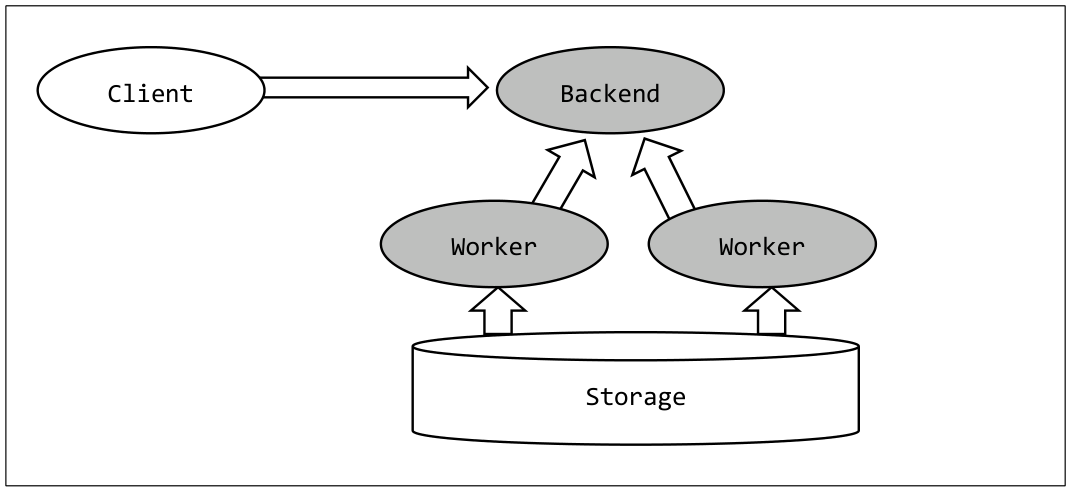
In the conventional PostgreSQL, all of the SQL statements ware executed only by the back-end process that accepts the connection. In PostgreSQL 9.6 now it is possible to perform parallel processing by multiple worker processes.
PDF page 38
Parallel processing can be executed only for Seq Scan, Join and Aggregate. The degree of parallelism depends on the size of the table. Processes executing parallel processing use the mechanism of the Background Worker. The maximum value of the degree of parallelism is determined by the parameter max_parallel_degree or max_worker_processes, whichever is smaller. Parameter max_parallel_degree can be changed by general users by per-session.
| Parameter Name | Description (context) | Default value |
|---|---|---|
| max_parallel_degree | The maximum value of the degree of parallelism (user) | 2 |
| parallel_setup_cost | Start cost of parallel processing (user) | 1000 |
| parallel_tuple_cost | Tuple cost of parallel processing (user) | 0.1 |
| max_worker_processes | The maximum value of the worker process (postmaster) | 8 |
| force_parallel_mode | Force parallel processing (user) | off |
PDF page 39
Parameter force_parallel_mode
Parallel processing is executed only when the cost is considered lower than the normal serial processing. By specifying the parameter force_parallel_mode to on, parallel processing is forced ( Also value ‘regress’ is for the regression test). However, the parallel processing is executed only when the parameter max_parallel_degree is 1 or more.
Related table option
Table option parallel_degree determines the degree of parallelism for each table. When the value is set to 0, parallel processing is prohibited. If not set, the parameters max_parallel_degree of the session will be the upper limit. If parallel_degree is set to greater than the max_parallel_degree, the upper limit of the actual degree of parallelism cannot exceed the max_parallel_degree.
3.5.2 Execution plan
The example below is the execution plan of the parallel processing SELECT statement. COUNT processing of large-scale table is processed in 3 parallelism.
PDF page 40
PDF page 41
| Plan component | Description | Explain Statement |
|---|---|---|
| Parallel Seq Scan | Parallel search processing | All |
| Partial Aggregate | Aggregation processing performed by the worker process | All |
| Gather | Processing to aggregate the worker process | All |
| Finalize Aggregate | The final aggregation processing | All |
| Workers Planned: | The number of planned worker processes | All |
| Workers Launched: | The number of workers that are actually run | ANALYZE |
| Worker N (N=0,1,…) | Processing time of each worker, etc | ANALYZE, VERBOSE |
| Single Copy | Processing to be executed in a single process | All |
3.5.3 Parallel processing and functions
There are usable functions and unusable functions in parallel processing. When functions which have ‘u’(PARALLEL UNSAFE) value for proparallel column in pg_proc catalog are user in SQL statement, parallel processing can not be performed. The following table shows major standard PARALLEL UNSAFE functions.
| Category | Function name example |
|---|---|
| JSON | json_populate_record, json_populate_recordset, jsonb_insert, jsonb_set |
| SEQUENCE object | nextval, currval, setval, lastval |
| Large Object | lo_*, loread, lowrite |
| Replication | pg_create_slot, pg_dropslot, pg_logical, pg_replication_ |
| Other | pg_advisory_, pg_try_advisory_, plpgsql_handler, pg_extension_config_dump, pg_backup, set_config, txid_current, query_to_xml* |
In the following example, two SQL statements that differ only conditional part of the WHERE clause are executed. SELECT statement with the literal in the WHERE clause will be performed parallel processing but, SELECT statement with the currval of sequence operation function is executed in serial.
PDF page 42
| Category | Function name example |
|---|---|
| Date and Age | age, now |
| Random number | random, setseed |
| Upgrade | binary_upgrade* |
| Convert to XML | cursor_to_xml*, database_to_xml*, schema_to_xml*, table_to_xml* |
| Other | pg_start_backup, inet_client*, current_query, pg_backend_pid, pg_conf*, pg_cursor, pg_get_viewdef, pg_prepared_statement, etc |
User-defined functions and PARALLEL SAFE
To indicate whether it is possible to perform parallel processing for user-defined functions, can be used PARALLEL SAFE clause or PARALLEL UNSAFE clause in the CREATE FUNCTION statement or ALTER FUNCTION statement. The default is PARALLEL UNSAFE.
PDF page 43
3.5.4 Calculation of the degree of parallelism
The degree of parallelism is calculated based on the size of the table, it is increased by one as the size of table is 3,000 blocks, 9,000 blocks and 27,000s block. After that, it is increased as the size of table becomes threefold within the range that does not exceed the parameter max_parallel_degree or parameter max_worker_processes. Actual calculation is executed by create_parallel_paths function in the source code src/backend/optimizer/path/allpaths.c.
PDF page 44
8 Monitoring Wait Stats
PDF page 45
The information of the wait events that are occurring in the PostgreSQL instance can be get now. Waiting column is deleted from pg_stat_activity catalog, wait_event_type columns and wait_event column are added. The wait_event_type column contains the following values.
| Columns value | Description |
|---|---|
| LWLockNamed | Waiting by a particular lightweight lock |
| LWLockTranche | Waiting by the lightweight lock for the group |
| Lock | Waiting by weight lock (LOCK TABLE statement etc) |
| BufferPin | PIN waiting for the buffer |
Please refer to the following URL for more information. http://www.postgresql.org/docs/9.6/static/monitoring-stats.html
9 Enhancement of FOREIGN DATA WRAPPER
PDF page 46
FOREIGN DATA WRAPPER to provide access to external objects has been extended.
3.7.1 Sort Push-down
In previous versions sort processing for FOREIGN TABLE were executed on the local instance after data were transferred from the external system. In PostgreSQL 9.6 the ORDER BY clause can be sent to external objects. In the following example, the SELECT statement with the ORDER BY clause to the remote instance is executed using the postgres_fdw module.
3.7.2 Direct Modify
DELETE and UPDATE statements in the old version for FOREIGN TABLE created cursors by SELECT FOR UPDATE statement, the update process was executed for each record in the cursor. In PostgreSQL 9.6 update DML can be executed directly in the remote instance. In the following example, the DELETE statement to FOREIGN TABLE is executed in PostgreSQL
9.5 and PostgreSQL 9.6. In PostgreSQL 9.5 SELECT FOR UPDATE statement is executed, but it
changes to DELETE statement in PostgreSQL 9.6.
PDF page 47
3.7.3 Join Push-down
A process to join the tables on the same FOREIGN SERVER can now be performed on a remote instance.
PDF page 48
10 Multiple Synchronous Standby Servers
PDF page 49
Support synchronous replication with multiple synchronous standby servers. Specify the number of instances to execute synchronous replication to the parameter synchronous_standby_names in primary instance. Syntax
Specify the number of instances to execute synchronous replication to the num_sync in integer of 1 or more. If specified zero or less , if omitted, the instance can’t start. If the specified number of instances cannot be ensured, update transaction of the primary instance is stopped. In the example below, there are three instances that can execute synchronous replication, and execute synchronous replication to two instance actually.
11 Security
PDF page 50
3.9.1 Default Role
Pg_signal_backend role is created in default. This role allow the transmission of the signal to the backend processes.
3.9.2 Namespace
Role (user) names that begin with pg_ are no longer able to use because those are reserved.
12 Bibliography
The links in this chapter are preserved from the source PDF’s URL list.
PDF page 51
13 Modification History
This chapter preserves the source document’s revision history and publication credits.
PDF page 52
History
Change history
| Version# | Date | Author | Description |
|---|---|---|---|
| 0.1 | May 20, 2016 | Noriyoshi Shinoda | Created for HPE internal. (Beta 1) Reviewers are: Tomoo Takahashi Akiko Takeshima Takahiro Kitayama Takuma Ikeda |
| 1.0 | May 30, 2016 | Noriyoshi Shinoda | Created to be published to the Internet. |
| 1.0.1 | May 31, 2016 | Noriyoshi Shinoda | Fix typo |
| 1.0.2 | June 2, 2016 | Noriyoshi Shinoda | Add pg_start_backup / pg_stop_backup |
| 1.0.3 | June 6, 2016 | Noriyoshi Shinoda | Fix parallel_degree parameter description. Fix Parallel Unsafe function list. Fix pg_proc description. |